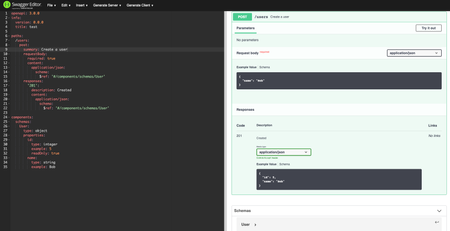
ContributionsMost RecentMost LikesSolutionsRe: readOnly properties do not display correctly with Swagger UI in python-flask I've tried to use the latest version 3.25.5 of Swagger UI by grabbing the dist files and following these steps and it didn't resolve it. I also tried cloning the whole repo, rebuilding the dist, and using those files, but that also did not resolve it. This is the index.j2 I'm using per the answer and I'm using the generated code to setup the app: app = connexion.App(__name__, specification_dir='./swagger/') app.app.json_encoder = encoder.JSONEncoder app.add_api('swagger.yaml', arguments={'title': 'test'}, pythonic_params=True) app.run(port=8080) readOnly properties do not display correctly with Swagger UI in python-flask Using this example yaml: openapi: 3.0.0 info: version: 0.0.0 title: test paths: /users: post: summary: Create a user requestBody: required: true content: application/json: schema: $ref: '#/components/schemas/User' responses: '201': description: Created content: application/json: schema: $ref: '#/components/schemas/User' components: schemas: User: type: object properties: id: type: integer example: 5 readOnly: true name: type: string example: Bob I expect to see this in the request body: { "name": "Bob" } However, I can also see the id property: { "id": 5, "name": "Bob" } This occurs whenever I generate code, through both the Swagger Editor and Swagger Codegen in python-flask. However, it displays correctly in the Swagger Editor's preview: I'm likely somehow generating it incorrectly, so any help would be greatly appreciated!