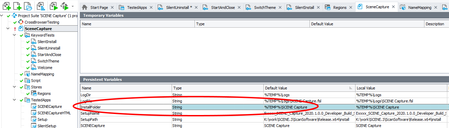
ContributionsMost RecentMost LikesSolutionsRe: Environment variable in persistent variables declaration Hi, the solution Benoit suggested was not exactly what I'm looking for. Using the %TEMP% variable was an example only. But anyway - I'm using C:\Test now for my tests. Works fine on all my windows machines. Rasmus Re: Environment variable in persistent variables declaration Seems that the environment variable is not expanded automatically. Variables: Tested apps using the variables: Test case: Value of Project.Variables.InstallFolder at breakpoint Is there any way to expand environment variables when defining project variables in the persistent variables window? Re: Environment variable in persistent variables declaration What's the best way to show the code? Environment variable in persistent variables declaration I want to use a Windows environment variable in the persistent variables section of a keyword test. E.g. Something line InstallFolder is %TEMP%\MyAppLocation. Using the variable InstallFolder works fine when defining the tested apps. E.g MyApp is $(InstallFolder)\MyApp.exe. The application starts as expected. But when adding a check in JavaScript to verify if the InstallFolder folder exists, the check fails because the variable %TEMP% is not expanded. E.g. aqFileSystem.Exists(Project.Variables.InstallFolder) returns false because Project.Variables.InstallFolder returns the string %TEMP%\MyAppLocation and not <Where ever my temp folder is>\MyAppLocation. How can I fix this? I'm new to TestComplete. So if my question may be a little bit unprecise. Hope it is not too confusing ... TestComplete 14.40 Windows 10 Scripting language JavaScript Solved