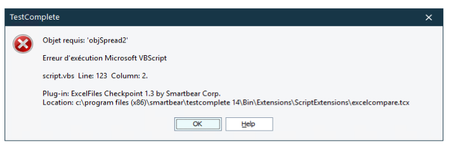
ContributionsMost RecentMost LikesSolutionsComparing Excel files TestComplete, "objectExcel is not defines" Greetings, It has been a while since I needed help, but recently on one of my script created with TestComplete and the "excelcompare" script doesn't work, when I run the script an error window pops up with the message "ReferenceError: objectExcel is not defined" since I'm not able to find any documents about how to use those script (all links in other topics are dead) I'm asking for help, does anyone has a clue on how to fix this problem? Thanks in advance SolvedRe: TestExecute: "Unable to create a project item of the 'Tested Applications' type" Hi Justin, I am in fact testing a desktop app and in TestComplete I use the command "TestedApps.NameOfApp.Run()" the app.exe is totaly valid where I'm using TestExecute, the reference to the file in the "TestedApps.tcTAs" is correct, however the path in the error window is incorrect and fetching a file that doesn't exist thanks for the help, Synchi64 TestExecute: "Unable to create a project item of the 'Tested Applications' type" Hi, I'm not sure if I'm supposed to post this here, but since I couldn't find the TestExecute forum I posted this here. I have created a TestComplete project, working perfectly fine, tried to run it with TestExecute and the message in the title of the subject apears, stating that a file is missing ( 'TestedApps.tcAPs' ) however the path is wrong, is there a way to change the path to witch TestExecute fetches the files from? sincerely, synchi64 SolvedIs there a way to edit an excel file with TestComplete? Greetings, The question is here, I'm trying to edit an excel file with TestComplete, more specifically, I need to know if there is a way to change the color of a cell in an excel file from TestComplete, thanks in advance SolvedRe: objSpread2 missing error in "excelcompare" i figured it out, thanks to all of you, thank you very much, it turns out that the script apparently didn't installed itself properly Re: objSpread2 missing error in "excelcompare" i'm not sure about the second point, when i download the script, they don't apear as zip files, but as ".tcx" files, witch makes it impossible to crack open, also, i tried using the code of "Compare Excel files" (https://support.smartbear.com/viewarticle/9046/) instead of the "Quickly Compare Excel Files" (https://support.smartbear.com/viewarticle/42199/), and it apears that TestComplete just can't compute "ExcelObj" Re: objSpread2 missing error in "excelcompare" sorry for the late answer, as i could not work for a week i didn't had time to test, now that i can test out the solutions, i have some difficulties still Re: objSpread2 missing error in "excelcompare" i tested both excel links, both links are correctly typed, the error occurs when the comparison starts, as for the "rebuild your own" i'm not sure how to go about it, do i try to create a script to export from the code in the link or am i missing somthing? Re: objSpread2 missing error in "excelcompare" i do have both excel and access installed on the computer objSpread2 missing error in "excelcompare" after installing the "Compare Excel files" (https://support.smartbear.com/viewarticle/9046/) and trying to run it, i was faced with an error saying that the "objSpred2" was missing and i can't find any fix for it, does anyone has any clue on what causes the error and how to fix it? Solved