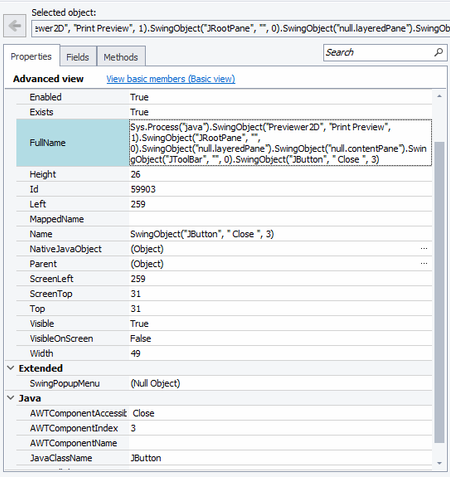
ContributionsMost RecentMost LikesSolutionsRe: JavaFX WebView Control Support Testcomplete Hello We have a system that is moving more and more to javafx webviews as well, and all our scripts are written in python to date. This is a very important feature request for us. Please re-consider it. Re: Strange Search Results for an Object Dang, I think you are right re the space. Thank you. Strange Search Results for an Object Hello, so I have this object as per the picture I am searching for. It exists and is visible (although for some reason it is greyed out in the object window, but when I click on the object in the object window it changes to black as normal) If I try and find the object using the Name = 'SwingObject("JButton", Close", 3)' I can find it just fine. However, I wanted to find via other parameters in case the 3 every changes. So I searched for it using AWTComponentAccesibleName = "Close" and other combinations None of these find the object - which I don't understand. In both cases I am used the same find function, refresh is true, layers is 100. SolvedRe: Desktop Application Lag and BDD Yes I did and it definately helped thank you Re: Waiting for onscreen message to disappear Great thanks you Re: Waiting for onscreen message to disappear Thanks Wamboo But unfortunately the message isn't an obect that can be obtained via object spy, not is it in its own text box or similar. Otherwise it would be a lot easier. Waiting for onscreen message to disappear Hello We are testing a desktop application. When changing forms on the application, loading up a customer etc, the desktop app with display a message on the bottom left of the application screen. e.g. "Loading Customer" This message will fade out and disappear after a few seconds, i.e. once everything on the form is ready for us. We want to delay trying to read buttons and controls, interacting with the form in any way until after this message fades out completely. We would rather not use a set delay timer. As the window/form exists, I don't see how a wait on the window to exist or similar would be useful. Any ideas how we could accomplish this? SolvedRe: Desktop Application Lag and BDD Great thanks I will check this out Desktop Application Lag and BDD Hello Everyone, two questions for you. 1. We are executing some testing in Australia connecting to a PC in the US. Running a desktop app remotely. The scripts are unreliable - sometimes they work, and then sometimes they can't find an object. So it seems to be due to lag and slowness of the PC. I saw in another solution that you can wait for each object to become available, would that be the best suggestion here? i.e. def wait_for_something_exists(something, timeout): counter = 0 while not something.Exists and c < timeout: aqUtils.Delay(1000) # or time.sleep(1) counter += 1 2. I am very new to BDD. I have some code written and it works, but the goes through my entire code twice. I only want it to iterate for each example certain parts of the code. i.e. my code is this: Feature: Generate Check @StartApp @EndAp Scenario Outline: Generate checks When I load the Checks forms When I load the <Customer> Then I generate check(s) for <Customer> Examples: |Customer| |1000000025 | |1000000025 | I am using hooks to start and end the application. What I want it to do is only execute these lines for each example: When I load the <Customer> Then I generate check(s) for <Customer> But it executes everything, including the hooks. SolvedRe: Deciding if a test passes or fails Great thank you