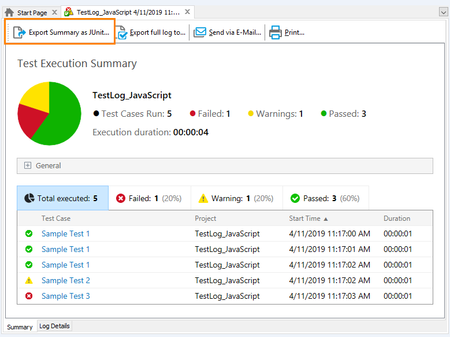
ContributionsMost RecentMost LikesSolutionsclarifications on exporting ‘Summary Report’ from Tests (not manual exporting from IDE) Is there a way to export the exactly specified data of the image including graph. We tried using Log.SaveResultsAs("C:\\Work\\Log.mht", lsHTML), which is mentioned in TestComplete documentation. But, we are able to export only log details and not Summary Report. We are looking for how to export Report with pie charts, which is a better look and feel. Also, tried Log.SaveResultsAs("C:\\Work\\Log.mht", lsJUnit), and this is also not generating any Report. SolvedTestcomplete plots a different image apart from a recorded image Hi All, I'm facing some issues while executing a recorded test. Please point me to a thread regarding this issue, if one exist already. I recorded a polygon creation drawing tool in a personal application. But whenever I re-run the test , its drawing some what different polygon, because its missing some sides. Why is this happening so? Why is the re-running missing some clicks ( Which is visible in the script ) ? Please find the attached images for refernece. Note: Expected : tcvi506527687601617 Actual : visImage12 Thanks and Regards, Anandhu Re: Image comparison with Map Thanks, Will try with that Image comparison with Map Hi All, I have to test a Desktop UI with a Map ( Not google maps). In the application I have some brushes and other regular drawing tools. I recorded a Test with a brush by drawing some random figure and added a Image comparison as the last step. But when I re-run the test the testcomplete is drawing based only on the starting and ending point and the whole image is different. How can i make the re test to follow the exact steps I made? Also I have a option to start a projectile by specifying Starting and ending point. Is there a way to verify its movement also? Thanks and Regards, Anandhu Solved