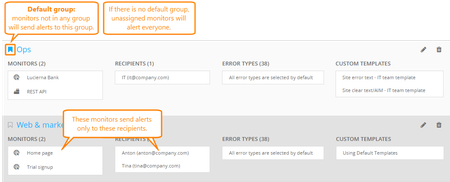
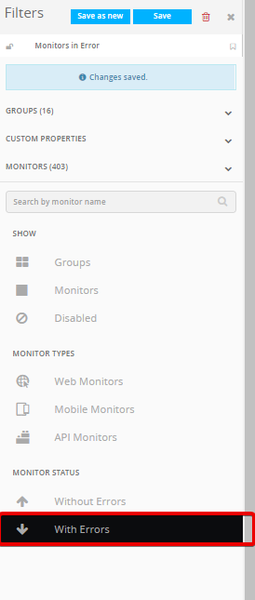
ContributionsMost RecentMost LikesSolutionsWhat are all the AlertSite IPs? The current list of available monitor location IP's can be found in the link below and additional IP's we utilize for QA Regression Test. Available Monitoring Locations: https://www.alertsite.com/cgi-bin/helpme.cgi?page=monitoring_locations.html#_ga=2.201864726.663480569.1571063234-1868474996.1570647344 QA Regression Test Servers: regressiontest01.qa-test.aws.alertsite.com 208.115.62.203 regressiontest02.qa-test.aws.alertsite.com 208.115.62.204 Report Types and Their Date Ranges Each Report type has a set date range that determines how much data can be aggregated to generate the report. Depending on the report type, you can select one, several, or all monitors. The Date range for report types in both single selection and multi-monitor selection have been provided below: Singe Monitor Selection Multi-Site Selection Report Type: Date Range: Report Type: Date Range: Detail 31 Days Monitor Summary 92 Days Hourly 31 Days Site Status Report Today Only Daily 184 Days SLA Summary 366 days Regional Breakdown 184 Days Summary Statistics 92 days. Statistics By Hour of Day 92 Days Usage Report 999 Days SLA Detail 92 Days Usage Report Summary 999 Days SLA Summary 366 days Notifications Detail 184 Days ContentView Summary 31 Days Outage Detail 92 days. Transaction Step 184 Days Transaction Step Summary 184 Days Page Objects 31 Days Notifications Detail 184 Days Outage Detail 92 Days Default Behavior for Monitors NOT in a Recipient Group 2022 Recipient Groups UXM (or Notifier Groups in AlertSite 1.0) allow you to define who will be notified when an alert for a specific device is triggered. The default behavior for any monitor that is not assigned to a group, is to notify all contacts on the recipient list according to the rules defined for each. It does not matter if a specific contact is in a group or not, the behavior is dictated based on the monitor disposition, not the recipients. Once a monitor is assigned to at least one recipient group, it will only notify recipients assigned to that group. Monitors can be associated with as many groups as you like, as can recipients. In the UXM console, you can configure a default group by navigating to the Alerts Tab > Recipient Groups screen. Next to the heading of any recipient group, Click the Flag icon next to a recipient group you would like to assign as the default group. In the AlertSite 1.0 console, you can tell which monitors are assigned to a notifier group under the Configuration tab. Any monitor that has the icon with the computer folders next to it is assigned to at least one group. In AlertSite 1.0, you can configure a default recipient group under the notifier groups configuration menu by navigating to Notifiers > Notifier Groups screen > Then clicking the Notifier group heading. Under the notifier group edit screen in 1.0, check the option for "Default Group will be used for all unassigned site" and click "Submit" button at the top right hand corner. Under the Account Preferences tab of the settings menu (Both UXM and 1.0 console) you can also disable notification for any new monitor you create by default. You can modify the settings for each monitor individually if needed. Another popular way to work around the default behavior is to create one 'Placeholder' group and assign all monitors to it, new and old. In this way, you can be sure that the wrong people are not notified if an error is triggered. You can then assign an invalid notification contact to the Placeholder group as well, or a contact who should be notified for all errors if one exists. Emulate Browser List Alertsite 1 -- ipd/1.0 (ipd; IPD 1.0; AlertSite) Firefox 1 -- Mozilla/5.0 (Windows; U; Windows NT 5.0; en-US; rv:1.7.12) Gecko/20050915 Firefox/1.0.7 (AlertSite) Firefox 2 -- Mozilla/5.0 (Windows; U; Windows NT 5.1; en-US; rv:1.8.1.18) Gecko/20081029 Firefox/2.0.0.18 (AlertSite) Firefox 3 -- Mozilla/5.0 (Windows; U; Windows NT 5.1; en-US; rv:1.9.0.4) Gecko/2008102920 Firefox/3.0.4 (AlertSite) Firefox 29 -- Mozilla/5.0 (Windows NT 6.1; WOW64; rv:29.0) Gecko/20100101 Firefox/29.0 (AlertSite) Google Chrome 0.4 -- Mozilla/5.0 (Windows; U; Windows NT 5.1; en-US) AppleWebKit/525.19 (KHTML, like Gecko) Chrome/0.4.154.29 Safari/525.19 Google Chrome 34 -- Mozilla/5.0 (Windows NT 6.1; WOW64) AppleWebKit/537.36 (KHTML, like Gecko) Chrome/34.0.1847.137 Safari/537.36 (AlertSite) IE 5 -- Mozilla/4.5 (compatible; MSIE 5.01; Windows NT 5.0; AlertSite) IE 5.5 -- Mozilla/4.0 (compatible; MSIE 5.5; Windows NT 5.0; .NET CLR 1.0.3705; AlertSite) IE 6 -- Mozilla/4.5 (compatible; MSIE 6.00; Windows NT 5.0; AlertSite) IE 6 -- Mozilla/4.0 (compatible; MSIE 6.0; Windows NT 5.0; .NET CLR 1.0.3705; .NET CLR 1.1.4322; AlertSite) IE 7 -- Mozilla/4.0 (compatible; MSIE 7.0; Windows NT 5.1; .NET CLR 1.1.4322; .NET CLR 2.0.50727) MSIE/7 (AlertSite) IE 9 -- Mozilla/5.0 (Windows; U; MSIE 9.0; Windows NT 9.0; en-US) (AlertSite) IE 10 -- Mozilla/5.0 (compatible; MSIE 10.0; Windows NT 6.1; Trident/6.0) (AlertSite) iPhone 2.2 -- Mozilla/5.0 (iPhone; U; CPU iPhone OS 2_2 like Mac OS X; en-us) AppleWebKit/525.18.1 (KHTML, like Gecko; AlertSite) iPhone 7 -- Mozilla/5.0 (iPhone; CPU iPhone OS 711 like Mac OS X) AppleWebKit/537.51.2 (KHTML like Gecko) Version/7.0 Mobile/11D201 Safari/9537.53 (AlertSite) Opera 9 -- Opera/9.62 (Windows NT 5.1; U; en) Presto/2.1.1 (AlertSite) Opera 19 -- Mozilla/5.0 (Windows NT 6.3) AppleWebKit/537.36 (KHTML like Gecko) Chrome/32.0.1700.107 Safari/537.36 OPR/19.0.1326.63 (AlertSite) Re: Create a view with just monitoring in Error status Thank you for submitting your feature request. In AlertSite UXM Dashboard you can create a new View to only show monitors reporting in error. On the top left-hand side Click 'Add New' > 'View' and on the right-hand side, a View configuration panel will appear. Select all monitors and at the bottom, under monitor status selects 'With Error'. Make sure 'Show disabled monitors' is unchecked. An attachment has been provided below on how your configurations should look. Thanks again Re: Upgrading Your InSite to the Latest Version This is the latest version for Private Node Servers listed below VMware: http://cdn.alertsite.com/InSite/2.1.5/OVA/InSite-vm-2.1.5.ova HyperV: http://cdn.alertsite.com/InSite/2.1.5/Hyper-V/InSite-vm-2.1.5.zip

 StaffStaff