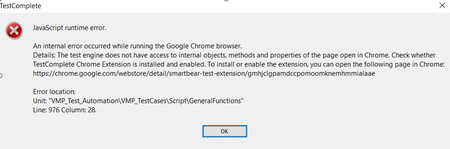
ContributionsMost RecentMost LikesSolutionsRe: An internal error occurred while running the Google Chrome browser Hi Alex, Could you please help me to find if the chrome version "Version 78.0.3904.87" is supported? If it is not supported, what is the procedure to update? Thanks in advance, Sindu Re: An internal error occurred while running the Google Chrome browser Hi Alex, Yes, it was working previously! I dint open the tool for a week, and when I tried to run the existing script this is the error I got on launching chrome. Wasn't Chrome updated recently? Ans: Chrome was not updated! Thanks, Sindu An internal error occurred while running the Google Chrome browser On running the script, an error is thrown as the attached image. SmartBear extension is installed and enabled also. Each time on closing the browser and reopening, the extension is disabled. How can this be solved? And also, if the extension is enabled and run the script without closing the browser, no objects are recognized!! SolvedReturn to end of the function on any error during execution of script We have one function for calling all the functions to be executed where all functions to be executed are called via Excel. As it is only one test item, one log is generated at the end. Do we have an option to split the logs for each row in excel? And also, during the script execution, if the object is not found run time error occurs and error is posted in log file causing the execution to stop. And, if the entire block is enclosed in try-catch block, on run-time error the control is not passed to catch block. How can we handle such situations and continue the script execution?