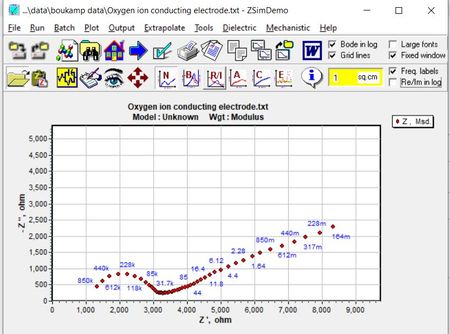
ContributionsMost RecentMost LikesSolutionsTest complete not stopping the script Hi, Whenever any script is running which is of longer duration and I click on stop button, test complete does not stop that. I have to kill the test complete process. All the effort is wasted and I could not see the logs. Not able to select the item in the combo box Hi, I have one combo box, I am using this logic to select the item in the combo box. value is the name of the combo box item. Sometimes, the item gets selected. But other times only the first item is getting selected. What can be the possible;e reason for that? for (var index=0;index<reqObj["wItemCount"];index++) { if(reqObj["Items"]["Item"](index)["Name"]==value) reqObj["ClickItem"](index); } Object spy is not highlighting the controls Hi, I was able to find the properties using object spy. But now it is not highlighting the objects that it was identifying previously. Test complete is in object identifying mode. Please refer to screenshot attached. Can anyone help me out? How to identify the controls in Delphi VT for Zsimpwin tool Hi, I need to read the values in the chart below for the ZSimpwin tool. The test complete object spy is only identifying it as "NameMapping["Sys"]["Process"]("ZSimDemo")["VCLObject"]("MainForm")["VCLObject"]("Chart1")" Can you please let me know how to get the chart coordinates and value. SolvedIs there any way we can validate graph using sci chart in desktop application Hi, I need to validate the curves in the graph (created by Sci chart) for my desktop-based application. Is there any way to do so? SolvedError while adding test complete project to version control Hi, I am not able to add my project suite in the SVN version control system. I am getting the attached error SolvedReg the UAC window Hi, I need to install a software as part of automation process. During the installation of the software , I am encountering the issue of the UAC window stating that "Do you want to allow this app to make chanes in your device?" I do not want to make the UAC setting as "Never Notify". Is there any other alternative to solve the issue as test complete does not recognizes the UAC window SolvedRe: TestExecute trial license expired without launching test Execute Hi, I have downloaded the testexecute trial set up on the same day only when I was preparing the set up for virtual device. TestExecute trial license expired without launching test Execute Hi, We are planning to run our script on remote computer using test execute. Please find the below steps we are following. 1. Copying the test execute exe(trial) version to the remote PC Copy-Item "\\NetworkPath\TestComplete\*" -Recurse -Destination "\\DestinationPath" -Force 2. In order to install test execute remotely in silent mode, we are using the instructions mentioned in the link https://support.smartbear.com/testexecute/docs/general-info/installing/installing-in-silent-mode.html#CreatingResponseFile Run TestExecute installation in response recording mode: <path_to_installation_package>\TestExecute1410_Release.exe /r 2. Follow the onscreen instructions and install TestExecute with the needed settings. The installation program will track the choices you make during the installation and record them to the Setup.iss file in the Windows folder on your system drive. 3. Move the iss file from the Windows folder to the folder containing TestExecute’s installation files. Since installation has happened first time with manual intervention, Setup.iss file is generated and it is kept with the testexecute setup for installation in silent mode. We are uninstalling the testexecute in order to have installation in silent mode. Note: Test Execute was installed in order to generate the setup.iss file. When with powershell command , we are again trying to install testexceute and launch it. It is giving message "Your time-limit license has expired" even though we never launched it SolvedControls are not identified in remote desktop Hi, My desktop based application's automation script is running fine in my PC. But when i run the same script in remote Desktop, only main window of the application is identified using Sys.Process.FindChild() After that no controls are identified in remote desktop Solved