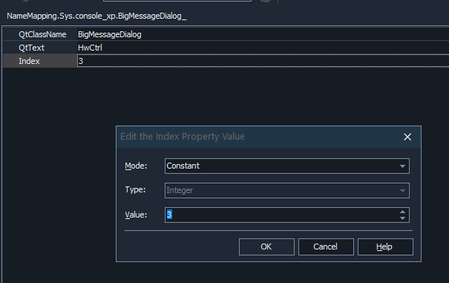
ContributionsMost RecentMost LikesSolutionsscript testing - prevent or change default wait for object I am implementing a system for UI testing that will allow full modularity of our system. when calling for an attribute of a map object - if the object is not on the screen, it enters a timeout with message "waiting for object". Is it possible to prevent the automatic wait period after calling object attribute\function from happening? For example - I want SomeObject.Exists to return False immediatly in case it is not currently on the screen thank you. SolvedMapped object - use wildcard on Index I have an issue where in our product pop up object (messages, warning windows ETC) receive different Index value between runs and appearances I want to refrain from mapping the same object multiple times with different Index numbers, I want to be able to look for object with any Index value, Is it possible to set Index value as wildcard (Couldn't use "*")? any other solution? How it looks in NameMapping: Thanks! SolvedRe: Python workflow and imports This does not answer what I intended. In most python IDES you can freely make nested folders to organize your project. Is it possible when working with testComplete? I want the hierarchy to be folderClassA--> ClassA.py --> ClassA object FolderClassB -->ClassB.py --> ClassB object and I want to know if it is possible to perform the imports of nested files (similarly to every other IDES as already mentioned): "From folderClassA.ClassA import ClassA " Python workflow and imports Hi, Trying to perform import between nested files and classes similarly to any other python project does not seem to work on testComplete. The case is as such: I have under script Dir two directories (A, B) with 1 script file in each dir (a.py, b.py) each file has the definition of a class(ClassA, ClassB) Trying to import using nested syntax doesn't work : from A.a import ClassA class ClassB(ClassA):..... is there a specific syntax for import behavior working in python on TestComplete? Thanks! Re: command prompt conversion of TC to TE hey Karkadil , Im trying to convert a project created in old testComplete version to new testExecute , not from new to old , the command /forceConversion doesn't seem to work and I didn't find documentation about it . Re: command prompt conversion of TC to TE I am working with older version on TC compared to the version of TE . command prompt conversion of TC to TE I want to convert a project built in TestComplete to TestExecute using a .bat command Due to the project being part of CI process new versions are released daily and conversion needs to occur automatically ; .bat file for running project : net use O: /delete net use O: %1 /persisten:no echo %PATH% IF EXIST "C:\Program Files (x86)\SmartBear\TestExecute 12" ( **I would like to enter conversion of project here** "C:\Program Files (x86)\SmartBear\TestExecute 12\Bin\TestExecute.exe" "O:\Diamond.pjs" ) ELSE ( echo "test execute 12 not installed" ) net use O: /delete