NikitaPyatakovOccasional ContributorJoined 6 years ago10 Posts3 LikesLikes received1 SolutionView All Badges
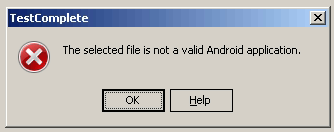
ContributionsMost RecentMost LikesSolutionsRe: Testcomplete not "see" object of Android app in "Object Browser" after "adb shell am force-stop" 2 C-Hansen adb force-stop command - this command kills the process itself and all its child processes - that's why we don't see objects This is because your application is called through the TestComplete agent on the device while running the application with the prefix ". tctest" as a child process of your main application Kulibins... Re: Testcomplete not "see" object of Android app in "Object Browser" after "adb shell am force-stop" sonya_m, Could you check with the development team in Tula? they know better in what order to stop and set P.S. They know this trite because they somehow created a mechanism for installing and restarting the application from TestComplete Testcomplete not "see" object of Android app in "Object Browser" after "adb shell am force-stop" Hi All! I ran into the following problem: If I run the "adb shell am force-stop <PACKAGE>" command while the script is running and run the Android app again with the "am start-n yourpackagename/.activityname" command, then the app is no longer visible in the "Object Browser" tab. Two points are also known: 1. the command " ... am force-stop .. "stops all child processes associated with the running package, which means that "your "(with the prefix". tctest") application also stops working 2. When I start the application via "TestComplete", then " TestComplete": 2.1 repackages "my" app in " packege.name-signed. apk" 2.2 creates an additional application "instrumentation-signed. apk" ("your") 2.3 installs these two apps on the device while removing the two apps from the computer at the same time 2.4 somehow runs both apps, so that "my" re-packaged app will run through " yours" So I have questions: 1. What is the best way to stop the app so that the connection between "my" re-packaged app and "your" app is not lost? 2. If I have "my" repackaged application and "your" application, in what order and with what commands do I need to launch the applications so that after launching "my" repackaged application, the objects are visible on the "Object Browser" tab? P.S. Suggestion: make a human work with the tested Android application from the "TestedApp" module-give opportunities: 1. Launch the app (with a full cycle of operation) 2. Run only the app (without instrumentation, just run and that's it) 3. Deploy the app (with a full cycle of operation) without starting 4. Deploy only (without instrumentation, just deploy and that's it) 5. Stop the app (just stop and that's it) 6. Restart the app (just restart and that's it) 7. Delete the app (just delete and that's it) Let this functionality be available only from the script. P.P.S. My env: PC: Win10x64, ru Android Studio: 4.0.1 x64 TestComplete: 14.71 x64 Thanks! Re: Testcomplete crash after second run mobile app from TestedApp I check the same on version 14.71 - Error was solved. Thanks! Testcomplete crash after second run mobile app from TestedApp Hi all When I re-launch the mobile app from TestedApp - TestComplete crashes details: 1.Project - TestedApps - mob_app 2. Right click on mob_app 3. Run 4. When app was started on smartphone, repeat steps 1 - 3 In result: - TestComplete crash Env: Win10, x64, rus TC: 14.70, x64 Device: Sony Xperia Z5 Dual, Android 6.0.1 Android Studio: 4.1 (x64) SolvedRe: 2 Errors "not a valid Android application." or "install packages" when I try add not instrument app Hey ya! I have found solution: 1. All files of SDK must be placed on one folder (In TC 14.61, 14.6 etc I just set folder where adb.exe placed, not all SDK folder, WHY your programmers change it?????) 2. In field "Path to Android SDK" we need set path without "backslash" on end (Hey, This important information!, because "C:\Folder" - worked, "C:\folder\"- not worked) 3. The same for set java runtime - best, set jre and without "backslash", f.e. C:\Program Files\Java\jre1.8.0_271 (In TC 14.61, 14.6 etc I set jdk folder and it work perfectly, guys what is wrong with you???) P.S. If some one need just Android SDK folder, without problem of download via cmd sdkmanager, I can archive it and give some link to it (f.e. this help for test on x86) 2 Errors "not a valid Android application." or "install packages" when I try add not instrument app Hi all! I want understand - what is wrong? I have two errors: 1) 2) when I try add not instrument android application in project This article says https://support.smartbear.com/testcomplete/docs/app-testing/mobile/android/preparing/computers.html that I must have Android 10.x (on the SDK Platforms tab) Android SDK Platform-tools Android SDK Build-tools ver. 26.0.2 or later and other... On my computer was installed: 1. Android 2. Java (JDK): 3. TestComplete Extensions 4. TestComplete Settings My Env: Windows 7 (x86), Sp1 TestComplete 14.7 Thanks SolvedRe: Android Testing - Unable to connect to device Hi! This bug is fresh for 3 years already, starting with TestComplete 10.30 or even earlier Want solution? Take absolute X and Y from the object, and then, divide modulo the width and height, add the absolute x with the width of the module, and absolute y in the height of the module and here's the coordinates where you need to send a click through command "adb shell input tap x y" HEY! Activate License! https://my.smartbear.com/manual-license-activation/ HEY! Activate License Cannot connect to the license server. Please try again later. ???? SolvedUnfortunately, combination TestComplete + iOS - NOT WorkinG! (Post of pain) OK, I prepared my ios app as required in documentation, developers have provided all sorts of certificates, etc. (but they do not understand why I need them) Then, on Windows machine, I recompile ipa-file via TestComplete - that operation add ipa-file in testcomplete project as tested application, then I trying deploy and run via TestComplete that ipa-file on iPhone (use iPhone XS, ios 12.2 and TestComplete 14.1). In result I have error - in short - TestComplete cannot deploy app...bla-bla-bla...It is bad for me and my autotest In result I take original ipa-file, copy to mac with macos 10.14 (majore), connect to that mac my iphone and deploy original ipa-file to iphone via xCode Then I connect (again) that iPhone to Windows machine, and try (again) run ipa-file via tested application in TestComplete - ta-da...Application runs! I have some questions for development/testers/managment team: 1. When you test support ios - what devices, ios versions and compbinations of this you have use? 2. Why you cannot create some agent for iOS device which can interaction with device and app all in all? Take example from Appium (appium free software)? 3. Maybe it's enough to lie that something there really works for you with something? Really, combination TestComplete + iOS - NOT WorkinG! Ok, what i made for solution that problem(real + work solution): You need: 1. Windows machine with TestComplete, python 3.7.2 + appium python client, iis, mssql 2. Mac machine + Appium In TestComplete write code for start python script (you should write it too) which wait some signal for execution some commands with appium from mssql (you should create db by yourself) via request to iis (script on iis you should write too) , and when the signal will come, python script execute command for interaction с appium which interactions with ios device Smartbear, thanks for making my day even worse!