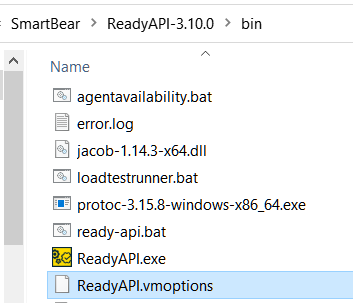
ContributionsMost RecentMost LikesSolutionsRe: ReadyAPI 3.9.2 - Deactivate check for incorrect endpoint? Hi PrathapR He didn't modified his bat-file but the vmoptions. It also worked for me. Just add -Dreadyapi.skip.endpoints.checks=true to that file and start ReadAPI Have a great evening. Cheers Re: ReadyAPI 3.9.2 - Deactivate check for incorrect endpoint? I got following answer... ... For a current work around you can downgrade to the version of ReadyAPI where your tests ran properly while an investigation is underway. At least he could have provide a how to do that. Re: ReadyAPI 3.9.2 - Deactivate check for incorrect endpoint? I contacted the support but all I got "Can you send the error message" which stupid me forgot to add :X If I get more information, I will post it here ReadyAPI 3.9.2 - Deactivate check for incorrect endpoint? Release Notes 3.9.2 Now, ReadyAPI checks an endpoint format and posts an error message to the log in case the endpoint is invalid. It helps you find the cause of the test failing when you, for example, misprint the endpoint. Is there a way to deactivate this check? ALL my tests are failing because of this change. My tests were working with 3.9.1 so the endpoint is not invalid. Thu Aug 26 13:33:26 CEST 2021: ERROR: com.eviware.soapui.support.IncorrectEndpointException: An incorrect endpoint is specified for the request [xxxxx xxxxx] SolvedRe: Git Integration and different users Thank you. I hoped for more insight from users which actually are working on the same project. In theory I know all of that and my project is a composite project 😃 But like I said, I used to work alone and even than I lost some of my changes because of merges and had to rewrite those tests. I am not very advanced in GIT nor in SoapUI. :X I am (now) able to create my tests in a branch and merge that to develop/master. I even store most of my variable locally so they won't get saved but unfortunatelly that is not possible for everything. So what I expect to happen if my colleques will start running and writing tests too, that we will get a lot of merge conflict and lost code. ^^ But I think we will see Git Integration and different users Huhu 😃 I used to work alone on my project so I never had the problem before. Are some you working on one projects with more than person? How do you avoid to overwrite changes from other testers? Some of my new colleques used to have those problems (but with SVN) I found this: https://community.smartbear.com/t5/API-Functional-Security-Testing/Tactics-to-Overcome-Git-Version-Control-Issues-in-ReadyAPI/m-p/188598#M43294 but I hope the integration was improved by now? Thank you and Cheers, Cekay SolvedRe: Run a test before other tests in a suite? You can also use Events like TestSuiteRunListener.beforeRun I use it for example to add the Testsuite to Testrail before starting the tests. Re: Use different format cells while create Excel file nmrao It has to be xls because the importer we have to test doesn't accept anything else. To write everything in a csv and manually save it as xls was my first approach. But I'd like to avoid that. TNeuschwanger I tried Number number = new Number before but I also got errormessages for that. Your codes works 😃 Thank you so much (to both of you) for your time and help For everyone who needs something similar for other objects: merchant.eachWithIndex { val, indx -> log.info val.getClass() if (val instanceof Integer) { Number number = new Number(indx, 1, val) sheet.addCell(number) } if (val instanceof String) { Label label = new Label(indx, 1, val) sheet.addCell(label) } if (val instanceof NullObject) { Blank blank = new Blank(indx, 1, val) sheet.addCell(blank) } if (val instanceof BigDecimal) { Number number = new Number(indx, 1, val) sheet.addCell(number) } if (val instanceof Date) { DateTime dateTime = new DateTime(indx, 1, val) sheet.addCell(dateTime) } } Re: Use different format cells while create Excel file Yeah CSVs and Json files are easy. I do that all the time. But unfortunately this special test needs a xls. Or is there a way to create the file as csv and convert afterwards to xls? (xlsx is also not allowed) :X Use different format cells while create Excel file Hello I have a simple script to create a test data and put that into an Excel file and that is working so far but the import of these files doesn't work because the format is not correct. 1. Some of my numbers are saved as text in excel and our importer can't work with that. How can I set the format of some cells? I tried to use BigDecimal format and Integer but both versions are not working. groovy.lang.GroovyRuntimeException: Could not find matching constructor for: jxl.write.Label(Integer, Integer, Integer) error at line: 29 2.Id_import should be empty but it is also considered as text import jxl.* import jxl.write.* import java.io.File import java.text.SimpleDateFormat def fileTimeStamp = new SimpleDateFormat("YYYYMMddHHmm").format(new Date()) File inputFile = File.createTempFile("Demofile" + fileTimeStamp + "_", ".xls") WritableWorkbook workbook = Workbook.createWorkbook( inputFile) WritableSheet sheet = workbook.createSheet("Worksheet 1", 0) def header = ["PartnerName","Fee","id_import","Branch","Date_of_Birth"] for(int i=0;i<header.size();i++){ Label label = new Label(i, 0, header[i]); // i = column=0=A, row=1 sheet.addCell(label) log.debug header[i] } def birthday = "19.03.1972" def fee = "0,3" def name = "Hans Peter" //def branch = 5732 -> is not working def branch = "5732" def merchant = [name,fee,"",branch,birthday] for(int i=0;i<merchant.size();i++){ Label label = new Label(i, 1, merchant[i]); // i = column=0=A, row=1 sheet.addCell(label) log.debug merchant[i] } workbook.write() workbook.close() log.info "File was saved : " + inputFile.getAbsolutePath() assert merchant.size == header.size Simplified version. I need more data but most of it are normal Strings. So no problem there. Thanks Sabine Solved