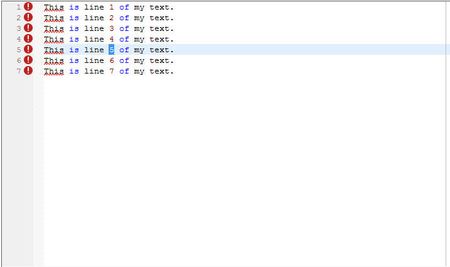
ContributionsMost RecentMost LikesSolutionsRe: Day 1 - API Testing vs. UI Testing Oh man - yeah, those are a pain. Currently, we ended up having our developers write a little function to do the dirty work for us (see code below), and then we call the function from our TC scripts as needed. I'm not a big fan of this method, and I did write a script that could handle it at one point, but it didn't work for every situation. I don't think this does either, but it's a bit easier to call. If you choose to use this, then you'd have to have your developer put it in their code (obviously, not ideal), and then call it from a debug version of the app your testing. Regarding your error, seems like there's a possible problem there, but a general idea here is to use the Object Browser, instead of Object Spy, because it'll give you a lot more detail about all the components, not just the one you highlighted. I almost exclusively use the Browser now when trying to lookup an object. Delphi Code: // Data can look like any of 'Value' or '[Value]' or '[Value][SubValue]' as many levels deep as needed. // The result they want back is |[n1]|[n2], etc. // where n1 is the node index of Value, // n2 is the child node index of SubValue, etc. // note the pipe. |[x] for each value returned. function TVirtualStringTree.GetNodeIndex(Data: String; VisibleColumnIndex: Integer): String; // for QA var Path: String; Column: Integer; function FindChild(aNode: PVirtualNode; aData: String): PVirtualNode; var Node: PVirtualNode; Idx: Integer; begin Result := nil; idx := -1; if aNode = nil then Node := GetFirst else Node := aNode.FirstChild; While Node <> nil do begin idx := idx + 1; if Text[Node, Column] = aData then begin Path := Path + '|[' + IntToStr(idx) + ']'; Result := Node; break; end; Node := Node.NextSibling; end; end; var lData: String; Node: PVirtualNode; aTS: TStringList; ColumnsArray: TColumnsArray; begin if Data <> '' then begin aTS := TStringList.Create; try ColumnsArray := Header.Columns.GetVisibleColumns; Column := ColumnsArray[VisibleColumnIndex].Position; Path := ''; lData := Data; if lData[1] = '[' then lData := Copy(lData, 2, MAXINT); if lData[Length(lData)] = ']' then lData := Copy(lData, 1, Length(lData) - 1); aTS.Text := Trim(StringReplace(lData, '][', #13#10, [rfReplaceAll])); Node := FindChild(nil, aTS[0]); aTS.Delete(0); while (aTS.Count > 0) and (Node <> nil) do begin Node := FindChild(Node, aTS[0]); aTS.Delete(0); end; if Node <> nil then Result := Path else Result := ''; finally aTS.Free; end; end; end; Not sure what language your scripts are in, but ours is in Python, and below is how it's called... #----------------------------------------------------------------------------- # Process TVirutalStringTree #----------------------------------------------------------------------------- def Process_TVirtualStringTree(ItemObjStr, ItemValue): try: ColIndex = '0' # if '>' is found, split if ItemValue.find('>') != -1: ColName, ItemValue = ItemValue.split('>') # get list of column headers ColumnList = ItemObjStr + ".ContentToText(3,',')" ColumnList = eval(ColumnList) ColumnList = ColumnList.split(',') # loop through header list until value is found, then set index index = 0 index2 = 0 ColIndex = -1 for item in ColumnList: index = index + 1 item = item.strip() if item == ColName: ColIndex = str(index2) break index2 = index2 + 1 # if ColIndex is never updated, then the column was never found - log error if ColIndex == -1: Log.Error('Column not found') # pass column value and column index to John's routine NodeIndex = ItemObjStr + '.GetNodeIndex(' + '\'' + ItemValue + '\'' + ',' + ColIndex + ')' NodeIndex = eval(NodeIndex) # if john's routine returnes -1 then we log an error if NodeIndex == '': Log.Error(ItemValue + ' not found') ItemValue = NodeIndex return ItemValue except Exception as Error: TerminateDueToError('Process_TVirtualStringTree', str(Error)) Hope this helps. Re: How to do a Ctrl+Click in a Text Edit Object without using coordinates Hi Alex, Unfortunately not. -1 is the default, so what that does is clicks in the middle of the recognized object - in this case, it's an editor object. I need it to click on the actual text, which could be anywhere in the editor object itself. Thanks, Dennis Re: How to do a Ctrl+Click in a Text Edit Object without using coordinates Thanks for the reply Vallalarasu. Yeah, I was hoping to stay away from using OCR, if possible. There's numerous issues I have with using OCR. I actually gave this a try and it didn't identify my text correctly. I may have to just stick to using coordinates in this case, for now, unfortunately. It seems like a relatively simple thing to just move the mouse to the actual cursor position and do a ctrl+click, but I guess not. Anyway, I appreciate the help. Dennis Re: How to do a Ctrl+Click in a Text Edit Object without using coordinates Hi Vallalarasu, Thank you for the reply. This will give me the coordinates of the object itself, which I can get easily enough. I need to get the coordinates of text within the control tho. My question is how can I get the coordinates of the text (or cursor) itself, so I can do a Ctrl+Click within the object? For example, in the pic below, I have searched for '5' and placed the cursor there. I now need to get the coordinates of that '5' character in the editor, so I can then use Click(x,y,skCtrl). If there's a better way to do this, I'd much rather use that, but the only option I've found to do a Ctrl+Click is to use 'Click', with that 3rd parameter. Any other suggestions? How to do a Ctrl+Click in a Text Edit Object without using coordinates Hi, I'm looking for a way to avoid having to use actual coordinates to do a Ctrl+Click Action. The Click method has this capability, by using a 3rd paramter 'skCntrl', but to use this, I have to provide coordinates. e.g. Obj.Click(X, Y, skCtrl) I found a similar post that dynamically figures out the coordinates of the Mouse (see below), which works great, but I would like it to look at the actual cursor position, instead of the mouse pointer position. I can also get this to work if I only have 1 line of text, but the goal is to be able to search for any text (possibly in a long script in the Editor object), set the cursor, and then do a Ctrl+Click, at that given point. Any Ideas? Sample code to get coordinates dynamically by Mouse cursor position: def Test(): import time time.sleep(5) MyObject = Sys.Process("xxx").VCLObject("SyntaxEditorForm").VCLObject("mmoTop") # Gets current mouse cursor coordinates on screen screenMouseX = Sys.Desktop.MouseX screenMouseY = Sys.Desktop.MouseY Log.Message("X: " + str(screenMouseX) + " Y: " + str(screenMouseY)) # Gets the object behind the mouse cursor onscreenObj = Sys.ObjectFromPoint(screenMouseX,screenMouseY) # Converts the screen coordinates to coordinates relative to the object controlPoint = MyObject.ScreenToWindow(screenMouseX,screenMouseY) Log.Message("objX: " + str(controlPoint.X) + " objY: " + str(controlPoint.Y)) # Control Clicks object from the converted coordinates onscreenObj.Click(controlPoint.X,controlPoint.Y, skCtrl) Re: Day 1 - API Testing vs. UI Testing Relative UI Testing newbie here - been working with TC for about 5 months now. Started from scratch having to learn the ins-and-outs of TC, python, and how TC integrates with our Windows application objects, etc. Since, I started out fresh, I was able to design the process however I wanted, and I believe I came up with a pretty unique design to aid in creating/updating tests faster and easier, very little maintenance, and allows anyone to create tests without first learning TC/python/etc. I compared my design to another teams (that's been using TC for 5 years now) and if my calculations are correct, I'll be able to reduce the amount of code we have to maintain by over 95% or more. Not sure if my design will stand the test of time yet, but I'm very happy with the way it's come out so far. :smileyhappy: btw...the hardest thing we've come across so far is VST's (Virtual String Trees) - in a Delphi Development environment. We did a ton a reseach (on here and other sites) trying to find a good solution. We finally figured out a way handle them, but I wouldn't say it's a great solution. If anyone has experience with VST's (especially using Python), I would definitely like to hear more about your experiences and how you figured out solutions for them.