ViniciusOccasional ContributorJoined 7 years ago5 Posts2 LikesLikes received1 SolutionView All Badges
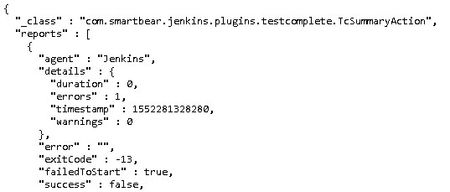
ContributionsMost RecentMost LikesSolutionsTestExecute and Jenkins (Test Result) Hi guys, Current I'm using the TestComplete plugin on Jenkins to execute a pipeline with tests being executed using TestExecute. And I use the Jenkins API to get the JSON with the results, parse and store that in a Database, where I want to create a live dashboard. The API is not getting the error message return from the TestExecute as the image: I'm wondering if and how it's possible to fix that because the console of Jenkins receives the correct return. Does someone have any clue about that? Also, I want to know if it is possible to return a "custom" message instead of the TestExecute default messages? The idea was returning a customized message that makes clear where the test stopped without having to access the test report. SolvedRe: how can we pass an object defined in one unit to another Maybe you can go with something like: Unit 1: function returnObj(){ return Sys.Process('app').Caption('text'); } And inside the unit 2 you can call the function. Re: Object Priority Different I would not say that is a solution, but for now, the machine that presented the problem was not presented anymore. I've uninstalled the TestComplete, restart the machine and then search for all the folders and the items on Windows Registry removing all references that I found. I think this topic can be closed, if the problem happens again in another machine I will try to get some screenshots or anything that can help us to understand better how the problem happens. Re: Object Priority Different It's not the case, because I don't use the NameMapping feature. The object shows these paths even looking in the Object Spy. Object Priority Different Hi, I'm having a problem with the object priority in TestComplete when the application is opened through "TestedApps.App.Run()" command. For example, when the application is manually opened the TestComplete shows the object like: Obj.Pane.Text In case opening the application through the TestComplete command the same object will be: Obj.Client.Text Does someone know how I can fix that problem? Or had a similar problem? I have searched but didn't find anything similar in the community. Solved