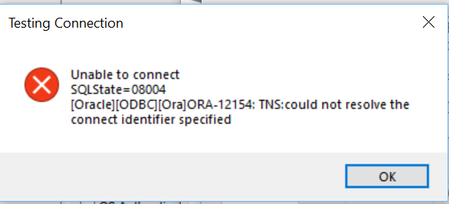
ContributionsMost RecentMost LikesSolutionsRe: Unable to connect to my localhost DB (MySQL Data base) Using test complete keyword framework Hi, I am trying to connect to oracle DB, 1. I have installed oracle ODBC drivers Version 12.1.0.2.0 - (Instant Client Package - Basic: All files required to run OCI, OCCI, and JDBC-OCI applications) and (Instant Client Package - ODBC: Additional libraries for enabling ODBC applications). And extracted them to one folder and installed as a admin. 2. I also created a tnsname.ora file with following info: m****** = (DESCRIPTION = (ADDRESS_LIST = (ADDRESS = (PROTOCOL = TCP)(HOST = ********************** )(PORT = 1520)) ) (CONNECT_DATA = (SID = m******) ) ) 3. And also added a TNS_ADMIN in sytem variables and gave the oracle instant client files extracted folder location path 4. And went to path in system variables and added the same racle instant client files extracted folder location path 5. When i run ODBC Data sources(64 bit) and click add under User Dsn i get the below error. I am not where is the mistake. Re: Unable to connect to my localhost DB (MySQL Data base) Using test complete keyword framework No, Im still facing an issue and trying to get a solution How to connect to winSCP using test complete (Keyword framework) for validating data in winSCP Hi all currenly, I am trying to connect winSCP with Test complete. As i am using keyword frame work and do not have desktop license is it possible to connect? If how? SolvedRe: Unable to connect to my localhost DB (MySQL Data base) Using test complete keyword framework Currently in manual sceanrio, We Take count of Tables using Oracle SQL developer and validate them. So my scenario here is to automate this process. I have few queries which i need to run from test complete connecting to oracle Sql developer and get those count of tables. So i guess i need to connect to DB for validating the count. Unable to connect to my localhost DB (MySQL Data base) Using test complete keyword framework Hi all how can we can connect to oracle SQL Developer using test complete keyword frame work. Re: What is best operation to use in this scenario, If we can't use file checkpoint? Thank you for replying Marsha, I have tried file check point operation. But the problem is everytime i run this scenario, The export functionality will download a new file. So each time i need to compare the baseline file with newly downloaded file. How can this be done? Thank you Re: What is best operation to use in this scenario, If we can't use file checkpoint? Yes, "How can i indicate to use your stored "expected data" as the file to be used for the comparison". This is the sceanrio: I am working on an Inventory project, So First file i have kept in my local system as Actual Data. But Now My challenge is i will need to automate a scenario where i need go to the inventory UI and export a new report and this exported report will be downloaded in local system automatically. Now how can i compare files, First file which is already in my local system as "extected data" and the second file which is downloaded using export report functionality"(actual data). What is best operation to use in this scenario, If we can't use file checkpoint? In the file comparison operation, IF we have a baseline file in our files which we use as EXPECTED DATA. And if we go to web page and export a new data file(ACTUAL DATA) how can that File pulled in to store to compare with baseline file? I am trying to validate data in this sceanario.