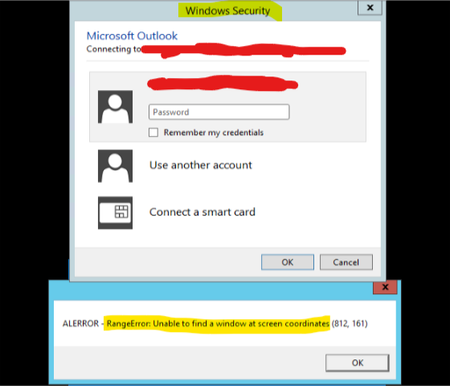
ContributionsMost RecentMost LikesSolutionsRe: Can't spy an object inside Windows Security popup "When you use TestComplete object spy, what do you see at the point where you dropped? " When I utilize the Object Spy of my custom app (which is utilizing the method I mentioned above), then nothing happens as the exception is thrown. If I insist, then the Windows Security popup freezes. When I utilize the Object Spy from TestComplete IDE (I mean, by clicking the button at top of TestComplete software when editing a project), and then drop the target into same Windows Security screen, then the red square blinks around the object and it is correcntly recnognized. So, it works. "Does the same code work with other objects other than Windows Security?" Yes. My code is working with everything else. Also, I must say that the issue is happening only with the Windows Security popup that is raised by Microsoft Outlook. So, when opening my Outlook, then the popup is opened to insert credentials and that popup is the one I cant spy. However, if I open any other software which prompts the Windows Security popup, then it works. So, as it works with another Windows Security popups I'm not sure the reason would be security. And I know it makes the problem even harder to overcome... Does TestComplete ObjectFromPoint method logs anywhere when it fails? I tried Windows Events Log but found nothing there. Re: Can't spy an object inside Windows Security popup The coordinates seems to be fine, as it is poiting exactly to where I dropped (I double checked). Any other idea? Re: Can't spy an object inside Windows Security popup My app has a control which user can drag and drop into any window. When dropping, then we run the Sys.Desktop.ObjectFromPoint to identify which object it is based on the coordinates where it was dropped. So, basically, when we utilize the Sys.Desktop.ObjectFromPoint method passing the coordinates of an object within the Windows Security popup, then an exception is raised as that method is not able to identify the window we're spying (as picture in my first message). Also, I realized that when opening TestComplete, then opening a project, then clicking the 'Display Object Spy' button at top of TestComplete, and then draging and dropping the target into any object from same Windows Security popup, then the object is recognized and works as expected. So the problem happens only when we are spying the object via a customized app, utilizing the Sys.Desktop.ObjectFromPoint method. And just to remember that the error is raised by the ObjectFromPoint method, not by my application code itself. Can't spy an object inside Windows Security popup I have an application that is utilizing TestComplete to Spy Objects. The Spy functionality works with any window, except the "Windows Security". When we try to Spy any object inside that window, then an excetion is thrown. I realized it happens when my code is calling for the ObjectFromPoint method (https://support.smartbear.com/testcomplete/docs/reference/test-objects/members/desktop/objectfrompoint-method-desktop-object.html) . The line from my code where error is raised is like this: obj = Sys.Desktop.ObjectFromPoint(px, py, true); The message we get is the one as bellow: Here are the version of softwares I'm utilizing: SmartBear TestComplete 11 - Version 11.31.2420.7 SmartBear TestExecute 11 - Version 11.31.2420.11 As it is a problem with TestComplete, then I'm not being able to overcome this issue on my app. Can someone please help?