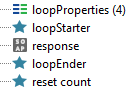
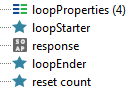
ContributionsMost RecentMost LikesSolutionsGroovy Automated DataSource Loopers Symptoms You may need to create the loop steps through groovy manually. So without further ado this is how I script my groovy loopers NOTE: in this example I am connecting to an OracleDB to fuel my requests. Solution 1) Structure: The structure within my test case is quite simple: loopStarter to connect to the db/initialise the data - storing the current information into properties, response to send these properties off to the API through a request, loopEnder to either propagate or exit the loop if the condition is met. 2) loopStarter Connection to/creation of your data source, be it a database, excel etc In this example I will be using the groovy.sql class (documentation) to connect to my db, and store the results into properties import groovy.sql.Sql sql = Sql.newInstance(<connection details>) def res = sql.rows(<sql query>) def loopProperties = testRunner.testCase.getTestStepByName("loopProperties") //will initialise count in the loopProperties step if count does not yet exist if(!loopProperties.hasProperty("count")){ loopProperties.setPropertyValue("count","0") } def count = Integer.parseInt(loopProperties.getPropertyValue("count")) //store the properties from the current result loopProperties.setPropertyValue("x",res[count].x) loopProperties.setPropertyValue("y",res[count].y) loopProperties.setPropertyValue("querySize",(String)res.size()) sql.close() sql.rows returns an array of ArrayLists, so to access the current result (more on this later) we will use res[count]. Just to reiterate this step ONLY sets the properties to be sent off in the request. querySize is set so we can continue looping over all the results from the query. 3) response To then call your properties into your request step we will do this: <soapenv:Envelope namespace:ns="namespace"> <soapenv:Header/> <soapenv:Body> <ns:x>${loopProperties#x}</ns:x> <ns:y>${loopProperties#y}</ns:y> </soapenv:Body> </soapenv:Envelope> if you choose not to store your properties in a property step and wanted to store them at the test case level you can fetch them like so: ... <ns:x>${#TestCase#x}</ns:x> ... 4) loopEnder This is the loop exit condition. It will tell the loop whether or not there are more results from your query to send through the request. This is also a pretty simple step: - check count vs querySize - increment count if true - go to loopStarter if true, to update the properties (count has been increased and because of this, so will the current result) def loopProperties = testRunner.testCase.getTestStepByName("loopProperties") def count = Integer.parseInt(loopProperties.getPropertyValue("count")) def querySize = Integer.parseInt(loopProperties.getPropertyValue("querySize")) if( count<querySize-1 ){ count = count+1 loopProperties.setPropertyValue("count", (String)count) testRunner.gotoStepByName("loopStarter") } 5) reset count Unnecessary step but I like getting into the habbit of clearing all properties after I'm done, and this groovy script will do it for you def loopProperties = testRunner.testCase.getTestStepByName("loopProperties") String[] removals = loopProperties.getPropertyNames() for(i=0;i<removals.size();i++){ loopProperties.removeProperty(removals[i]) } I've been thinking of doing something similar to this for the Excel DataSource script Olga_T mentioned, well similar to the loopStarter step anyway - doing it completely through groovy so SoapUI free users can do it too, I just need to look into parsing exel files with groovy. Anyways I hope this helps you all, Mo Groovy Automated DataSource Loopers I understand that this is a SoapUI Pro forum but I think creating the loop steps through groovy manually can be a good lesson and can help you customise your loops to your heart (and/or requirement)'s content! So without further ado this is how I script my groovy loopers NOTE: in this example I am connecting to an OracleDB to fuel my requests. 1) Structure: The structure within my test case is quite simple: loopStarter to connect to the db/initialise the data - storing the current information into properties, response to send these properties off to the API through a request, loopEnder to either propagate or exit the loop if the condition is met. 2) loopStarter Connection to/creation of your data source, be it a database, excel etc In this example I will be using the groovy.sql class (documentation) to connect to my db, and store the results into properties import groovy.sql.Sql sql = Sql.newInstance(<connection details>) def res = sql.rows(<sql query>) def loopProperties = testRunner.testCase.getTestStepByName("loopProperties") //will initialise count in the loopProperties step if count does not yet exist if(!loopProperties.hasProperty("count")){ loopProperties.setPropertyValue("count","0") } def count = Integer.parseInt(loopProperties.getPropertyValue("count")) //store the properties from the current result loopProperties.setPropertyValue("x",res[count].x) loopProperties.setPropertyValue("y",res[count].y) loopProperties.setPropertyValue("querySize",(String)res.size()) sql.close() sql.rows returns an array of ArrayLists, so to access the current result (more on this later) we will use res[count]. Just to reiterate this step ONLY sets the properties to be sent off in the request. querySize is set so we can continue looping over all the results from the query. 3) response To then call your properties into your request step we will do this: <soapenv:Envelope namespace:ns="namespace"> <soapenv:Header/> <soapenv:Body> <ns:x>${loopProperties#x}</ns:x> <ns:y>${loopProperties#y}</ns:y> </soapenv:Body> </soapenv:Envelope> if you choose not to store your properties in a property step and wanted to store them at the test case level you can fetch them like so: ... <ns:x>${#TestCase#x}</ns:x> ... 4) loopEnder This is the loop exit condition. It will tell the loop whether or not there are more results from your query to send through the request. This is also a pretty simple step: - check count vs querySize - increment count if true - go to loopStarter if true, to update the properties (count has been increased and because of this, so will the current result) def loopProperties = testRunner.testCase.getTestStepByName("loopProperties") def count = Integer.parseInt(loopProperties.getPropertyValue("count")) def querySize = Integer.parseInt(loopProperties.getPropertyValue("querySize")) if( count<querySize-1 ){ count = count+1 loopProperties.setPropertyValue("count", (String)count) testRunner.gotoStepByName("loopStarter") } 5) reset count Unnecessary step but I like getting into the habbit of clearing all properties after I'm done, and this groovy script will do it for you def loopProperties = testRunner.testCase.getTestStepByName("loopProperties") String[] removals = loopProperties.getPropertyNames() for(i=0;i<removals.size();i++){ loopProperties.removeProperty(removals[i]) } I've been thinking of doing something similar to this for the Excel DataSource script Olga_T mentioned, well similar to the loopStarter step anyway - doing it completely through groovy so SoapUI free users can do it too, I just need to look into parsing exel files with groovy. Anyways I hope this helps you all, Mo Re: How to generate a Json request body using the test case property. right click within the request body where you want the property to go, navigate down to the 'get data' option. Continue to navigate to the specific test case property you want and it will auto-insert text that looks something like this: ${#TestCase#propertyName} Hope this helped, Mo Re: DataBase Connection in SetUp script and use the same in Groovy Test Step Is there any way to use DB confiuration at Project level in Databases Menu in test scripts? No, unfortunately not. Custom properties (the way to preserve values) only store strings. As I said in my previous reply it doesn't seem like there is any way to fetch an existing sql instance. Instead you will need to open and close the sql instance each time you need to access the database (hence the script library would come in handy to not have to write out the connection parameters each time) Re: DataBase Connection in SetUp script and use the same in Groovy Test Step As far as I can tell there is no way to preserve the sql instance or fetch it unfortunately. I have read through the groovy SQL documentation but I didn't see a way to do it. you can however move your script into a script library I would create a script methods for both opening and for closing connections Hope this was helpful, Mo Re: Groovy Automated DataSource LoopersYeah that's what I'm currently reading intoRe: how to make Data generator to execute every test for random data To create random passwords (Strings), and numbers you can use the RandomStringUtils: Documentation here You'll then want to store them into custom properties to then be used in your test requests. Example: import static org.apache.commons.lang3.RandomStringUtils.* //if you have a property step you can use it to store them, otherwise you can store them at test case level def randomProperties = testRunner.testCase.getTestStepByName("randomProperties") def randomPassword = randomAlphanumeric(8,21) // arguments: minimum length, max length (so a string between 8 and 20 characters) def randomString = randomAlphanumeric(8,21) def randomNumber = randomNumeric(5) // random numbers of length 5 randomProperties.setPropertyValue("randomPassword",randomPassword) randomProperties.setPropertyValue("randomString",randomString) randomProperties.setPropertyValue("randomNumber",randomNumber) you can then access these properties in your requests with ${randomProperties#<propertyName>} Hope this helps, Mo Re: how to make Data generator to execute every test for random data Hi there, What kind of data would you like to generate? Random strings of characters? Random dates? Random numbers? And would you require multiples of these? Mo Re: Multiple sql statements in one JDBC step with Oracle One way to achieve this is to use a groovy step and script the db queries, you should find the information you need to get started with groovy sql coding in the documentaion here NOTE: The objects that are returned from the sql query methods are ArrayLists and so to retrieve a specific element (column name) from within the object (sql result object) you would use something like object.specificElement Hope this was helpful, Mo EDIT: You can also find some usage examples here Re: [OffTopic] Who are you outside of testing? I guess I'll start with the basics I'm 22, so only have about a year under my belt as a tester, with one sister (21 years old, now an optometrist), and one little brother (9 years old). I've been a Londoner all my life (born in North, grew up in Central, and now live in East). I am driven by the thought of helping people - originally I wanted to be a Doctor before I realised coding is my true calling. And with that... onto the interesting stuff I am a massive foodie, huge East Asian persuation (Chinese, Japanese, Korean, Thai) but I also love Caribbean, Italian, and Mexican cuisine. But to be honest sometimes you can be a simple man and just want a nice steak more than anything else. Also Venison is delicious. I adore the theatre, haven't performed in several years, but I still love going to watch plays like Phantom of the Opera, Sweeney Todd, Les Misérables, Blood Brothers, Macbeth, Woyzeck, and a little bit of a spoiler for the next thing I'm gonna talk about The Lion King, Wicked, and Aladdin. As you might have guessed I am a massive Disney nerd, my favourites come from the renaissance: Tarzan, The Hunchback of Notre Damme, Mulan, The Lion King, and Hercules. I don't think there is a single disney movie that I haven't seen post Snow White (assuming animation). I also love singing along at least semi in tune :smileytongue: Other than Disney I enjoy watching a whole bunch of different series like Stranger Things, Dr. Who (doctors 9-11 - we don't talk about 12, haven't seen 13), The 100, and Black Mirror. And movies like How to Train your Dragon, The Prince of Egypt, Anastasia, The Impossible, Kubo and the Two Strings, Star Wars, and the Marvel Cinematic Universe (although those last two are also Disney). Gaming has always been my escapism of choice, indies like The Darkest Dungeon and The Binding of Isaac are great but my all time favourite is Borderlands 2. I am a massive minmaxer so I love a lot of Nintendo games like Fire Emblem and Pokémon, and strategy games like Sid Meiyer's Civilization. Outside of video games, I have been a part of a few DnD 3.5 and Call of Cthulu campaigns which were super fun. And I was the President of the Games and Video Games society at Queen Mary, leading it to its most successful year of over 200 members! I realise this post is already pretty long so I'll quickfire the other things in which I like to dabble in: Origami, Guitar, Violin, Cooking, Baking, Basketball, Amateur Story Editor, Photography, Learning about the English Language, Creative Writing, Drawing, and Pub Quizzes (or general knowledge quizzes in general). I've been doing these a lot less since I started working - still figuring out my worklife balance ahaha. The final thing I will say about myself is that I love to travel, I've been on residentials all over the South of England, Whales, and Liverpool. I've been back to my family homes in Bangladesh, on a two week school trip to China (Beijing and Haerbin - definitely recommend the latter) and to several African/Middle Eastern countries (Saudi Arabia, Tunisia, and Morocco). These all represented great opportunities to practice photography! So that's my not so short "summary" of me, hope you all enjoyed the little insight into the things that I like, Mo