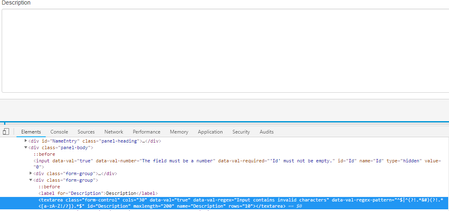
ContributionsMost RecentMost LikesSolutionsRe: How to open a dropdown control I tried the recording the tests using keyword test but the Gender Dropdown does not open when the recording is on. After a few tries, I eventually found the solution. The DateTimePicker and the Generder Dropdown are wrapped inside a lot of control containers. The DateTimePicker control has two <Input> and they are inside multiple <div>, I must get the <input> with "class = 'dateTimePicker'" using XPath and then perform click() operation on this control to open the DateTimePicker; the Gender DropDown has multiple <span> controls, I must get the <span> with "Role = 'combobox'". When perform a "Click ()" on this control, it opens the dropdown. The attached image has the two controls hightlighted in Red. I hope this may help someone who is puzzling on this type of issues. How to open a dropdown control I am writing Automation Test for a web appliocation. On a page, there are two controls: Date of Birth and Gender. The Date of Birth is like a Datetimepicker. When it is clicked, a calender shows up. The Gender is a <select> control, a dropdown opens when it is clicked. The picture shows the Source code behind the page. I am writing script to identify the objects and then envoke the right method of the object to perform actions. I need to programatically open the dropdown of these controls and then take a screen shot as objective evidence to show the dropdown opens. I used XPath to identify and get the object on the page and then tried "Click()" and "DropDown()" methods on the object, but neither opened the dropdown control. Can anyone help? Thank you!! SolvedRe: cannot enter data to a <textarea> control I can type in characters and numbers. The following is the function that performs the setting text. When I stepinto the code, I can see the right textArea object on the page is selected and jas the focus when txtObj.Click() is executed, but the next line txtObj.SetText(inpVal) does not set the data on the page. '****************************************************************************************** 'Function:EnterTextAreaValue 'Description:Function to enter text in any text area 'Input Parameters :txtObj - the textArea object, lblName-the textArea Lable, inpVal-the input value '****************************************************************************************** Public Function EnterTextAreaValue(txtObj,lblName,inpVal) EnterTextAreaValue=true If (txtObj is nothing) Then fnInsertResult "Object does not exists","Please recheck object properties of textarea, " &lblName ,"",gFail End If If Not (txtObj.Exists) Then fnInsertResult "Object does not exists","Please recheck object properties of textarea, " &lblName ,"",gFail End If If Not (txtObj.Visible) Then fnInsertResult "Object does not visible","Please recheck object properties of textarea, " &lblName ,"",gFail End If If Not (txtObj.Enabled) Then fnInsertResult "Object does not enabled","Please recheck object properties of textarea, " &lblName ,"",gFail End If On Error Resume Next txtObj.Click() aqutils.Delay(50) txtObj.SetText(inpVal) aqutils.Delay(50) txtObj.Keys("[Tab]") aqutils.Delay(50) getPage().wait() If Err.Number <> 0 Then Log.Error gException & "EnterTextAreaValue"& Err.Description EnterTextAreaValue = False end if On Error GoTo 0 End Function Re: cannot enter data to a <textarea> control I am able to type in letters and numbers cannot enter data to a <textarea> control I am writing tests for a web application. On one page, there is a <textarea></textarea> control. I tried to record the actions of typing data into the control, but the recorded test seems not able to record the text entered. I tried to write script to enter data, it also failed. I tried two ways to do it, but both did not work. Can anyone help to let me know how to work this out? Your help are appreciated! The two options that I tried: 1) txtObj.Click() aqutils.Delay(50) txtObj.SetText(inpVal) aqutils.Delay(50) txtObj.Keys("[Tab]") aqutils.Delay(50) 2) txtObj.Click() aqutils.Delay(50) txtObj.wText = inpVal aqutils.Delay(50) txtObj.Keys("[Tab]") aqutils.Delay(50) The pic is the <textarea> in inspection window. I believe this control is an ASP.net control. SolvedRe: cannot enter data to a <textarea> control The following pic is the control in inspection window. I believe this control is an ASP.net control. <textarea> control on the page. Re: Imported Keyword test does not work Thank you very much! I will start to review the 101. Re: Imported Keyword test does not work Thank you for your guidance. The importing feature is supposed to have just references to the imported tests. It seems like that the Name mapping object does not have the Namespace concept build in. By the way, how do I refresh the imported keyword test if it is modified or its name modified in the original project? How do I get that "Reload" menu option? The image shows what I see in my project. The CU_LaunchLogin is an imported test. Re: Imported Keyword test does not work I am new to Test Complete. How do I share the Name mapping? Imported Keyword test does not work I am developing some autotest for a web site. All the tests will start from login page and login with user name and password. I planed to have to projects in the project suite: Project A to Project B. In Project A, I recorded a keyword test i to perform the login actions. In Project B, I imported the LoginTest of Project A. Then I created a keyword test (DashBoardTest) in Project B. The first step of the DashBoardTest is to run LoginTest. I run the LoginTest in Project A, it works fine. I run the DashBoard test in Project B, it launched the LoginPage but it can not find the Username input box and then it stops working. This is a simple test to test the importing keyword test from one project to another. But it seems not working well. What have I missed? I also notice, there is no "Reload" right click menu context. I am using Test Complete 12. How do I refresh the imported test? Solved