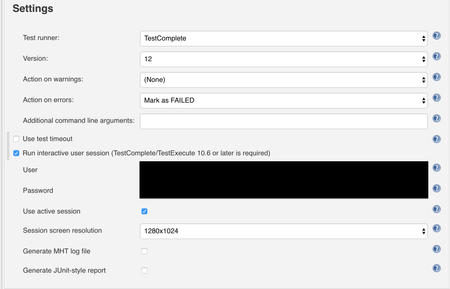
ContributionsMost RecentMost LikesSolutionsRe: [Jenkins] Test Complete Report Images are Blank / Click Causes User Session Disconnected Error Was able to get this to work - The way Jenkins was connecting to the node prior was through a headless method, meaning that a RDC was not being established, therefore I wouldn't be able to get screenshots or use any clicks. From this document - "If your tests interact with the GUI, configure your TestComplete Test build steps in your Jenkins projects to open an interactive user session in which they will run. Otherwise, your tests will fail. See the description of the Run interactive user session property of the TestComplete Test build step." However, with my initial setup I was getting an error when I specified the "Run interactive user session" flag in the Jenkins config. "The node is connected via Java Web Start (JNLP). In this mode, the "Run interactive user session" property of the TestComplete Test step is ignored. TestComplete (or TestExecute) will work in the current user session." After installing Jenkins as a service, I was able to use the "Run interactive user session" property, but I also needed to use the "Use active session," meaning I had to manually set up a RDC with the specified user prior to starting the Jenkins job. Re: [Jenkins] Test Complete Report Images are Blank / Click Causes User Session Disconnected Error Just tried, same results. My policy files looks like this. If there is an error please let me know - grant codeBase "file:${jnlpx.home}/javaws.jar" { permission java.security.AllPermission; permission java.lang.RuntimePermission "accessClassInPackage.sun.awt.windows"; permission java.lang.RuntimePermission "accessDeclaredMembers"; permission java.lang.reflect.ReflectPermission "suppressAccessChecks"; }; [Jenkins] Test Complete Report Images are Blank / Click Causes User Session Disconnected Error I'm using the Test Complete plugin on Jenkins to run Test Items within my project suite. Through each assertion of a step in a test scenario, I call the following function to take a screen shot of the app to add it to the log for verification - Log.Checkpoint(passMessage, undefined, undefined, undefined, Aliases.MyApp); The test log comes out fine when I manually start the tests, but when I run them through Jenkins and look at the test report there, the images of the application and the desktop are blank (see attachment). Currently Jenkins connects to the slave through Java Web Start, but I also see in the logs that when I perform a click "The operation cannot be performed, because the user session is disconnected." Upon an error I have an Event set up to restart the application, which based on the logs it is able to do, thus I don't think the user session is truly disconnected. Since I am using Java Web Start, based on the document I linked, Test Complete should be able to interact with the app's GUI. However, this error message that shows up when a click function is called makes me think otherwise. Has anyone encountered / been able to resolve these issues? I would be happy to add more information if needed. SolvedRe: Jenkins TestComplete Time-Limited License Error Worked for me. Had to have someone log into our service account which is how Jenkins connects to the node and apply the fix there which is why it wasn't appearing for me initially when I logged on to that node manually. Jenkins TestComplete Time-Limited License Error moved here as I posted this in the wrong forum: https://community.smartbear.com/t5/TestComplete-Desktop-Testing/Jenkins-TestComplete-Time-Limited-License-Error/m-p/157900#M11434 SolvedRe: Jenkins TestComplete Time-Limited License Error I'm trying to test a desktop application using the TestComplete plugin for Jenkins. It seems as though when it tries to launch, it checks for expired testing modules, and prompts me that the Web Testing feature has expired. I'm not planning on using the Web or Mobile Web features for my particular application, and I can't seem to find a way to disable this check as I don't receive this prompt when I launch TestComplete manually. Is there a setting in the TestComplete application where I can disable these feature checks? The console log from Jenkins is attached below. "[TestComplete] Test runner exit code: -1. [TestComplete] [WARNING] Error: You are using a time-limited license for the 'Web Testing' feature and it has expired.."