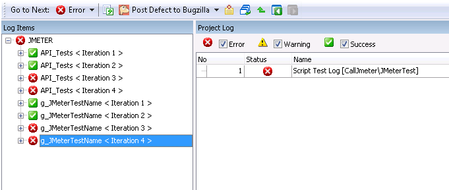
ContributionsMost RecentMost LikesSolutionsRe: Naming Each Iteration of a Test Item Thanks for your input. I know how to write to the project log, but unfortunately that is not sufficient in this case. If there is no way to update the test item name, then I will have to rethink my approach to this problem. Re: Naming Each Iteration of a Test Item Thanks for your suggestion. I haven't specified anything to be included in the log, the iteration number seems to be the default behaviour. Naming Each Iteration of a Test Item Hi, I have a test item which is run multiple times using the Count option. Is it possible to give each iteration a unique name in the test log? Currently each iteration appears in the log as "TestItemName < Iteration N >". I would like to be able to be able to assign each iteration a more meaningful name via scripting e.g. "TestItemName < MyUniqueName>" or even better "MyUniqueName". Any ideas on how to achieve this type of naming in the test log would be appreciated. Add Item to Log at same level as Test Item I have a test item which calls a scripted function. The function iterates through a list and calls multiple tests based on the content of the list. For each iteration of the script, I currently get one entry in the Test Log. Is it possible to shift the logs up a level in the logging hierarchy and have one entry in the Log Items for each iteration. What I really need is to be able to dynamically build and execute test items via scripting, but this doesn't seem to be possible, so I am looking for an alternative way to get the logs in the format I need. The logs need to be in this particular format as they are exported and parsed by an external reporting system. The parser only looks at the test item level of the logs. Test Item Loop Stops after one Iteration has an Error I have a test item which has Count = 10. I want the test item to always run 10 times, regardless of whether previous iterations have failed or have errors. Currently, the loop only completes 10 iterations if all iterations complete without throwing an error. Stop on error is unchecked in the Current Project Properties menu. Any ideas on how I can continue the loop after an error? Solved