bwehkingOccasional ContributorJoined 8 years ago6 Posts3 LikesLikes received1 SolutionView All Badges
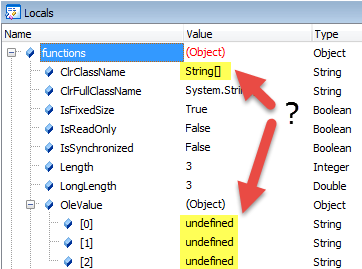
ContributionsMost RecentMost LikesSolutionsLet TryFind() return (a lot) faster for processes Hi, I try to determine in a loop whether certain processes are running and in turn handle different messageboxes that might appear. I noticed, that using driver.TryFind<IProcess>(new ProcessPattern() { ProcessName = "notExistingProcess" }, 1, 0, out var process); takes more than 3 seconds on my machine, whereas Process.GetProcessesByName("notExistingProcess"); returns in a few (<10) milliseconds. I hoped that the timeOut parameter lets TryFind() return immediately, but obviously it's not the case. Finding an existing process is fast: driver.TryFind<IProcess>(new ProcessPattern() { ProcessName = "Explorer" }, 1, 0, out var process); This takes 4 milliseconds. Is there something I can do about it? Or do I have to use .NET Process class to check for the existing process first and only if it exists, use TestLeft to find the IProcess? Thanks in advance! Re: Let TryFind() return (a lot) faster for processes Hi, thank you for your reply, but no, it doesn't speed up things. I ended up with a workaround. I created an C# extension method, that inserts that .NET framework call before it calls TrayFind(). public static class TestLeftExtensions { public static IProcess TryFindProcess(this IDriver driver, string processName) { if (System.Diagnostics.Process.GetProcessesByName(processName).Length == 0) { return null; } return Instances.Driver.Find<IProcess>(new ProcessPattern() { ProcessName = processName }); } } It can be used like this: var process = this.Driver.TryFindProcess("NonExistingProcess"); I would not consider this behaviour a "bug", but for me it's a "major inconvenience". I think this fix could be easily integrated into TestLeft directly. Catch CLR Bridge exceptions in JScript Hello, is there a chance to catch .NET exceptions via the CLR bridge and handle them in JScript? Currently, when an exception occurs in my .NET assembly, I can not handle this exception gracefully. The test just fails. Any ideas? Thanks Bernd Re: Read array of strings from dotNet (CLR Bridge) Hello, thank you for pointing me in the right direction! But that means, that the documentation is wrong: Single-dimensional arrays have to be accessed without using OleValue and the array elements need to be addressed using Get(), as it is stated for multi-dimensional arrays. This worked: var justTrying = Config.myConfig.get_ArrayForTestComplete(); var first = justTrying.Get(0); I guess, the documentation should be reviewed. Thank you! Bernd Re: How to Reload CLR Bridge Assembly Programmatically Hello, yes, it would be great, if TestComplete could release the assembly as soon as it is not in use! I use a .NET assembly to read test configuration values using entity framework. During development I always need to remove the assembly from the CLR bridge click reload re-compile the assembly in Visual Studio add the assembly to the CLR bridge again. Is this easier than restarting TestComplete? I'm not sure.. Both approaches are definitely uncomfortable. Bernd Read array of strings from dotNet (CLR Bridge) Hello, I guess I miss something obvious: I'm using TestComplete 12.31.1833.7. I use the CLR Bridge to call a .NET method which returns an array of strings. The documentation says that "single-dimensional .NET arrays" have an OleValue property, which allows to access the array members. But how do I access the members? The debugger only gives me "undefined" values. To better diagnose the issue, I even hardcoded the members of the string array on the .NET side. Do you have any ideas? Thanks in advance! Bernd Solved