raj360logicaOccasional ContributorJoined 8 years ago6 Posts2 LikesLikes received1 SolutionView All Badges
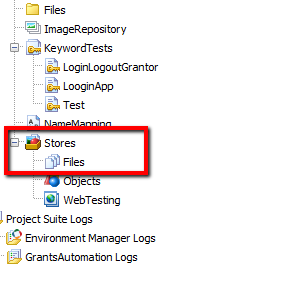
ContributionsMost RecentMost LikesSolutionsRe: How to add an Excel file withing the TestComplete project. Great..... var path=Project.Path; Log.Message(path); it returns path to the Project file, hence it solved my problem. Thank you How to add an Excel file withing the TestComplete project. Hi There, I have an Excel file that contain data for my scripts i.e username, Password, App URL etc, and its located on my local machine i.e C:\Users\Text.xlsx and its working as expected. But I want to put this Text.xlsx file in project somewhere but I am unable to add Excel file to the project. Also I have tried to add it in Stores=>Files its add successfully but unable to see its content. Please help to overcome this issue. Thanks..! SolvedRe: Not able to get the text of an HTML element. obj.text and obj.innerText works for me. Thanks a lot. Not able to get the text of an HTML element. Hi Guys, I am working on a POC of my project using test complete. But I am unable to get the text of HTML element i.e. Button, Link etc. I am using Jscript. I have to do it soon as possible. Any help will be appropriated. Thanks..! SolvedRe: I am working with testcomplete and trying to integrate my project with Jenkins but getting error. Thank you YuriPeshekhonov for you reply, But problem still exist. Thanks. I am working with testcomplete and trying to integrate my project with Jenkins but getting error. [TestComplete] The test execution started (GrantsAutomation). [TestComplete] Found TestComplete/TestExecute installations: Type: TC, Version: 12.31.1833.7, Path: "C:\Program Files (x86)\SmartBear\TestComplete 12\bin\TestComplete.exe" [TestComplete] Selected TestComplete/TestExecute installation: Type: TC, Version: 12.31.1833.7, Path: "C:\Program Files (x86)\SmartBear\TestComplete 12\bin\TestComplete.exe" [TestComplete] [WARNING] The node is connected via Jenkins Agent running as a Windows service. TestComplete tests cannot run in this mode, as they require an interactive user session. To create such a session, enable the "Run interactive user session" property of the TestComplete Test step. [TestComplete] Launching the test runner. $ "C:\Program Files (x86)\SmartBear\TestComplete 12\bin\TestComplete.exe" "C:\Users\rajneeshk\Documents\TestComplete 12 Projects\GrantsAutomation\GrantsAutomation.pjs" /run /SilentMode /ForceConversion /ns /exit /ExportLog:C:\Users\rajneeshk\.jenkins\workspace\TestComplete\1397247.tclogx /ExportLog:C:\Users\rajneeshk\.jenkins\workspace\TestComplete\1397247.htmlx /ErrorLog:C:\Users\rajneeshk\.jenkins\workspace\TestComplete\1397247.txt [TestComplete] [ERROR] An exception occurred: java.io.IOException: CreateProcess error=740, The requested operation requires elevation. [TestComplete] Marking the build as FAILED. [TestComplete] [WARNING] Unable to publish test results (xml data is empty). [TestComplete] The test execution finished (GrantsAutomation). Build step 'TestComplete Test' changed build result to FAILURE Finished: FAILURE Please any help would be appreciated.