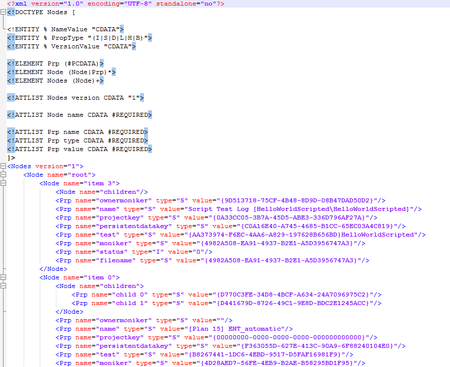
ContributionsMost RecentMost LikesSolutionsAllow for marking single attributes of XML files/checkpoints to be ignored on compare/check Dear all, I am facing a problem with XML checkpoints. The root-node of my XML file has an attribute in it, which reflects the date, the file was generated. I would need to skip ONLY this attribute during compare/check phase. I cannot use the "Ignore attributes" option, as this would ignore all attributes on the file. But other attributes are relevant. I cannot delete the node from the checkpoint (as suggested by the online help about excluding information from the comparison), since it is the root node. All other nodes would be gone as well. Feature request: An option in the XML checkpoint editor would be great: just right clicking an attribute, selecting "Ignore on check/compare". So far, one will first need to alter the actual XML file and manually remove the attribute. Harald Re: Export Logs as XML or JSON format Changing the extension to .html did not help either. I already tried the option with the code/scripting: I added a OnTestStop event handler to the project and used SaveResultAs, but that did not help either. I still get the weird XML format and not the one specified here: https://support.smartbear.com/testcomplete/docs/testing-with/log/working-with/exporting/structure.html#the-structure-of-test-results-ex To me, this seems to be a bug in the runner of TC. According to all the documentation of the cmd-options, I should be able to just launch TC for test execution (/run parameter) with the /exportLogToXMLAlso flag and should get the XML file with the structure defined in the link above. Somehow, I just don't get the files I need. Will need to come up with a robust algorithm for parsing the RootLogData.dat file (which is in XML format) and just consider all the Nodes-Node-Node-Node combinations, using the moniker-element as indication for the tree-structure within the project. Re: Export Logs as XML or JSON format I am passing a simple file path there: e.g. "C:\TestAgent\log.mht" The path does not contain any spaces, so I can pass it without being worried about escaping etc. It does not matter what name the log has, passing log.mht and log.xml both evaluates to a file, which contains MHT content in base-64 encoding. Really going nuts with this problem ... :-( Re: Export Logs as XML or JSON format I would also be very happy with an ordinary JSON file. Doesn't really matter actually, if it is XML or JSON. Just parsable and in the format as given by the documentation. Re: Export Logs as XML or JSON format Hey Robert Thanks for your reply. In fact, I am using the following PS1 script to start the process: Start-Process TestComplete -ArgumentList "$project /run /exportLog:$log /exportLogToXMLAlso /errorLog:$errorLog /Exit /ns" -Wait However, even if I start it from an ordinary command prompt, no XML results are produced. I only get the RootLogData.dat file generated, which is XML, but not really structured nor according to the documentation. It is pretty hard to parse, as there is only a Nodes/Node collection in there. So, the following things tried and no XML results showing up: * PS1 scripts * CMD (batch) scripts * TFS run functional tests with additional arguments in .runsettings file Only thing working so far: right-clicking the logs in TC itself and clicking on "Export to ..." + then selecting the XML option with unpacked format etc. BTW: am using version 12.31.1833.7 Thanks again for any advice/help with that topic! Export Logs as XML or JSON format Dear all, I am trying to accomplish the following: in a TFS build definition, I want to execute TC tests using the Run Functional Tests task on a remote (distributed) test agent and afterwards parse the log output to further process that data (especially the data about every single test-item of the suite). Background is, that the test results published by TC do not include all single test items from TC suites and projects, but only one entry for each test project in the suite. And only if you open up the entry for the test project in TFS, you will see the attached .mht file, which then contains all information about all test items of that project. I actually thought that I can use the /exportToXmlAlso flag for running TC, but this does not produce an XML at all. No matter if I start TC using the command line and provide that parameter or if I run TC using the MSBuild task, it somehow just gets ignored. Also for the TFS "Run functional Tests" task, I do not know how to supply that parameter. I also tried to add an event handler for the OnTestStop event for the general events and use the Log.SaveResultAs() method to write a proper XML file, but that did not work either, as I only can write for the current test item and not for all the test items in a suite. My used documentation so far: For publishing test results (which happens automatically when using "Run Functional Tests" task in vNext): https://support.smartbear.com/testcomplete/docs/working-with/integration/ms-vs/alm/team-builds/definitions/vnext.html#publish For viewing results and seeing the .mht file attached: https://support.smartbear.com/testcomplete/docs/working-with/integration/ms-vs/alm/team-builds/running.html#Results For the MS Build task: https://support.smartbear.com/testcomplete/docs/working-with/integration/ms-vs/msbuild.html For the CMD line: https://support.smartbear.com/testcomplete/docs/working-with/automating/command-line-and-exit-codes/command-line.html For the Log.SaveResultAs: http://support.smartbear.com/testcomplete/docs/reference/project-objects/test-log/log/saveresultsas.html Actually I would expect TC to export the logs in the formats as specified here: https://support.smartbear.com/testcomplete/docs/testing-with/log/working-with/exporting/structure.html All I get so far is the some weird TC internal formats (when using the .tcLogX extension for the log file) or a .MHT file (when using the .mht extension for the log file) and the RootLogData.dat file in the Log folder of the TC suite, which just contains a weird XML structure, having <Node> elements nested allover and which does not seem to be really "parsable". How can I instruct TC from TC/MSBuild/TFS-Task to export the logs in a nice XML or JSON format? Any help regarding this topic is very much welcome!!!