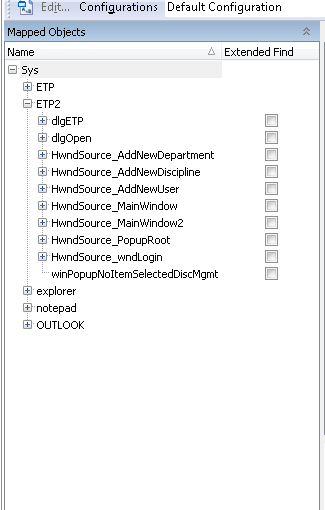
ContributionsMost RecentMost LikesSolutionsUninstall desktop application from control panel. Uninstall desktop application from control panel. I found this article "https://support.smartbear.com/viewarticle/9012/" and it works fine for me after some modification in windows 7 ; but i want something similar to work in windows 10. Please help. TestedApps - Application getting crashed when automated, manually could not recreate it. Application crashes as soon as login button is clicked, Once it has crashed , when we launch application by clicking run ->TestedApps it again crashes at the same point. This is in Continuous integration. Manually could not recreate this scenario. This has been running smoothly since last 2 months. Any idea what might have gone wrong. Please help. Re: TestedApps - application name got changed. How to handle it in namemapping,No objects are recognised Ok, Thank you. I have been doing it. Wanted to check if there is any shortcut. Re: TestedApps - application name got changed. How to handle it in namemapping,No objects are recognised Please find it attached. Re: Excel column returns null for non-numeric characters Thank you, it worked. Re: TestedApps - application name got changed. How to handle it in namemapping,No objects are recognised Its a one time change, I resolved it partially by replacing sys.abc by sys.def in namemapping tree, but my problem is i have 2 such trees , i think it got created in the intial phase, when we could launch 2 or more instances of the application, so ihabe sys.abc and sys.abc2, half of my objects are under sys.abc2 , tried to replace it with sys.def2 but did not work. It still cannot recognize any objects listed under abc2. Kindly help. I am new to testcomplete TestedApps - application name got changed. How to handle it in namemapping,No objects are recognised My desktop application name got changed, because of which objects are not recognized now. Error says parent object not found. Sys.nameMapping.abc is now Sys.nameMapping.def .. Please help SolvedObject does not exists, still it returns true. Why .. Please help My code checks whether an object exists, if yes return true else fai, even though the object is not there, it does not go to else condition. Re: How to get 'Files' listed in 'Stores' in project explorer Thank you tristaanogre!! It worked. Can you please tell me how to upload/add an image to the desktop app from testcomplete scripts, i work with Jscript. How to get 'Files' listed in 'Stores' in project explorer Hello, My requirement is to click on "Browse" button in my application and upload an image. From my understanding to add files/images from our local system, we have to use "Stores|Files" in testcomplete, where we have to first add the images in 'Files' and use it in script. But in project explorer, i can see only "Stores", "Files " are not seen listed under it, so i used this way if (Stores.Exists("Files") || Stores.Create("Files")) { Files.Add("C:\\Users\\Public\\Pictures\\Sample Pictures\\Desert.jpg", "Desert"); } When i run this, i am getting runtime error saying "Stores is undefined". Please help me resolve this. And welcome any other approaches/suggestions by which we can add files from local system. Solved