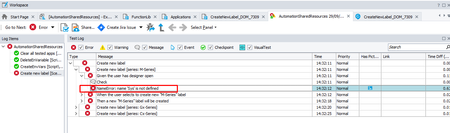
ContributionsMost RecentMost LikesSolutionsName error : name 'Sys' is not defined Hi, We are using TC to write our scripts and execute them using TE on a remote Azure vm. After installing the latest version - Version: 15.77.6.7 x64 it is not possible to debug issues occures on the server as TC will not launch the application on my local. this is very odd as the tests being executed properly on the server using the same version being kicked off by TE. Downgrading to 76 will resolve the problem. The error we see: The code it fails to execute: We need your help promptly with this as it prevents us from progressing when there's an issue on the server. Thanks, Ofer Re: Name error : name 'Sys' is not defined. Hi, We have the same issue, test complete stopped launching the AUT and the error we are getting in the log is the same as above Name error : name 'Sys' is not defined We do need an urgent help resolving this as we're stuck. Thanks Ofer Re: Sharing NameMapping from one project to another in the same project suite won't work Hi 8kit and thanks for the reply. I did use right-click the project and choose Add>Existing Item but didn't work as expected. I wonder if that could happen for a different reason I edited my NameMapping file. I did change (drag and drop) things not only in the Aliases bit but also in the System bit. I wouldn't expect that not to happen as it allowed. Sharing NameMapping from one project to another in the same project suite won't work Hi, I have a project suite and have a few projects inside, in the first project I have a NameMapping that is working fine, I've shared this NameMapping to another project, and what a wonder it won't recognize the objects the original NameMapping does. it does recognizes the very high application level in the name mapping but won't recognize any objects which are down the hierarchy. by the way, when sharing scripts or feature files I don't see any issues, I also tried adding a new NameMapping to the other project and then merging it with the original one, but that didn't work the same outcome. Any idea why? An update: When I worked on the NameMapping I changed a few things in the Mapped Objects section (moved objects position etc.) and now when sharing the NameMapping file it looks like it changed a few of the values and therefore cannot trace the tree hierarchy. Thanks, Ofer Re: Passing Test Parameters via Command Line won't work Hi, Just for the sake of anyone else get into this problem, here is the solution: def processCommandLineArgument(VersionFromTheApp): #iterate through all parameters sent via command line set in Jenkins file for i in range (0, BuiltIn.ParamCount()): #verify any of tha parameters contain a string called LatestSprintVersionNumber if "LatestSprintVersionNumber" in aqConvert.VarToStr(BuiltIn.ParamStr(i)): #split the /LatestSprintVersionNumber=x.x.xxxx.xx parameter into 2 bits ('/' 'and LatestSprintVersionNumber=x.x.xxxx.xx') items = aqConvert.VarToStr(BuiltIn.ParamStr(i)).split("/") #split the LatestSprintVersionNumber=x.x.xxxx.xx parameter into 2 bits ('LatestSprintVersionNumber and 'x.x.xxxx.xx') items = aqConvert.VarToStr(items[1]).split("=") #check if the first item in position [0] in items array equals to 'LatestSprintVersionNumber' if aqConvert.VarToStr(items[0]) == "LatestSprintVersionNumber": #check if the value appears in the app in the help-->about window equals to the second item in position [1] in items array if VersionFromTheApp == aqConvert.VarToStr(items[1]): Log.Message("The latest sprint version passed via the command line is " + aqConvert.VarToStr(items[1])) Log.Message("The installed version is " + VersionFromTheApp) Log.Message("Both, latest sprint build version and the installed one are the same") else: Log.Message("The latest sprint version passed via the command line is " + aqConvert.VarToStr(items[1])) Log.Message("The installed version is " + VersionFromTheApp) Log.Message("The latest sprint build version and the installed one are not the same") Re: Passing Test Parameters via Command Line won't work Now when running this code on the Jenkins pipeline I get an error: 13:21:15 The TestExecute process has exited with the following code: 2. 13:21:15 IndexError: list index out of range this is my code and I can't understand why it is going out of range: This is my command line, the argument I am passing is in bold bat "SessionCreator.exe RunTest /UserName:%USERNAME% /UseActiveSession /Password:%PASSWORD% /ProjectPath:${env.WORKSPACE}\\DA_Automation_Test_Framework.pjs /p:AutomationSharedResources /arg:LatestSprintVersionNumber=$LatestSprintVersionNumber /ExportLog:${env.WORKSPACE}\\reports\\HTML\\report.html /ExportSummary:${env.WORKSPACE}\\reports\\report.xml" And this is the code I am trying to use when running the TE def processCommandLineArgument(): for i in range (0, BuiltIn.ParamCount() + 1): items = BuiltIn.ParamStr(i).split(":") items = items[1].split("=") if items[0] == "LatestSprintVersionNumber": Log.Message("The latest sprint version passed via the command line is " + items[1]) return items[1] Can you please tell me where do I go wrong? Any idea what is the problem? Thanks, Ofer Re: Passing Test Parameters via Command Line won't work Hi Marsha, I managed to figure out what was the problem. in the examples on the URL you sent they count the number of parameters and then for loop through them. it looks like the loop should go 0 to ParamCount() + 1 and not 0 to ParamCount(), if I use ParamCount() + 1 I get to see the desired value def processCommandLineArguments(): for i in range (0, BuiltIn.ParamCount() + 1): Log.Message(BuiltIn.ParamStr(i)) #processCommandLineArgument(BuiltIn.ParamStr(i)) processCommandLineArgument("/arg:LatestSprintVersionNumber=6.3") def processCommandLineArgument(arg): items = arg.split("=") Log.Message(items[0]) Log.Message(items[1]) Passing Test Parameters via Command Line won't work Hi, I'm trying to launch test complete and pass a parameter via command line but, following the instructions from here - https://support.smartbear.com/testcomplete/docs/working-with/automating/command-line-and-exit-codes/custom-parameters.html it fails This is my command line - TestComplete.exe "C:\Testcomplete\DA_Automation_Test_Framework.pjs" /r /p:PlayGroundProject /u:Unit1 /rt:Main /LatestSprintVersionNumber=ppp I also tried /arg: (As I work with sessioncreator), I tried pv and psv. nothing is working. In TC report I can see all the parameters except the one I want which is /LatestSprintVersionNumber=ppp We are triggering TE to execute the code via jenkins file and I'm not sure what should I put in the command line. the parameter I want to transfer is being retrieved by jenkins, I want to take it and pass it to the executable code via the command line. If anyone knows why please let me know? Cheers, Ofer SolvedRe: Update Test Execution version using command line (via Jenkins) or in any other way Hi, The truth is that we decided to take a different approach and instead of using Azure vm's we will user different technology like Packer Thanks, Ofer Re: Update Test Execution version using command line (via Jenkins) or in any other way Hi Marsha, Is there way to run the installer as admin. we are struggling by passing the UAC approval, we tried using this command like which doesn't seems to work - bat "runas /user:Administator TestExecute1481.exe -SilentInstall", it still saks for user name and password. Is there a way to by pass the AUC via command like? Thanks, Ofer