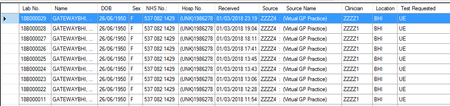
ContributionsMost RecentMost LikesSolutionsCreating Table Checkpoint - have an option to ignore specific cells Often the grids I am looking at have variable data in some of the cells ( e.g. date and time). I would like an option to ignore specific cells that I select. I would also like an option to apply a mask to specific cells :- e.g. mask for the date yyyy-mm-dd or yy/mm/dd etc Re: Name mapping Thanks useful food for thought. Name mapping Hi, I am looking for guidance on Name Mapping. I am relatively new to TestComplete and wanted to gather ideas about what forum users consider the best approach to creating the Name Mapping. Is it best to allow Alias and Name mapped objects to be automatically generated ? How do I prevent incredibly long aliases from being generated? Do I populate the Name mapping area with all the objects in my application before starting to script? All ideas around this topic will be most gratefully received SolvedDEBUGGING When debugging and I get to a breakpoint I want to be able to :- add lines of code to the script I am running. add checkpoints to the script I am running This would improve productivity immensely. It is possible in other test automation software(TestPartner) and I am surprised it is not standard in TestComplete Re: TestComplete VBA scripting - I want to variablise checking table checkpoints Thanks for the idea but I wanted something simple so I will stick with the case statement. Cheers Re: TestComplete VBA scripting - I want to variablise checking table checkpoints There is Eval statement in vbscript but this soution did not work for me. Thanks fro trying TestComplete VBA scripting - I want to variablise checking table checkpoints I have 8 Table Checkpoints( as the code below shows) I would like to replace this clumsy Select Case End Select with one elegant statement. I would like to replace the number in the name of the checkpoint with a variable. e.g. BT_AT_01_Chk_3 becomes BT_AT_01_Chk_varRequestCount I have been unable to bend the VBA code to my will. Any ideas/help much appreciated. ~~~~~~~~~~~~~~~~~~~~~~~~~~~~~~~~~~~~~~~~~~~~~~~~~~~~~~~~~~ For varRequestCount = 1 to 8 select case varRequestCount case 1 Call Tables.BT_AT_01_Chk_1.Check case 2 Call Tables.BT_AT_01_Chk_2.Check case 3 Call Tables.BT_AT_01_Chk_3.Check case 4 Call Tables.BT_AT_01_Chk_4.Check case 5 Call Tables.BT_AT_01_Chk_5.Check case 6 Call Tables.BT_AT_01_Chk_6.Check case 7 Call Tables.BT_AT_01_Chk_7.Check case 8 Call Tables.BT_AT_01_Chk_8.Check case else msgbox " Invalid Request Count: " & varRequestCount end select next Re: Searching for Text in a Windows ListView Thanks for the help and suggestions. You were right it is a GRID not a LIST But it is not a standard Grid and I had to add the classname to the Object Mapping Properties of the Project before it was recognised as a Grid. The classname was DataGridViewRichTextBox.SelectDataGridView added under the tree Microsoft Controls WinForms DataGridView I am now able to use the methods I would expect with a Grid. Hooray. Cheers Searching for Text in a Windows ListView I am using keyword tests. I am running a Windows App. I have a List and I want to search for a specific Lab No e.g. 18B000025. Can anybody suggest a .Method I can use. I have trawled through the list to no avail SolvedRe: I want to run multiple keyword tests in a certain order. Thanks Just what I needed