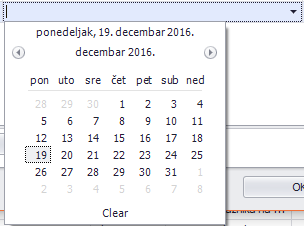
ContributionsMost RecentMost LikesSolutionsRe: MS Word automation and getting to the objects Oh, I kudosed it immediately! How do I mark it as the answer? Re: MS Word automation and getting to the objects Worked like a charm! I owe you a drink!:smileyhappy: Re: MS Word automation and getting to the objects Thank you HKosova! Adding the ".Item()" made my function work. Here is the final version: function myFunc (){ var objWordApplication = Sys.OleObject("Word.Application"); objWordApplication.Documents.Open('C:\InvoiceLatTemplate.doc'); //objWordApplication.Visible = true; var WordDoc = objWordApplication.ActiveDocument; var myVariable = WordDoc.Variables.Item("Group").Name; var myVariable1 = WordDoc.Variables.Item("Group").Value; Log.Message(myVariable) Log.Message(myVariable1) } Both name and value are logged properly. One final question: is there a way to iterate through all the variables in a Word file? I have that function that itterates in VBA, but obviously TC script and VBA are not the same... Re: MS Word automation and getting to the objects I have a piece of VBA code that iterates through all the variables in a document and prints them. I use it to check if I've placed all the variables into my Word document. Private Sub ListAllVariables() Dim myVariable As Variable For Each myVariable In ThisDocument.Variables Debug.Print myVariable.Name & " : " & myVariable.Value Next End Sub How can I implement this in my TC function? I know how to iterate through arrays and stuff in Javascript, but how can I iterate something I don't have access to? Re: MS Word automation and getting to the objects Note with the enable visibility option (second one) doesn't work for me. I'v tried it earlier. I get the same error. As for the first one, I've tried implementing Sys.Process("Winword").Window("Shell_TrayWnd").Activate(); I'm not sure what this Shell_TrayWnd is. This is the error I get after I insert the above line into my code. Cannot obtain the window with the window class 'Shell_TrayWnd', window caption '*' and index -1. See Additional Information for details. 9:31:30 Normal Re: MS Word automation and getting to the objects Hi, tristaanogre. Sorry for the late reply, I wasn't in my office during the weekend. After implementing the line that opens the document I got a different error. TypeError WordDoc.Variables is not a function Error location: Unit: "HR\HR SmartTemplates\Script\Unit1" Line: 8 Column: 26. Any hints on what this might be? Re: MS Word automation and getting to the objects Hi all. Sorry for bringing this topic from the dead, but I'm having kinda the same problems like the original poster. There's an awesome answer on how to manipulate document content, but what I'm interested in is reading variables from a .doc file added using VBA. I have a function that adds variables to a Word file Private Sub AddVariable() ThisDocument.Variables.Add "Group", "Group" End Sub So, I have a variable named Group that has a value Group. It's stupid, I know, but just as an example. I would like to use TC and read the value of the variable Group. The document is open at the same time as TC, it's in windows' processes. From what I read here (and oh similar topics), this is the function I've come up with in TC. function myFunc (){ var objWordApplication = Sys.OleObject("Word.Application"); objWordApplication.Visible = true; var WordDoc= objWordApplication.ActiveDocument; var myVariable = WordDoc.Variables("Group").Value; Log.Message(myVariable) } This doesn't work. When I type „WordDoc.“ , there is no intellisense after the dot. As if there is no Variables property. Also, the error i get is: JavaScript runtime error Cannot read property 'Variables' of undefined. So, I'm kinda stuck. I could really use some help! Re: DevXpress dateedit calendar Hi, Colin. Tnx for the reply. Colin_McCrae wrote: The two things I would suggest you look into first .... 1. Are the controls being recognised correctly if object if you object spy them? ie. They has all the relevant property data, fields and methods present? It looks like the actual calendar is working OK. (It clicks the cell based on value) The error is on the DateEdit field? I'm guessing the calendar populates the value you select into that field? I'd suspect it's that that's the problem here ... I believe TC recognizes everything in order. Once you manually click the drop down menu and pick a date, that date will populate the field you originally clicked. Like this: My problem is that TC cannot reproduce that field population. It doesn't get that there is a calendar there once you click the little arrow on the right. 2. The "hint" before your error line suggests you have object recognition problems (with the edit field, not the calendar itself). As your date edit field is not being populated, it could be that whatever properties you used to map it are not staying consistent at run rime. I forgot to include the hint text: Failed to find the exact match for the test object: NameMapping.Sys.Client.PropertiesForm.layoutControlProperties.tabControlP.tabPageDocAttr.layoutControlDocAttr.gridControlAttr.DateEdit Hint: A similar object has been found – see the Picture tab. Consider updating the identification properties to use the similar object: Property Mapping Value Found Action ✓ ClrFullClassName DevExpress.XtraEditors.DateEdit DevExpress.XtraEditors.DateEdit ⓧ WndCaption 2018-05-18 Update View identification properties in the Name Mapping editor I'm not sure what this August 18th is, though... Finally, as this is a date field, I reckon you'll have more work ahead here. Have you already parameterised it? As obviously, dates in December won't work in January. Record and playback, without converting at least parts of it to parameters, seldom works for calendars. Parametrisation hasn't been mentioned in the training video so far. I'm not sure what you mean by this so I'm afraid I don't know what to answer to this question... DevXpress dateedit calendar Hi people. I'm quite new to TestComplete, I'm still going through TestComplete's on-demand video trainings and I've hit my first snag. One of many more to come, probably. I'm having problems testing this: It's a date property on our document management desktop application. It's written in .NET, using DevXpress. This in particular is DateEdit. On top of that, it's and DateEdit repository item from DevExpress. From a user standpoint it's a simple drop down where a little calendar appears and I can pick a date. TestComplete is having problems when I run my test. It doesn't detect this pop-up calendar. It only detects a click on certain coordinates, but no calendar. This is my test: and my log: I went around and tried to add that particular item to the Object mapping list. I grabbed the calendar itself. TestComplete's Object spy recognized it as VistaDateEditCalendar, but it still doesn't detect that it's actually a calendar. If I grab the combo-box itself, I get WindowsForms10.Window.b.app.0.141b42a_r39_ad1. But event then - no calendar recognition... This exact same calendar appears on several more places in our apps and I could really use any input you might have. Thanks.