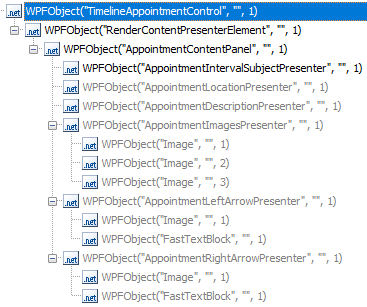
ContributionsMost RecentMost LikesSolutionsTestComplete support .NET8 TestComplete support .NET8 Re: DevExpress.Xpf.Scheduling.Visual.TimelineAppointmentControl Hi Sonya, I have created a workaround using the parent object that is still our own code to get our tests running again and to get test results. Let’s say: Both are not to my satisfaction. Regards Thomas Re: DevExpress.Xpf.Scheduling.Visual.TimelineAppointmentControl Hi Marsha, Hi Alex, Thank you for your feedback. I have tried all of it before asking the community. I think the problem is, that it is a native DevEx Control that shall be used ‚as is‘ to save time. Doesn’t seem to be a common Control but maybe someone here had the same problem before. Regards Thomas DevExpress.Xpf.Scheduling.Visual.TimelineAppointmentControl Hi, Does anyone know where to find the grip handels in the object tree? The Appointment*ArrowPresenter move the whole object but i need to rezise it. Our DEV-Department tried Snoop but couldn’t find it too. Thank You in advance Thomas SolvedRe: QAComplete and test run. Gap in test execution Hi, are you using TestExecute 12.60? Re: QAComplete and test run. Gap in test execution Hi, yesterday me and a coworker where able to see this in Testcomplete: We have an Onstop Event which is just the logoff from our application. The Test ran and we could see the click on the logoff button. Our application went into “no response”. This is where the test are for. Our DEV people are searching for an error in our application. Anyway after several minutes our application window disappears but we could still see the Testexecute widget for about 5 minutes. When the Testexecute widget disappears too as well as Testcomplete. We restarted Testcomplete and where was no log of the Test. Where even were no Windows logs of the crash of our application or Testcomplete/Testexecute. So Testcomplete/Testexecute could as well have crashed first and took our application with it. Additionally I’ve found false positive tests in QAComplete. The result is shown as passed but if we look into the results, the log stops in the middle of the test and the other test steps are just missing without any error. So I think Testexecute crashes and QAC don’t get it. Did you open a support Ticket? It might help Smartbear. Regards Tom Re: QAComplete and test run. Gap in test execution Hi azwip, our problem startet right after a windows 10 update on our test clients. Re: QAComplete and test run. Gap in test execution Hi azwip, I have a support ticket for something similar. When you click in QAComplete on the test without a log, is the actual result: "TestComplete (TestExecute) was terminated for an unknown reason."? I could find the logs on my test client, QAC just didn't get them from there. Same at yours? Regards, Tom Re: Playback time is doubled after windows update 10.0.17134 Updated one of my clients to TE 14. The QAComplete Server Can't find TE any more. Still nothing from Support. Re: Playback time is doubled after windows update 10.0.17134 Hi anupamchampati, I have a similar problem. Update to win10pro 1803. Runtime went up from 16 to 20 hours. Update to 1809 didn't help. Since i use QAComplet for nightruns i have a support case for QAC. My Testexecute version is 12.60. The 1803 update broke the Sentinel-LDK license manager on on our testclients so Testexecute wouldn't find a license. Regards, Tom