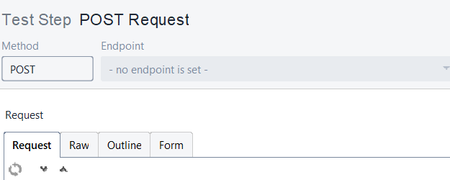
ContributionsMost RecentMost LikesSolutionsJMS Test Step usage for Multiple users Hi, We have just recently migrated from RaedyAPI v2.6.0 to v3.9.1. the biggest difference was HermesJMS now not being available on new version. So that means we have to change our configurations for JMS. We use IBM WebSphereMQ. So I ha d to use the desired jar files, create Connection Factory in WMQ and then able to execute the JMS step. Question is, if multiple users want to execute, do we have to install IBM WMQ and then create Connection factories on those machines as well to run these JMS steps or is there any easier way to handle this scenario as we have around 20 users? So again in future if any changes desired like MQ changes, then do we have to ask all 20 users to modify their respective MQ settings/Connection Factories? Reards, Arup JMS Endpoint is not editable Hi, We recently have migrated from v2.6.0 to v3.9.1 which means HermesJMS can't be used anymore in our existing scripts. So, I am trying to create new manual JMS steps. I am creating using a REST resource, say using localhost, and then MQ details and creating a test step. However the test step which gets created always have no endpoint URL and it's non-editable. I am unsure how to fix this. Please help. PFA screenshot. Regards, Arup SolvedPhantomJS integration with ReadyAPI v3.9.1 Hi, We have just recently migrated from ReadyAPI v2.6.0 to v3.9.1. We had PhantomJS integrated with Selenium Standalone jars to test few headless browsers. This sis till working all right for v2.6.0 but it's failing with v3.9.1. Smartbear suggested that with the upgraded Java libraries, PhantomJS will not work anymore. Any suggestions please in terms what other headless browser testing options we can utilize instead of PhantomJS in ReadyAPI. Any pointers are appreciated. Regards, Arup SolvedHow to handle bulleted points in Response as Contains assertions Hi, One of Responses has texts in bullted points as "<![CDATA[<ul><li>arup4</li><li>arup3</li><li>arup2</li><li>Arup1</li></ul>]]>" Above, arup4 arup3 arup2 Arup1 are technical texts but in bulleted points. I am trying to match these values via Groovy scripting. How do I achieve that? If i copy paste everything & compare the response (stored in varaiable), it doesn't match because of bulleted points values as ![CDATA[<ul><li>, etc. I am using SOAPUI Pro 5.0.2. If not groovy & something from tool also that will do. Please suggest/guide. Re: Command Line Execution Thanks much for your reply. So in my current condition, my teammates can't execute these test cases considering they have free version only? Not even in batch file run? Command Line Execution Hello, I have used Data Driven Testing concept (excel based framework using DataSource & DataSource Loop steps) in my project using SOAPUI Pro 5.1.0. My teammates don't have Pro license on their machines, but I have, hence I was able to design the test cases. Now the question is: If they want to do the batch file/command prompt execution using TestRunner.bat, will the test cases get executed & give proper output/response (because they are using free versions which doesn't support DataSource & DataSource Loop )? Please let me know the solutions. Regards, Arup SolvedRe: How to remove auto populated fields in SOAPUI Pro request? Thank You very much. It works like I expected. One question. For Web Services which work fine, shall I stick to Form or Source? In other words, if I keep Source, can I expect unexpected Responses in future or it may impact somewhere? Re: How to remove auto populated fields in SOAPUI Pro request? Below is my Test Step (Request). <soapenv:Envelope> <soapenv:Header/> <soapenv:Body> <xyz> <Amount>50000</Amount> </xyz> </soapenv:Body> </soapenv:Envelope> It gives proper response. Then I save the project, close the Test Step & reopen again. Below is the Request. <soapenv:Envelope> <soapenv:Header/> <soapenv:Body> <xyz> <Amount>50000</Amount> <Amount1/> <Amount2/> <Amount3/> </xyz> </soapenv:Body> </soapenv:Envelope> Because of new tags like <Amount1/>, <Amount2/> & <Amount3/>, which gets auto populated every time, the Test Step fails this time. Ideally only <Amount> should come in the Request like I saved earlier. WSDL has <Amount1>, <Amount2> & <Amount3> tags as MinOccurs=1 but Dev team are saying these are not mandatory fields. I want only <Amount> to come in the request all the time. How to remove auto populated fields in SOAPUI Pro request? Hi, My request always comes with auto populated fields after I save. For example. If I execute the below request, it works fine. <abc>000012</abc> Once I save, close & reopen the Test Step again, it comes like this <123/><456/><789/><abc>000012</abc> So the Step fails with errors. I checked the WSDL. Fields 123, 456 & 789, like mentioned above, have MinOccurs=1 but Dev team are saying these are not mandatory fields & they can’t change schematics of the services. Please suggest how best to manage this scenario. I am using SOAPUI Pro 5.1.0. Solved