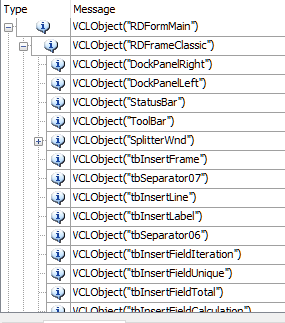
ContributionsMost RecentMost LikesSolutionsRe: VCLObject not recognized in virtual machine Windows 7 and 10 Nobody has any ideas? :smileyfrustrated: Re: VCLObject not recognized in virtual machine Windows 7 and 10 Thank you for your reply :) But, all TE extensions are already checked... VCLObject not recognized in virtual machine Windows 7 and 10 Hi, I am under the version 12 of TC and TE. I have a WPF application and I open a modal coded in Delphi, On my computer, components delphi are always found but it is not necessarily the case on the slaves machines. I coded a method to retrieve the structure of my modal delphi. I do not have the same structure between my PC (Windows 10) and the virtuals machines (Windows 7 and Windows 10). On Windows 10, VCLObject is recognized as a Window and all objects are not detected Do you have a solution for all components to be detected on my virtual machines? Any help would be much appreciated :smileyhappy: Thank's, Melody Re: Run TestExecute from a PowerShell script Thank you for your reply ! :) PowerShell is not running in Administrator mode. I just did a launch of my test series with powershell launched as an administrator. I'm waiting for it to finish to see if it's good. Run TestExecute from a PowerShell script Hi, I'm on a Windows 10 machine with TestExecute 12. I want to run a series of tests by calling TestExecute from PowerShell and I wait until it is finished to continue in my script. I need TE to run as an administrator to execute tests under Edge. I tried : 1) Start -wait -verb runas $sTestExecutePath $sParameters Start : to execute TE -wait : to wait for TE to be closed -verb runas : to start TE as an administrator $sTestExecutePath = "C:\Program Files (x86)\SmartBear\TestExecute 12\Bin\TestExecute.exe" $sParameters : list of parameters for TE = $sSlaveSolutionPath + ' /project:"' + $sProjectName + '" /LaunchConfigFile:"' + $sFileXml + '" /ExportLog:"'+ $sExitPathLog + '" /SilentMode:true /DoNotShowLog:true /run /exit' 2) & cmd /c $sParameters -wait -verb runas & cmd : I run the command prompt $sParameters : list of parameters for TE = ' ' + $sTestExecutePath + ' ' + $sSlaveSolutionPath + ' /run /project:"' + $sProjectName + '" /LaunchConfigFile:"' + $sFileXml + '" /exit /SilentMode:true /ExportLog:"'+ $sExitPathLog + '" /DoNotShowLog:true ' -wait : to wait for TE to be closed -verb runas : to start command prompt as an administrator 3) & cmd /c "$sParameters" -wait & cmd : I run the command prompt $sTestExecutePath = TE shortcut path with the "Run as Administrator" property checked $sParameters : list of parameters for TE = 'start /wait "TestExecute" ' + $sTestExecutePath + ' ' + $sSlaveSolutionPath + ' /project:"' + $sProjectName + '" /LaunchConfigFile:"' + $sFileXml + '" /SilentMode:true /ExportLog:"'+ $sExitPathLog + '" /DoNotShowLog:true /run /exit ' -wait : to wait for TE to be closed NB : /LaunchConfigFile = Custom setting. In all three cases, my series is launched. When it is finished, TE closes but the process remains active. So I am stuck in my PowerShell script. For my script to continue, I have to kill the TE process by hand. Any help would be much appreciated :) Thank's, Melody Slave machine - Search for components Delphi fails Hi, I am under the version 11 of TC and TE. I have a WPF application and I open a modal coded in Delphi, On my computer, components delphi are always found but it is not necessarily the case on the slave machine. I tried the methods Find, FindEx, Wait, WaitChild (under ObjectIdentifier, Name), unsuccessfully on the slave machine, while components are present. Have you a solution for the success of search for my components delphi on my computer and the slave machine? Any help would be much appreciated :) Thank's, Melody