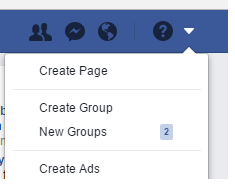
ContributionsMost RecentMost LikesSolutionsRe: Issue in name mapping Thanks for the reply. In my previous post I have mentioned the steps I follow to map objects. Is that not the correct way of mapping objects? Please find below the sample of the issue i faced : Aliases.AppName.HwndSource_ShellWindow.ShellWindow.bv.ScrollViewer.ItemsControl Aliases.AppName.HwndSource_ShellWindow.ShellWindow.bv.ScrollViewer2.ItemsControl The Line 1 was mapped intially. I was using it in code and it was working fine for couple of months (for few application releases) Then one day one of my test failed. Then when checked the object it has been modified to as mentioned in Line 2 Re: Issue in name mapping Thanks for the replies. You have mentioned about auto-mapping. I am not sure what that is. I can explain how i did mapping here. I used the object spy and select the desired object , then use "Highlight the object in object tree" option. Once am able to view the object in object browser , i right click on the object and get the mapped name (it has the alias ) . I use this mapped name in my code. Assign a variable to the mapped name and use that vairable. I am doing this for mapping all the objects. I have run tests for close to 6 months using these mapped name ( variable). 95%-97% of the mapped name dont change. Its working fine. The remaining % changes for some reason which I dont know. Issue in name mapping Using the object spy , I got a mapped name for an object. Say for example the mapped name looks like Aliases.abcd.xyz.window.Item I ran the test cases using this mapped name it all worked fine. Now after couple of days if I run it now it failed because the mapped name got changed . It got changed to like Aliases.abcd.xyz.window2.Item This has happened for couple of objects over a period of time. I raised this concern with my team and asked the developers if they have changed any of these objects. They confirmed that they didn't touch any of these objects. Can someone help me find out the reason as to why the mapped name gets changed for some of the objects ? I need to find a way to stop this , as this affects my test results Re: Issue in name mapping Thanks for the reply. I will try doing that. Re: Issue in name mapping when I tried to record and playback , the script generated had the object selected as below obj = myApp.Item.Item.Item.Item.Item obj.click() It has mapped the object as item ,item etc. and had performed the click action. Re: Issue in name mapping m_essaid I tried that too. Not useful though Re: Issue in name mapping RajeshVV Can you pls let me know where I can find the "Show Invisible Objects" Re: Issue in name mapping I just tried the one that you have mentioned. No luck. Its not able to map the item Issue in name mapping I am using Object Spy to find items in an option which is similar to dropdown as shown below. If I click on the tiny arrow near the ? icon (refer below picture) , it will expand and show the options like "Create page", "Create group" etc. Once I unfocus it will collapse. Now am trying to map an item from the available options (for ex : Create Group).But the object spy is not able to map it. So I tried using Point and fix (Shift+ctrl+A) from the Object spy, its able to get the properties of the item but not able to map the same in the object tree. Is List ( Python) supported in Testcomplete Am using testcomplete for desktop automation. Using Python for scripting. I am trying to create a list and add elements to it. But it is not working. For ex if i create an empty list as below , there is no auto complete suggestion list = [] list. ----> No autocomplete suggestion So i tried like below list.append ["hello"] Its throwing error. Can anyone let me know if list is supported in testcomplete