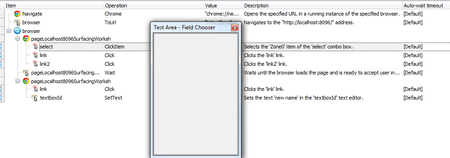
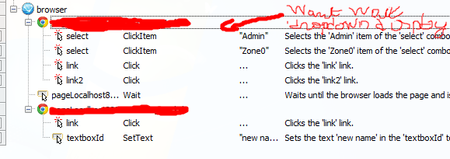
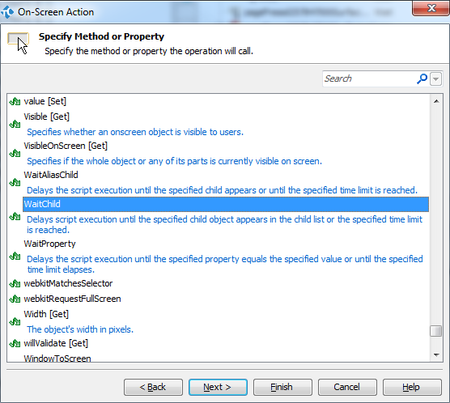
ContributionsMost RecentMost LikesSolutionsxpath selector in visual mode I would like to be able to use an xpath selector in visual mode and not only in script mode. Xpath selector is easy to find even for non devloppers ( can find it with chrome devlopper or filezilla just with a righ click on the element we want to target) and it is more understandable for devs than the testcomplete tree for indicatings dom parts. use xpath selector in visual mode I am using the recorder for having a first plan that I then adjust to have what I want. I saw there is a good selector that ask to use put mouse on the wanted item. I would like that there is a way to select my item with the xpath way without leaving the visual mode. Do you know if I can do this? Re: Recorder result Adding a waiting for the displaying of a dropdown solution was to add before an action with same target and to double click on operation for setting action " waitChild" Re: Recorder result Adding a waiting for the displaying of a dropdown T Tank you for your answere but When I click on firld Choose , that shows me an empty box I know I can wait the number of ms I want but my waiting time is fluctuating and I would like to don't wait a long time for nothing. Can you help me? Recorder result Adding a waiting for the displaying of a dropdown Sorry If my question is stupid I am starting with TestComplete I am using the recorder of the testComplete Software I would like to adjust the result for doing an end to end website test. But before that I have an issue when I try to replay the record result: I have a dropdown list that takes few seconds before be displayed. On picture it is the Dropdown list where the item 'Admin' has to be selected I saw ther is a Delay method in tools, and it woeks is i put this action but I don't see a WaitFor method like I saw in Tother softs Please Do you know how to do it and could you help me? Solved