eykxasRegular ContributorJoined 9 years ago178 Posts64 LikesLikes received10 SolutionsView All Badges
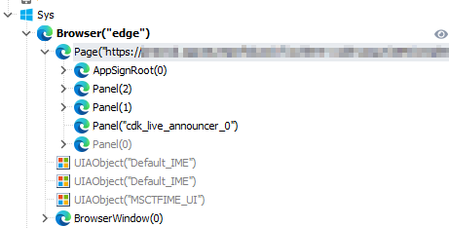
ContributionsMost RecentMost LikesSolutionsRe: Hover Button... Hi ! You can use the HoverMouse action on the parent object first, then you will able to click on the button. https://support.smartbear.com/testcomplete/docs/reference/test-objects/members/onscreen/hovermouse-action-onscreen-object.html Re: Upgrade to Test Complete 15.79.5.7 I have the same issue. I can't link my Test case from Devops because of this error (rebinding devops change nothing) : Re: Object Brower : annoying behavior That's not how our project works. It doesn't use a lot of built-in functions of TC, instead, the project relying on a custom set of tools (coded in javascript). Directly "mapped" onto the DOM structure exposing by chromium engine. This DOM structure is not the same in firefox engine, that means all of our Xpath and associated classes need to be modified or rewrited. And, the performance of firefox is way too slow. (Plus, I forgot to mention that our project is not approved for firefox). Re: Object Brower : annoying behavior That's precisely the problem. It appeared with version 140 of the engine. Unfortunately, my company enforces extremely strict security rules, and I can't revert to a previous version (it's strictly forbidden by internal policy). I'm stuck and need to find a workaround. I tried using Firefox, but that would require rebuilding the entire project, which isn't feasible (not to mention the significant performance drop). I'll open a ticket, meanwhile, if you have any idea... Object Brower : annoying behavior Hi everyone ! I have a very annoying issue. Sometimes, the object browser load the DOM in the same manner than "legacy features". The normal behavior is this : Custom Angular components are properly detected, like "AppSignRoot" in this example. But sometimes, the tree look like this : Custom components are not properly detected. Here, the "AppSignRoot" node is "Panel(4)". If I hit the refresh button, everything gets back to normal like the first screenshot. But, calling the Refresh() method on the page object or browser object (in my script and / or test item) does nothing. The DOM is randomly not detected properly. And I'm out of solutions. Any idea ? Re: Don't update Chome to v140 In my case, the organisation pushes every updates... for "security reasons"... and unfortunately, it's not negotiable. (even for one computer...) So, I have no choice to deal with "unstable" versions. Re: Don't update Chome to v140 Hi ! I think many of us know this. But in my case, browser updates are managed by the company and I have no way to downgrade them. Re: Don't update Chome to v140 The issue seems random. Sometimes the objects are detected properly in the object browser, sometimes not. For example, an angular component using the tag "app-root", sometimes it's detected as AppRoot(0), sometimes as Panel(0)... Re: getting "FindAll is not a function" error I don't understand the issue here. He wants to get the list of all mat-chip-row and then doing something (click on the [X] button). With FindElements (and the proper xpath) he gets an already populated array, and just need to iterate through. That's what I'm doing in my projet, and it works fine. Without needing NameMapping. Re: getting "FindAll is not a function" error Hello! I'm also working on an Angular project. For this type of project, I exclusively use XPath to retrieve my objects. In your example, here's what I would do: let ar = page.FindElements("//div[@role='presentation']//mat-chip-row"); //page is your parent object, this xpath returns an array of all the mat-chip-row inside your div.