jpnjordanOccasional ContributorJoined 9 years ago11 Posts1 LikeLikes received2 SolutionsView All Badges
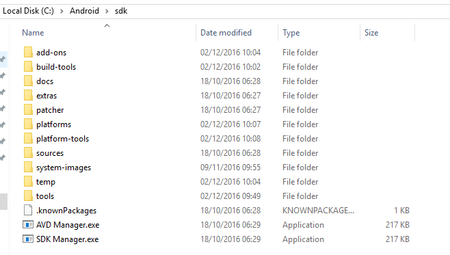
ContributionsMost RecentMost LikesSolutionsRe: TestExecute, CMD & UAC I've given the solution stated there a try, but unfortunately it didn't work. I think the issue is that it doesn't recognise that TestExecute has closed, so CMD waits for it. Edit: Thought I'd add the contents of the new bat file, in case I didn't understand the solution. "c:\Program Files (x86)\SmartBear\TestExecute 12\bin\TestExecute.exe" "C:\TestComplete\Automation.pjs" /el:"C:\TestComplete\CanaryExport.mht" /r /project:"Canary" /exit /DoNotShowLog /SilentMode taskkill /f /im cmd.exe TestExecute, CMD & UAC Hi All, I have an interesting issue I thought I'd reach out to the community for help with. My setup: UAC is completely disabled (see 1.png) A VB.NET ClickOnce console application monitors a folder for a indication of a new compile of our desktop software. When a compile occurs, it grabs the latest copy of the TC project from TFS, installs the compile and calls a batch file. The batch file contains the TestExecute command line, which instructs TETestExecute to run the project. Once the testing finishes and TestExecute closes, the CMD window doesn't close...which means the ClickOnce application can't continue and I need to intervene (which I'm trying to avoid) Enabling UAC does allow the CMD window to close, but then I can't install our software (TE doesn't recognise the objects). Disabling UAC again allows TE to recognise the objects, but then the CMD window doesn't close. Quite the pickle. Example batch file: "c:\Program Files (x86)\SmartBear\TestExecute 12\bin\TestExecute.exe" "C:\TestComplete\Automation.pjs" /el:"C:\TestComplete\CanaryExport.mht" /r /project:"Canary" /exit /DoNotShowLog /SilentMode Again, I've tried adding "exit" or "exit 0" to the end of the batch file but that's not helped. So, I'm a little bit stuck. I'll give SmartBear Support a try if no-one's had similar experiences, but it hits me as more of an environment issue. Cheers 12.40 Crash on project load Both x86 & x64 versions load, but when trying to load a project from TFS both crash x86: Exception address: 0x159B11C4 Exception code: 0xC0000005 Report number in session: 1 Session id: {BBDBFC16-9404-466A-ACA7-E5FD480E3075} Session start time: 10/10/2017 10:34:47 AM Session duration: 00:00:18 Product name: TestComplete Product version: 12 Command line: "C:\Program Files (x86)\SmartBear\TestComplete 12\Bin\TestComplete.exe" Re: Failed to find the Android SDK tool "\aapt.exe" As usual, I solved the issue shortly after asking for help. Funny how that happens... Reinstalling TestComplete solved the issue. Failed to find the Android SDK tool "\aapt.exe" Morning all, I'm struggling to install/launch an Android app from within TestComplete. The app has been instrumented using TC, but I don't think that this is the issue. The error is (as the title states): Failed to find the Android SDK tool "\aapt.exe" One potential issue is I haven't set the Android SDK path correctly. I have it set to C:\Android\sdk: The aapt.exe should be in C:\Android\sdk\build-tools\22.0.1 - This version also matches the device version, if that makes any difference. What path is the application looking for? Have I got this wrong?Has anyone experienced this issue before? Do I need to copy aapt.exe somewhere? Any/all help would be much appreciated. Jason SolvedRe: Upgrading 11 -> 12 error Strange... Adding the existing network suite worked fine and I haven't experienced any errors yet. Upgrading 11 -> 12 error Hi All, I'm currently experiencing this error when upgrading from 11.31 to 12.0.122.7. After backing up & converting, I get this: Cannot open C:\[My Network Path]\NetworkSuite.tcNetSuite file. Reason: The operation completed successfully. Resulting in the following in v12: Has anyone else experienced this? Should I be worried about the stability of the new project? Many thanks for any insights SolvedRe: Map object from screen Hi Linda, Does your toolbar have the "wItems" property? Should be in the Extended group whilst in Advanced View. Jason Re: Database CheckPoint Hi, Have you tried creating two checkpoints? One to be run when the test starts (when the value is 0) and one to be run when the test completes (when the value is -1)? J Re: Python - Code Completion Ha - turned out to be an issue with my scripts. In case anyone else encounters this issue: Check your referenced script for any errors...thoroughly... :smileylol: