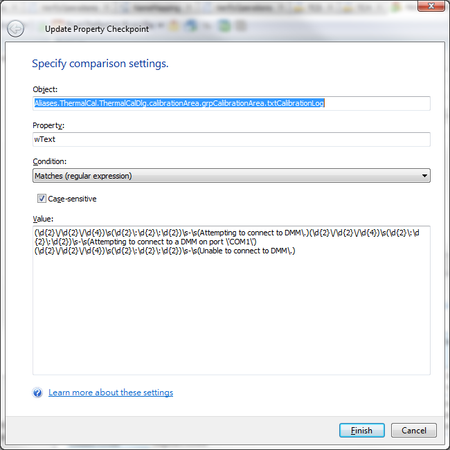
ContributionsMost RecentMost LikesSolutionsRe: How to specify a regular expression in a property checkpoint in a keyword test The below is when defining/updating the checkpoint Re: How to specify a regular expression in a property checkpoint in a keyword test baxatob I used the online tool you recommended and the expression was validated successfully. The problem though is when I plug it into TestComplete for some reason does not like it. I tried to escape the ':' and ''' (single quote) as well for the string under test but no success. Using the online tool... This expression: (\d{2}\/\d{2}\/\d{4})\s(\d{2}\:\d{2}\:\d{2})\s-\s(Attempting to connect to DMM\.) (\d{2}\/\d{2}\/\d{4})\s(\d{2}\:\d{2}\:\d{2})\s-\s(Attempting to connect to a DMM on port \'COM1\') (\d{2}\/\d{2}\/\d{4})\s(\d{2}\:\d{2}\:\d{2})\s-\s(Unable to connect to DMM\.) Matches the following: 09/09/2016 11:25:31 - Attempting to connect to DMM. 09/09/2016 11:25:31 - Attempting to connect to a DMM on port 'COM1' 09/09/2016 11:25:32 - Unable to connect to DMM. Not sure what else to do. Re: How to specify a regular expression in a property checkpoint in a keyword test Thank you NisHera and baxatob for your input. I have tried your suggestions but for some reason still not working. I will keep at it and if need any advice I will post back. Thanks again!! Re: How to specify a regular expression in a property checkpoint in a keyword test Thank you for your reply. I looked at that table initially and that is how I came up with the posted expression; however, something is wrong obviously. I was in the hopes that someone here could identify the issue with it. Again, thank you for any light someone can shed on it. How to specify a regular expression in a property checkpoint in a keyword test I need to check the following text displayed in a textbox. 08/30/2016 16:31:48 - Attempting to connect to DMM. I need to express the date/time stamp in a regular expression so that it accounts for the new date/time stamp (i.e., if the test is run tomorrow). I am having issues with the syntax. As of now, this is what I have but not working. Again, I need to express this in a keyword test. \d\d/\d\d/\d\d/\d\d \d\d:\d\d:\d\d - Attempting to connect to DMM. Any help will be much appreciated. Miguel Re: Call using USEUNIT in vbscript does not work Thank you all for responding. Colin, You are right on target. That was the issue. function name was SelectRow(row) which resided in script name or unit by the same name SelectRow Therefore statement below was throwing an exception. SelectRow(row) 'This throws exception SelectRow.SelectRow(row) 'This does not throw exception I am new to TC so I am sampling the application and its potential. I realize a sound structuring of artifacts and good naming convention is as important. To this end, the case above could have been avoided by carefully naming your items. Thanks again and sorry for the trouble. Re: Call using USEUNIT in vbscript does not work Correction needs to be made. Method 2 works; however, Method 1 does not. Call using USEUNIT in vbscript does not work I have function1(param1) defined in script Unit1 and I want to call function1(param1) from script Unit2. Thus, I have done the following according to documentation: 'In Unit2 script, did ''''''''''''''''''''''''''''''''''''''''''''''''''''''''''''' 'USEUNIT Unit1 function1(param1) 'Method 1 Unit1.function1(param1) 'Method 2 ''''''''''''''''''''''''''''''''''''''''''''''''''''''''''''''''''''''''''''''''''''''''' None of the above methods worked. Am I missing something? Any input will be greatly appreciated. SolvedRe: Can I pass the object textfield Name as a parameter How would one do it using vbscript? I don't think there is such Eval() function. Thanks! Re: Can I pass the object textfield Name as a parameter Thank you for your response. It is not clear to me how one would go about doing something as below: Aliases.PatternID.GemCat.txtPatterName and Aliases.GemCat.PatternID.txtSAPInvestigationDescription Please note that I still have to hard-code for each text field. What if I want to do the following: param1 = "txtPatterName" Aliases.PatternID.GemCat.param1 (this is what doesn't work in TC. How would you do something like that?) or approaches 2, 3, and 4 are more conducive for something like that. I would like to concatenate the base string (green text) which stays the same and only pass the text field name (blue text).