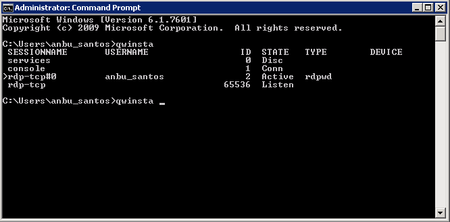
ContributionsMost RecentMost LikesSolutionsRe: How to check if a specific Item on a MenuItem object exist Tks, djadhav. FindChild method worked fine, Find method and Child method worked too. How to check if a specific Item on a MenuItem object exist I'm handling a MenuItem object, but this menu work with permissions filters and sometimes the option i need to interact isn't present on screen. To check if that option exist before send the action to the object, i access the Item in the position expected to be my option by the index and get the Caption property value. If that Caption matches with the option i expect, i send the action (click, selection, ...). I'm looking in the SmartBear Community and Support for other ways, but not succesfully. Anyone can help? C#: //Items(4): Position i expect my option, if the user has permission to see it. var expectedOptionName = "optionX"; var optionText = Menu["PopupMenu"].Items(4).Caption; if(optionText == expectedOptionName) { Menu["PopupMenu"]["Click"](4); } else { Log["Message"]("Option is disabled for this user."); } How to read data from a command prompt window / Reading data from cmd.exe - TC c# script With cmd.exe running, the code below returns the users logged in, read the results and record it in the test log. function functionName() { var p, w, txt, cnt, i, s; p = Sys.Process("cmd"); w = p.Window("ConsoleWindowClass", "*"); w.Keys("qwinsta [Enter]"); txt = w.wText; aqString.ListSeparator = "\r\n"; cnt = aqString.GetListLength(txt); for (i = 0; i < cnt; i++) { s = aqString.GetListItem(txt, i); } }