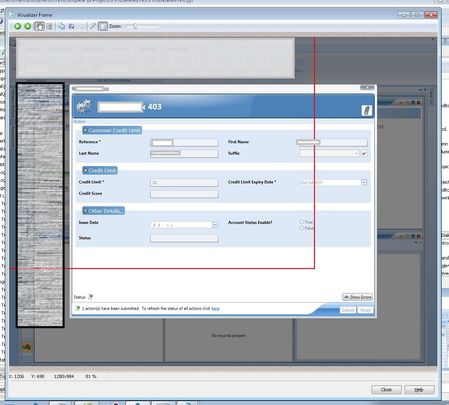
ContributionsMost RecentMost LikesSolutionsRe: When I use "Drag the target to point to the object" the incorrect area highlighted Hi Marsha_R (Apologies for the delay in replying) No its not possible to map to the controls. The Object tree goes to ["workbookRootGrid"]["AQComplexActionDialogView"]["Canvas"] And the controls I need to access (in theory) should be listed in the "Canvas" element but it is not listed there. I highlighted all the other child elements, and they are displaying elements/areas of the dialog I'm not currently interested in eg Action area, and the title. I want to close the dialog. Also there is no keystroke shortcut I can think of. When I use "Drag the target to point to the object" the incorrect area highlighted This is preventing me from closing the popup configuration page (ie the x for close is outside the area). I tried editing the co-ordinates but this is restricted to the border (see screenshot below) This is being done on a ["WorkBookView"]["workbookRootGrid"]["AQComplexActionDialogView"] SolvedDatabase Table Checkpoint configuration pages are not showing tables I'm creating a recorded keyword test and would like to check the database I have setup a Microsoft OLE DB Provider for Oracle Filled in my details and the test Connection was successful Clicked OK on the Data Link Properties filled in the Login and Password in the "Database Table Checkpoint" configuration pages Clicked Next The next page "Select the project whose data will be stored" page is blank I checked with the DB person and they said that the request is refering to user$ (for a user table) this is not allowed it has to be "sys.user" How do I configure this?