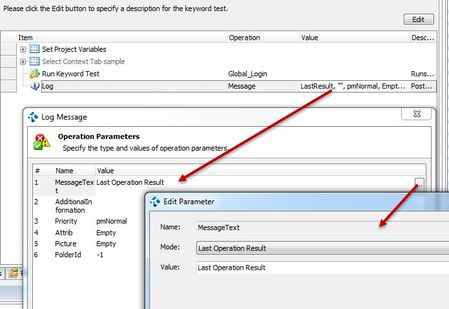
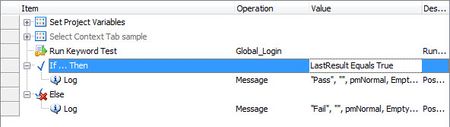
ContributionsMost RecentMost LikesSolutionsRe: Query database with VBScript help please... Thank You, Thank You, Thank You!!! That worked! I figured it was something like that. Unfortunately, VBScript is the one that I am most familiar with, sad to say. :) But I only have basic skills, so still learning. Query database with VBScript help please... Some help would be appreciated please. I am trying to write a VBScript to query a database and return a result to the log, but I am having trouble getting the result back. I am newish to VBScript so not sure what the code needs to be. Here is what I have so far. At Log.Message Qry it is returning a blank value and I am sure there needs to be more in that code, I just don't know what. Also, I am using the TestComplete ADO example, but don't have to if you have an easier way to do it. Eventually, I would feed into the sub the query to be run and it will always only return one value from the database, like get the max number or look up the id# for the customer where name = "ABC corp", etc. Sub DBquery ' Create a query Set Qry = ADO.CreateADOQuery ' Specify the connection string Qry.ConnectionString = "Provider=OraOLEDB.Oracle.1;Password=Qad;Persist Security Info=True;User ID=DBQA;Data Source=FJO" ' Specify the SQL expression Qry.SQL = "SELECT MAX(PCMP.TAX_IDENTIFIER.TAX_ID_NO) FROM PCMP.TAX_IDENTIFIER" ' Execute the query Qry.Open ' Process results and insert data into the test log Qry.First While Not Qry.EOF Log.Message Qry Qry.Next Wend ' Closes the query Qry.Close End Sub SolvedRe: Read from and write to the same Excel file using VBScript Thanks for the suggestions. The suggestions about write permissions got me thinking and it turns out that because I am using the same file in a datadriven loop in the keyword script that calls the script above, to pull data from another tab, that was the issue. I seperated out the tabs and used a different file for the datadriven loop, and now I don't have an issue with read write. Read from and write to the same Excel file using VBScript I am trying to find a solution to the following issue, but what I have found is not working for me so I am not sure what I am missing. I have a VBScript that opens and excel spreadsheet that has a header row of keyword script names, saves that name as a variable and in the next row it has an indicator if that script should be run or not. If the indicator is Y then it uses the name variable to call the keyword test. It loops through these for each test case ID #. TC# Global_Login Global_PrimaryNav_Open Com_Cust_CreateCust Gen1.0 Y Y Y Gen2.0 Y Y Y Cust1.0 N N N What I would like to add to this is that once the script is ran, it changes the indicator to "P" to indicate that the script ran. TC# Global_Login Global_PrimaryNav_Open Com_Cust_CreateCust Gen1.0 P P P Gen2.0 P P P Cust1.0 N N N The problem I am running into is when it saves the file, it creates a new file in my My Documents folder, not to the same file and folder. After looking at this, when the script open's the excel file it is opening it as read only, so it won't save any changes to it. I need to saved to the same file/folder because 1. if the script stops half way through the test cases, I want to have it updated which test cases ran, instead of me doing it manually so I can start where they left off, and 2. I want to use those results later when running a report. I have tried several things suggested in other topics, including SaveAs with the the current file's path, closing the excel file before opening it again to write to it, etc., but they are not working for me. I get that the file is read only, cannot write to readonly, etc. Any help would be appreciated. What am I missing? I know some VBScript and newer to TestComplete, but I am still learning. This is my script. I am using Excel 2007. Sub testSuiteRun(scriptRunType, customerType, runComponentArea) Dim excelApplication, projectPath Dim sheetName 'Open and set Excel objects, spreadsheet, sheet, row count and column count projectPath = Project.Path Set excelApplication = Sys.OleObject("Excel.Application") set book = excelApplication.Workbooks.Open (projectPath & "Test Data\TC_Script_Run.xlsx") excelApplication.Visible = True sheetName = runComponentArea Set sheet = book.Sheets(sheetName) rowCount = sheet.UsedRange.Rows.Count colCount = sheet.UsedRange.Columns.Count tcCount = 1 recordResults = "Y" 'excelApplication.DisplayAlerts = False 'Loop through rows of spreadsheet ignoring the header row For r = 2 To rowCount 'check if active row = run type and customer type If (sheet.Cells(r, 1) = scriptRunType And sheet.Cells(r, 2) = customerType) Then 'Loop through component script columns For c = 4 To colCount 'Set test case name to the header cell (row 1) for active column and the run indicator for active column and row testCaseName = VarToString(sheet.Cells(1, c)) runInd = VarToString(sheet.Cells(r, c)) 'Check if test case name is not blank for active col to eliminate extra blank columns If testCaseName <> "" Then 'check if run indicator is Y and if so then call that component script If runInd = "Y" Then If testCaseName = "Global_PrimaryNav_Open" Then Log.Message(testCaseName) 'Call Eval("KeywordTests." + testCaseName + ".Run(""" + runComponentArea + """)") Else Log.Message(testCaseName) 'Call Eval("KeywordTests." + testCaseName + ".Run") End If If recordResults = "Y" Then sheet.Cells(r, c).Value = "P" book.Save 'book.SaveAs (projectPath & "Test Data\TC_Script_Run.xlsx") End If End If End If Next End If Next 'quit excel excelApplication.Quit excelApplication.DisplayAlerts = True End Sub SolvedRe: Last Operation Result returns blank Ok thanks. I will give this a try if I can't find a way to not have to update the scripts being called. Re: Last Operation Result returns blank Ok i don't see that mentioned in what I have read. The script being called is a keyword test script, not a VBA script, it is looks like this. From what I read here, https://support.smartbear.com/viewarticle/74736/ the Last Operation Result should carry over to the script/keyword that it is called from without adding anything to the keyword that is called. Or maybe I miss it. I would prefer not to have update all of the 50 some keyword tests that we already have being called if that is possible. Re: Last Operation Result returns blank Maybe I don't understand exactly what both of you are asking, or I wasn't clear above but hopefully I can answer. djadhav - In the testSuiteRun Sub code above, I included basically the code that is in the "Using the Return Operation" section in the link you included in your post. It is represented in this code: If Eval("KeywordTests." + testCaseName + ".Run") Then sheet.Cells(r, c) = "P" Else sheet.Cells(r, c) = "F" End If After it plays the script on the If Eval("KeywordTests." + testCaseName + ".Run") Then line, it jumps to the Else step. I don't know if that is what you mean by "Did you include the Return Option.." or not, or is there something else I need to do? If so where would it fit into the testSuiteRun sub script above? joseph_michaud and djadhav - Above is also the script, Test_Run_JG(), that I did in fact try to log the return value, and it returns nothing, it is blank, no True or False, nothing. Here are screenshots again of just a keyword script that I had also tried before posting with calling another keyword script, then logging Last Operation Results. Again, nothing. Re: Last Operation Result returns blank Here is ideally the script that I would use, but when it gets to the if Eval.... to get the results from running the script, the script runs, but it always goes to the else even though the script that was called passed. Sub testSuiteRun(scriptRunType, customerType, runComponentArea) Dim excelApplication, projectPath Dim sheetName 'Open and set Excel objects, spreadsheet, sheet, row count and column count Set excelApplication = Sys.OleObject("Excel.Application") projectPath = Project.Path Set book = excelApplication.Workbooks.Open(projectPath & "Test Data\TC_Script_Run.xlsx") sheetName = runComponentArea Set sheet = book.Sheets(sheetName) rowCount = sheet.UsedRange.Rows.Count colCount = sheet.UsedRange.Columns.Count tcCount = 1 excelApplication.DisplayAlerts = False 'Loop through rows of spreadsheet ignoring the header row For r = 2 To rowCount 'check if active row = run type and customer type If (sheet.Cells(r, 1) = scriptRunType And sheet.Cells(r, 2) = customerType) Then 'Loop through component script columns For c = 4 To colCount 'Set test case name to the header cell (row 1) for active column and the run indicator for active column and row testCaseName = VarToString(sheet.Cells(1, c)) runInd = VarToString(sheet.Cells(r, c)) 'Check if test case name is not blank for active col to eliminate extra blank columns If testCaseName <> "" Then 'check if run indicator is Y and if so then call that component script If runInd = "Y" Then If Eval("KeywordTests." + testCaseName + ".Run") Then sheet.Cells(r, c) = "P" Else sheet.Cells(r, c) = "F" End If book.Save End If End If Next End If Next 'quit excel excelApplication.Quit excelApplication.DisplayAlerts = True End Sub I have also tried a very simple one like the following and what is returned to the log is blank. Sub Test_Run_JG() Dim Var1, LastResult Var1 = "" 'Set LastResult = KeywordTests.Global_Login.Run LastResult = KeywordTests.Global_Login.Run Var1 = LastResult 'Posts an information message to the test log. Call Log.Message(Var1, "") End Sub Re: Last Operation Result returns blank Yes, that is the line above "If Eval("KeywordTests." + testCaseName + ".Run") Then" Last Operation Result returns blank I have a master VBA script that loops through a spreadsheet header row to get the name of the keyword script that I want to run next, then feeds that name from the header as a variable to run that script. I am now trying to get the result of that keyword test, pass, warning or fail, and write that back to the spreadsheet in the row below the header. I know how to write back to the spreadsheet but what I have a problem with is getting a value for the result, it is always returning blank so it always goes to the else even though the keyword test passed. I have tried the following that I found in other topics, but always blank. Is there something I am missing? LastResult = Eval("KeywordTests." + testCaseName + ".Run") If (LastResult = True) Then Call Log.Message("Pass", "") Else Call Log.Message("Fail", "") End If If Eval("KeywordTests." + testCaseName + ".Run") Then Log.Message "Test returned True" Else Log.Message "Test returned False" End If I have also tried this through just a simple keyword test, but still returns blank.