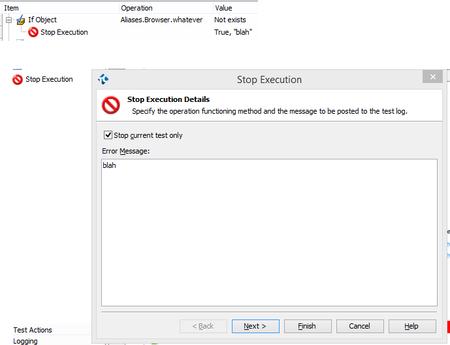
ContributionsMost RecentMost LikesSolutionsRe: using global variables in test complete Hi blacy If I understandyou well. You want to share a variable from script one to script to. There are many posibilities. The easyest one would be just creating a Project variable. (Double click into your project. Variable Tab. Create one variable...name it, choose type...) From script 1 save the value into that variable. Project.Variables.YOUR_VARIABLE = "whatever" From Script 2 blahblah = Project.Variables.YOUR_VARIABLE Another aproach would be to read from Script 2 the variable straight from the Script1. For that you have to import the Script1 from the Script2. Just add on top Script 2: 'USEUNIT Script1 Script1: function function_return_value function_return_value = "some_value_in_script1" end function Script2: 'USEUNIT Script1 sub subs_cannot_retur_values thisValue = Script1.function_return_value() Log.Message(thisValue) end sub Functions can return values. Subs cannot return values. Note about project variables. Persistent variables will remain after test run. Temporally variables will be clean after test run. Hope this example helps you Regards, Lage Re: Looks Like TC11 does NOT support Chrome 45.0.2454 or later! Re: Looks Like TC11 does NOT support Chrome 45.0.2454 or later! I said that in the other post dude. http://community.smartbear.com/t5/Functional-Web-Testing/Custom-Web-Objects-are-opaque-to-TC-TC11-Angular/m-p/105832#M25802 Re: How to stop Chrome processes from running after closing the window Hi there, A less polite option to kill the browser process. note that Project.Variables.TestConfiguration_Browser = can be chrome, firefox, iexplore, etc 'LAGE''Close Specified Browser Sub CloseSpecifiedBrowser 'Close all open specified Browser Windows While Sys.WaitProcess(Project.Variables.TestConfiguration_Browser,2000).Exists Sys.Process(Project.Variables.TestConfiguration_Browser).Terminate WEND End Sub Call the function and forget abot configurations in all of the environments. Get a beer. Hope it helps Lage Re: How to Connect Oracle Database using TestComplete - Database Table check point hope that help http://community.smartbear.com/t5/Functional-Web-Testing/Validate-the-user-input-values-in-the-Database/m-p/99787#M24794 Lage Re: TestComplete11 - Organize Tests - Stop on Error For me is much more easy that way. note than you can stop the current test or the whole run.. hope it helps Lage Re: Looks Like TC11 does NOT support Chrome 45.0.2454 or later! Plese have a look in your previous post. Re: Custom Web Objects are opaque to TC? (TC11 + Angular) One more thing. If you have overwritted the Chrome patch with any of the provided by the TestComplete Downloads Center.. thats may be the problem. You shouldn't. TestComplete 11 already install the proper patch for the last versions of chrome. In that case you should execute again the TestComplete 11 installer. That will overwrite again the */Program Files*\SmartBear\TestComplete 11\Bin\Extensions. After that, go to chrome://extensions/ and enable again the SmartBear Extension. Hope it helps Lage Re: Custom Web Objects are opaque to TC? (TC11 + Angular) hi mate, My scenario is working fine: TestComplete 11.10.1005.7 Chrome Version 45.0.2454.93 m Can you have a look in to your chrome extensions: chrome://extensions/ ? Should be that way: Re: Custom Web Objects are opaque to TC? (TC11 + Angular) Sorry but I still think that your testComplete can not detect the pages in your chrome browser. Can you highlighting something in your chrome? The google logo for example. anything? Give me a screenshot of your Object Browser tab with anything opened in chrome. Regards