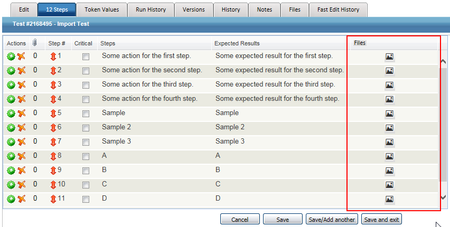
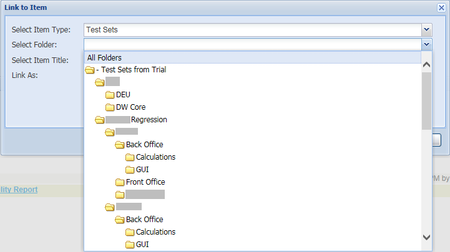
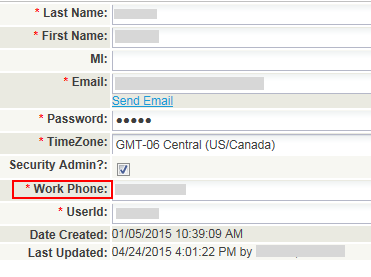
ContributionsMost RecentMost LikesSolutionsRe: Force User Log Off Thank you for the reply barbarae. I have begun to see updates to requests. Export Test Library Folder Structure We would like to export the folder structure of the Test Library. We have attempted to run various Reports, but only folders that have tests in them are returned, not the entire folder structure. Import Test Steps for Existing Tests We would like to the ability to specify an existing Test within a csv and import new Test Steps for it. Below is our use case for this request. For our implementation of QAComplete, we are using a staged rollout. That is, we are creating Tests without Test Steps and executing the corresponding Test Sets. We are doing this due to the time constraints and resource limitations to entering the large volume of tests and the varied state of testing documentation throughout the organization. Add Custom Fields to Test Runner We need the ability to add custom fields to the Test Runner. When we test for a release, new builds are continously created and are used by various departments/individuals to test against. We need to record which build was used during each test run. We also need to be able to record which environment the test was executed in. Our test environments are extremely dynamic in that db schemas are refreshed frequently, new builds are installed, and various browsers are used. This information is needed for each test run for tracking and performing root causes analyses. Re: Force User Log Off Great! Thank you for providing the target release. To avoid submitting Feature Requests that are already in queue, is there a feature roadmap available for QAC? Force User Log Off As an admin, I would like the ability to log off a user. A user may neglect to log out of the system and if licenses are concurrent, this would be extremely useful for allowing another user accss to the system. Add Photos or Files to Test Steps While Editing Steps QAC makes entering Test Steps and Expected Results quick and easy. What is not quick is having to change tabs, upload a limited number of files, and specify the mapping for which file should be associate with a particular step. I would like to see this process streamlined and on the same tab as Test Steps. Perhaps after tabbing past Expected Results, you could have a load file icon which would have the focus, the user could press the space bar, select the file, click Okay, and continue tabbing to enter the next Step and Expected Result. Below is a mockup of what it could look like. Ability to Delete User Completely QAC does not allow any user to be fully deleted from the system. Currently, deleting a user results in the "Active User?" field not haveing a green check mark. The reason behind this is maintaining historical record if someone created, ran, or otherwise modified anything within the system. What if you have an account that never executed tests, created tests, etc; i.e. not associated with the historical record of any object? In my case, I created a test account to try the security configuration after making changes, but prior to exposing end users to them. If I no longer need this account I would like to remove it entirely. Remove Unncessary "Required" Field QAC has predetermined required fields; denoted (Required). These cannot be made optional. While I understand the intetion behind this, I do not wish Work Phone to be a (Required) field when creating a user. Collapsible Folders/Directory Trees Anytime a folder structure is displayed within QAC, I would like to be able to collapse folders. Additionally, I would like the initial view of the folder structure to default to a collapsed state. Navigating through a directory tree where all folders are expanded is time consuming and at times frustrating.