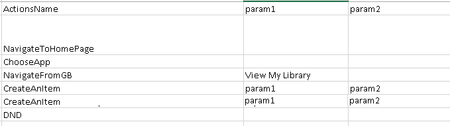
ContributionsMost RecentMost LikesSolutionsRe: mutiple monitors with different resolution It keeps giving me "Unable to find the object Sys.Browser("iexplore"). See Additional Information for details. " while running "Sys.Browser().BrowserWindow(0).Maximize();" even tho it ran well before. I am using IE11, and testcomplete 10 Re: mutiple monitors with different resolution Thank you all the same :D mutiple monitors with different resolution Hi All I just found somehing really weird. That My scripts run well with mutilple monitors with the same resolution, I recently changed one of them to another resolution, then it's always trying to find the browser, and it fails finding it all the time. Does anyone know anything about this? Thanks Veronique Re: How to use the value in the previous function My issue has been resolved, I simply used multiple Global Variables instead of trying to use Global Array. Thank you all the same. Re: How to use the value in the previous function No, it's Jscript, but it's not in script, it's calling thru excel like below, DND function will be using two params returned by CreateAnItemUnderAnyTree( ). I think I need to create a global variable, but I really have no idea about the details... I do know how to create a global variable, but I don't know how it would serve my purpose. How to use the value in the previous function For example: function a (b) { return (c:c) } function a (e) { return (f:f) } function d (c,f) { //Statement } I am calling the functions thru excel, I would like to run function a twice and use the returned value in function d. how can I do that ? or if there's any other easier way? SolvedRe: Lauching IE not successfully Thank you Re: Lauching IE not successfully Ok, Thanks for the suggestion, it's working well so far :P Re: Drag and drop between tree See http://community.smartbear.com/t5/Functional-Web-Testing/How-do-I-find-an-Object-if-there-s-scroll-bar-involved-And-how/m-p/103019#M25320 I had the same issue, there are two methods in the post, help it could help :P Lauching IE not successfully This might be an old topic, I am using below script to launch IE, but I found sometimes, it can not be done successfully, because the browser is already running while clearly the browser is not launched... Is there any way that I can improve this? I tried other methods before I came up with below script, this is the best solution so far, if I go with other solutions, I am more likely to fail lauching the browser. Even with this one, it fails sometimes with much lower frequency while (Sys.WaitBrowser().Exists) Sys.WaitBrowser().Close(); Browsers.Item(btIExplorer).Run(); webPageObj = Sys.Browser("iexplore*").Page("*"); Sys.Browser().BrowserWindow(0).Maximize(); Browsers.CurrentBrowser.Navigate(ProjectSuite.Variables.url) webPageObj.Wait(10);