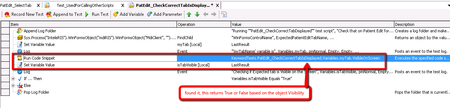
ContributionsMost RecentMost LikesSolutionsRe: Keyword Tests: create an object by concatenating variables or parameters Great idea, thank you tristaanogre Re: Keyword Tests: create an object by concatenating variables or parameters Found the solution, see the screenshot below: Re: Keyword Tests: create an object by concatenating variables or parameters Great job tristaanogre, it worked. Now it is returning my object and assigning it to my variable! Now if I want to add a "VisibleOnScreen" method to the returned variable (which is the object I am looking for) and assign it to another variable, how I should make it work. What I have within next attached image is not actually working -nothing is returned. Re: Keyword Tests: create an object by concatenating variables or parameters Thank you tristaanogre - this looks to be quite close to what I am looking for. Could you please see the image below and let me know if that is something related to what you've suggested. Note: this Operation Parameter (in the image) is applied to: Sys.Process("InteleRIS").WinFormsObject("mdiRIS").WinFormsObject("MdiClient", "").WinFormsObject("frmPatientMain").WinFormsObject("tabPages").WinFormsObject("UltraTabPageControl23") with FindChild method. Keyword Tests: create an object by concatenating variables or parameters I have the path below: Sys.Process("InteleRIS").WinFormsObject("mdiRIS").WinFormsObject("MdiClient", "").WinFormsObject("frmPatientMain").WinFormsObject("tabPages").WinFormsObject("UltraTabPageControl23").WinFormsObject("pnlApptRequests") Now, this is used within a small keyword test which is called from other test cases. The last part of this path (the bolded one) should be a parameter which I am throwing in when I call this test. So basically because this value is dynamic, I need to create an object by concatenating the path with a parameter in the last part of it and then use this object to do different actions on it, like IsVisibleOnScreen. I have tried something like next (but it does not work, tried with Variables and Parameters as well): Sys.Process("InteleRIS").WinFormsObject("mdiRIS").WinFormsObject("MdiClient", "").WinFormsObject("frmPatientMain").WinFormsObject("tabPages").WinFormsObject("UltraTabPageControl23").WinFormsObject(" + KeywordTests.PatEdit_CheckCorrectTabIsDisplayed.Parameters.ExpectedPatientEditTabName + ") Please suggest. Note: I need this as a keyword test (but I don't mind a VB script example as well) Thank you. SolvedRe: How to capture an object, not by coordinates but by the object itself when recording a Keyword test? How about next object, how would you write it in a Descriptive way? var myButton = AddTheDescriptiveObjectWithPropertiesAndValues; Next are object's properties and values (I don't want to use the mapped object): FullName: Sys.Process("calc").Window("CalcFrame", "Calculator", 1).Window("CalcFrame", "", 1).Window("#32770", "", 2).Window("Button", "", 11); Name: Window("Button", "", 11) RecordClass: Button WndClass: Button Index: 11 I am looking for something like this: var calcWindow = (Sys["Process"]("calc")["Window"]("CalcFrame:Calculator", 1)["Window"]("CalcFrame:", 1)["Window"]("#32770:", 2); var myBtn = calcWindow.["Window"]("RecordClass:Button", "WndClass:Button", "Name:Window(\"Button\", \"\", + caption)", "Index:11"); myBtn.ClickButton(); I know something is wrong in the code above but cannot figure it out, please help. Re: Recursive Name Mapping of Child Objects I agree with this too, many times you might have many child levels and have to manually map each level one by one, I would like to have an option which will map all child objects for a parent. Re: Make a description of custom function to be visible in the standard popup dialog Great idea, this can help you choose the correct method when you don't know what is better to use on your objects.