mfoster711Regular ContributorJoined 13 years ago208 Posts78 LikesLikes received1 SolutionView All Badges
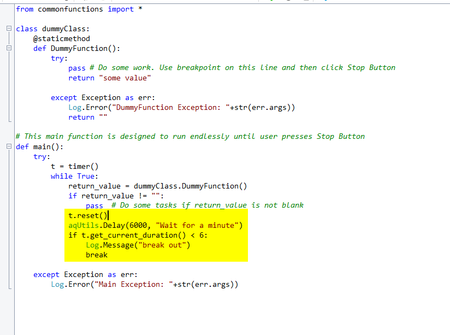
ContributionsMost RecentMost LikesSolutionsRe: API Tokens, Passwords - Storing and Retrieving I am trying to understand SessionCreator, I have never used it. Does it allow me to run scripts on a computer WITHOUT having to sign on to that computer? API Tokens, Passwords - Storing and Retrieving How do you store and retrieve API Tokens and the various passwords that you might use with your automated testing? I am trying to be a little more security conscious. With this in mind, you shouldn't be storing tokens and passwords in plain text in your scripts. I have read suggestions to use Windows Environment Variables but I don't see how this is really any more secure on the PC. My automation PCs all run scripts overnight to test various Desktop applications and WEB applications. These PCs must automatically sign on to Windows and start TestComplete to run my scripts. At this point, the PCs are "unsecured" because anybody can walk up and access the PC and view any script code or Windows Environment Variable. So, how do you safely store this information. I thought about use TestComplete project variables but it only works when using Keys or SetText commands which will not work with Web api calls. Re: Script to Stop and close TestComplete or TestExecute I ended up going with the option to user a PowerShell script. My normal script will run the PowerShell script and stop. This leaves TestComplete open but stopped. The PowerShell script pauses for 20 seconds (to ensure TestComplete has stopped) and then forces TestComplete to close. Not the most elegant, but it works. Script to Stop and close TestComplete or TestExecute In my code, I want to check for a certain condition and if it is true then stop execution of the script and close TestComplete. How can this be done? I know that the /exit option is available if I started the script from command line. But, I was looking for an option that would work when manually running scripts or running from command line. I am also aware of aqEnvironment.RebootAndContinue but I don't need to reboot. I just want to exit TestComplete. Re: TestComplete Freeze up after Stop Button Thanks for feedback. I will submit something to Smartbear to report this. I was able to come up with a workaround for now in case anybody else encounters this issue. I added a timer inside my While loop that times how long the aqUtils.Delay takes. It should take 6 seconds in the following example but aqUtils.Delay seems to get skipped when you press stop button. This cause the IF statement to be true which then results in the BREAK statement getting executed and stops the infinite loop. Re: TestComplete Freeze up after Stop Button Why does script keep processing if I use Stop Button inside the dummy function? Re: TestComplete Freeze up after Stop Button I modified the code to include some extra debugging and remove the infinite loop. There are two lines marked Example 1 and Example 2. I paused the script on the line marked Example 1 and clicked Stop, the script exits immediately. I paused on Example 2 and clicked Stop, the script seems to continue pressing when you review the log. See below for logs from the two different runs. class dummyClass: @staticmethod def DummyFunction(): Log.Message("DummyFunction") try: pass # Example 2 - Use breakpoint on this line and then click Stop Button. Scripts seems to keep running return "some value" except Exception as err: Log.Error("DummyFunction Exception: "+str(err.args)) return "" # This main function is designed to run endlessly until user presses Stop Button def main(): try: i = 0 while True: Log.Message("Main. i="+str(i)) i += 1 return_value = dummyClass.DummyFunction() if return_value != "": pass # Example 1 - Use breakpoint on this line and then click Stop Button. Scripts exits immediately aqUtils.Delay(60000, "Wait for a minute after performing work") if i > 5: break else: aqUtils.Delay(60000, "Wait for a minute") except Exception as err: Log.Error("Main Exception: "+str(err.args)) TestComplete Freeze up after Stop Button TestComplete will freeze up if I press the stop button in the following example. Add a breakpoint in the DummyFunction on the line marked "Use breakpoint on this line.....". Run the Main function When the script pauses on the breakpoint, click the TestComplete Stop button. TestComplete will freeze and only option is to force close in Task Manager Any clue why this is happening? class dummyClass: @staticmethod def DummyFunction(): try: pass # Do some work. Use breakpoint on this line and then click Stop Button return "some value" except Exception as err: Log.Error("DummyFunction Exception: "+str(err.args)) return "" # This main function is designed to run endlessly until user presses Stop Button def main(): try: while True: return_value = dummyClass.DummyFunction() if return_value != "": pass # Do some tasks if return_value is not blank aqUtils.Delay(60000, "Wait for a minute after performing work") else: aqUtils.Delay(60000, "Wait for a minute") except Exception as err: Log.Error("Main Exception: "+str(err.args)) SolvedRe: 'Project not defined' errors after updating to 15.77.6.7 Thanks for the update! I am rolling back at to previous version. I just wanted to make sure this was not some Python change that I needed to update in my code. Re: 'Project not defined' errors after updating to 15.77.6.7 Did you find the root cause of this or is this just a break with TestComplete? I am now having this issue after updating one of our PCs to the latest version of TestComplete.