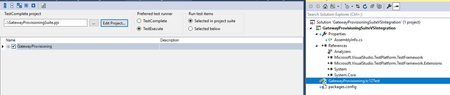
ContributionsMost RecentMost LikesSolutionsRe: Using Project/ProjectSuite password variables in other places than SetText or Keys -edit- I had just written an extensive post about the fact it didn't work when I used the DecryptedValue construction, but then I realized there was a \ in the password and we had put in and extra \ since it was sent as a string before. Which needed to be removed again So it works! Thanks! :) Re: Using Project/ProjectSuite password variables in other places than SetText or Keys The documentation literally says it only works for Keys + SetText: https://support.smartbear.com/testcomplete/docs/testing-with/variables/data-types/password.html If you try to use it elsewhere, it looks like this: {414EEFD2-6760-437C-B9A7-61FE6CAB07C5}SomeProjectSuitePasswordVar If there is a decrypt command (DecryptedValue...is that a TestComplete method? Cannot find it in the help) , then won't people be able to decrypt it, defeating the purpose? Using Project/ProjectSuite password variables in other places than SetText or Keys So we wanted to make our test data a bit more secure an decided to move the login password strings to the project variables and make it a password, so that it is encrypted and not hardcoded in our script unit anymore. I wanted to do the same thing with the password we use to access the application's SQL database, but found out it didn't work. After reading the information I noticed password variables only work for SetText and Keys. Is there a workaround within TestComplete to also make it work when the password is used in another way? For example when using it to set an SQL connection string. SolvedRe: How to work with Canvas Object Why would you need to automate a check on the needle? That seems like an unnecessary increase of complexity. The 140 is the most important thing. If it is not possible to get that from any of the properties in the object, I think you will indeed be stuck with image comparison. If there is a property somewhere in the object, I'd suggest just to skip the extra layer of complexity in your tests by also trying to check the needle itself. Exit TestExecute after running a test via Visual Studio integration Using VS integration, a Test assembly (.tc12test) will start testexecute and run our tests. However, testexecute does not close after running, failing tests that come after. I'd like to have testexecute stop (via /exit parameter), but you cannot pass parameters when you use VS integration. This is annoying. Request: either stop TestExecute after testing via VS integration or implement so you can edit parameters . Re: Suppress browser crash error? update: Ok, I have added the following to my project: - Added EventHandler 'OnLogError' , which executes function 'suppressEvents' While doing a browser.Close() , the iexplore crashed once again (happens quite often) generating a log error: "The iexplore.exe process crashed" and then the event handler I added. But I do not want to have the log error appear at all and only the event handler. Is that possible? Re: How to start tests using parameters in VisualStudio integration I solved it for now by going back to my previous solution: Have the Release create a txt file with the required value (in our case, the Release.EnvironmentName) and have TestComplete read it. I did see some options to overwrite parameters in the Test Assembly you use in the VSTS task list to start the TestComplete assembly, but failed to get it to work. How to start tests using parameters in VisualStudio integration We use VisualStudio integration to run our suites in VSTS. Is it possible to control the parameters you send with the test so that TestExecute runs using these parameters? So far I only see to have control over the test items I want to run, but what if we want to run a specific script or simply give a parameter so we can parse it later in our scripts? https://support.smartbear.com/testcomplete/docs/working-with/integration/ms-vs/alm/add-tc-tests.html doesn't really say anything about parameters. Screenie : SolvedRe: Suppress browser crash error? Thank you for the reply! To elaborate on our situation: - Each test step is run in a try/catch so that we gracefully capture the error and move on to the next step. Not every function. It's more like a shell around executed functions. - We have some functions that gracefully try to stop browsers and terminate the process if browser.close does not work. We do this in a loop, so those nasty multiple iexplore background processes are also killed, since they often screw up target frame identification. I notice we haven't set the TabProcGrowth registry yet, so maybe that helps. What I really try to do is indeed simply catch the particular 'browser has crashed' error. But the event handler seems a little complex. There is no event.browsercrash event handler of some sort it seems and onerrorlog seems to do stuff 'before the error is posted to the log' and not suppress the error. What would be the jscript code to prevent a specific error from appearing? Suppress browser crash error? Our tests occasionally fail with a browser crash. Chrome crashes a tiny bit more often due to the still somewhat unstable chrome plugin, but IE also suffers from the occasional crash. This gets reported as an error in the log "the <browser>.exe process has crashed". Is it possible to suppress this error or have it not show up as an error? It most often appears when we try to gracefully close browsers, so technically it's just a 'hiccup' and won't fail other tests. All our functions are run in a try/catch construction, but the crash is not caught unfortunately and still force us to analyze the logs because the 'tests have failed'. TLDR: a way to have a browser crash not appear as error, failing the test suite.