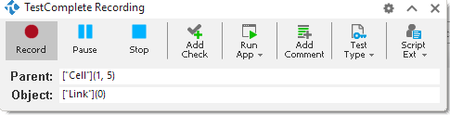
ContributionsMost RecentMost LikesSolutionsRe: Calculate a dynamic value each test You can also change the type of text you want to type from Constant~String to Code Expression. [See attached] Re: Turn off completely object recognition hints Changing the timeout to 50ms still waits almost a full second... which is much better than the 3-15 minutes it was waiting before when the value was set to -1. Unfortunately, SmartBear's tech support already knows the issue is with the indicator and the object recognition hint message. Their initial stance of "we cannot recreate this problem so we cannot help" still stands. The original tect support issue has been closed from their side... and this post was opened in June with no one from SmartBear replying. Re: Turn off completely object recognition hints So just for clarification: Does an actual warning get logged to the test log? Or is this just the "waiting for OKbutton" kind of message that comes up during a test run? The TestComplete Indicator says it is preparing a recognition hint. Logging is not the issue. We are experiencing the latter and, as per @cunderw, we've changed the timeout setting on those button clicks and, for our purposes, it's working well. Yes, the tool still waits for the button (has to do, especially, if it's an "Alert" type message from the browser rather than an actual component within the HTML DOM) but we don't get any yellow triangle warning flags in our log. I don't believe the problem has anything to do with TestComplete waiting for the button to appear... It has everything to do with TestComplete waiting for the button to be found AFTER it's already clicked the button and the dialog has been closed. Re: Turn off completely object recognition hints "Therefore, I can't understand all the complaints in this post " It's because you haven't recreated the issue on your end properly... and you're assuming we haven't already tried your "solution." So just for grins, I just added your code to my code that does the same thing: LogParams["MessageText"]["Search"]('recognition hint') > -1 vs. LogParams["MessageText"] == "Preparing an object recognition hint." And I have the same problem. If I click on a button in a popup Alert message that causes that dialog to go away, TestComplete gets lost trying to find the button it just clicked. You' didn't provide an answer and you didn't help... you've only added noise. Until SmartBear is willing to acknowledge there's a problem here... I'm stuck with my crappy work-arounds... or I'm stuck waiting for the replay to continue as the object recognition hint stuff happens. Tha'ts why I'm complaining. :smileyfrustrated: Re: Turn off completely object recognition hints That's not my experience. Mine is more like pulling teeth. I sent them everything they should need to recreate the problem and the first thing they ask for is logging information that we can't kick off without running the external program. Heaven forbid any of these issues happen on a virtual machine running in AWS that's kicked off via Jenkins... because they won't be able to help you. I've done screen sharing with them and if the intermittent problem happens, great! They'll acknowledge it. They won't necessarily fix it though. I spent weeks trying to get them to look seriously into this problem and have come to the conclusion that the issue won't be addressed as a bug... so I'd like it addressed as a new feature... to disable the other new feature. And I'm not alone. I think I'm done now. I've said my peace and I need to get back to work automating. Re: Turn off completely object recognition hints Agreed. And I did... and they listed it as working as designed because they couldn't recreate it. :( Re: Turn off completely object recognition hints No! Do I have your (and SmartBear's) attention yet? This feature is broken. Plain and simple. This was mentioned in post #1: "The objects are either gone because a window closed and TestComplete doesn't recognize that..." The objects in that dialog are gone. The popup window has been closed and the next step of the test should be executing without issue, but it's not. The object recognition hint thing jumps up and tries to find the button that TestComplete just clicked! The text on the TestComplete indicator tells me it's trying to find the button that it just clicked, on the window it just closed. I can list example after example of this, here's two: Click a Cancel button on a popup window (that invokes the wm_close method). TestComplete gets lost trying to find the window that was just closed. Click an OK button on an alert prompt and TestComplete will go hunt for the popup prompt that was closed after the OK button was clicked. And I know this is broken because the object recognition hinting stuff isn't added to the logs and the timings listed are not accurate/real. The logs list the times to perform the actions, but do not include the 3-15 minutes that TestComplete goes off in the weeds. It shows that the OK button was clicked and then it immediately claims that the next testing step occured within the same second... but in reality I had to sit and wait for the hint in the indicator progress bar to go away AND THEN the next testing step is performed without error. TestComplete was better before this feature was introduced. Please give us a way to disable it. Re: Turn off completely object recognition hints "You can turn off the object recognition hint for mapped objects already." WHERE? Show NameMapping entry in the TestComplete Recording dialog instead of raw names It would be great if you would show the NaqmeMapping entry for the Parent and Object when recording. Then revert back to the raw names if a NameMapping entry isn't found. Then I could go create a new NameMapping entry manually (as the automatically saved properties are not great for web apps). Give me a button on this dialog to create a NameMapping entry while still recording and this feature would be even better! Turn off completely object recognition hints I would love a way to go back to the old versions of TestComplete where that object recognition hint stuff wasn't present. I have never seen this be helpful; it's only caused problems for us when running tests. The objects are either gone because a window closed and TestComplete doesn't recognize that or TestComplete tries to find a control and takes 3-15 minutes to finish the hint and click the button. I want a way to shut this feature off completely.