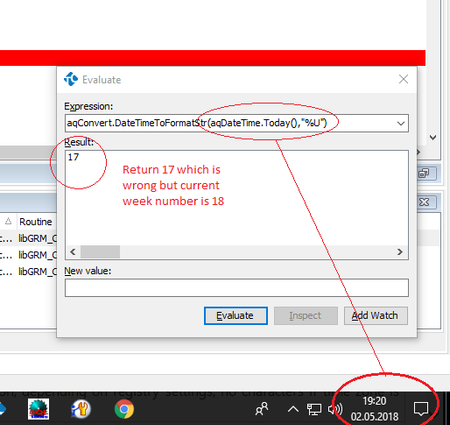
ContributionsMost RecentMost LikesSolutionsRe: aqConvert.DateTimeToFormatStr(aqDateTime.Today(),"%U") format is not work properly Hello All, Thank you for reply. As per the previous conversion. You suggest use %W instead of %U. But the %W formater also not working properly. Please check the below image: %W formater for current year its working correctly but for next year its return wrong value aqConvert.DateTimeToFormatStr(aqDateTime.Today(),"%U") format is not work properly Hi All aqConvert.DateTimeToFormatStr(aqDateTime.Today(),"%U") is return wrong week number. Ex i have evaluate the function format on date 02.05.2018, So current week number is 18 but this function format return 17 which is wrong. This function format is not working properly please refer attached image. SolvedRe: TestComplete 12.3 Code editor find string issue Hi This issue this TestComplete 12.3 only. In the old version of TestComplete 12.2 or 11 it is work fine. Search any string in the code editor with in sec's. If customer face issue like this than what is the of upgrading TC Version. Regards Santosh TestComplete 12.3 Code editor find string issue Hi TestComplete support, We have updated the Testcomplete 12.2 to 12.3. But in the Test complete 12.3 code editor we face issue like searching any string took much time by Alt+F. If we are searching the string in the script file of code line is more than 25k. You can reproduce the issue by follow steps Create project Create unit with line of code more 25k Search any string in code script and see that for searching any testcomplete took more than 45 sec’s which is too much Please help me testcomplete support team and as early as possible debug issue and come up with solution. Thanks & Regards Santosh Thenge Re: cefsharp browsersubprocess.exe is not identified by testcomplete. Hello Sanjay Thank you for reply. 1.We are lunching cef application from from Winform application. 2. I am using testComplete 12 I have gone through both processes 1. Hook the application by commnad line parameter 2. Manually the instrument of cef application Please refer below image cefsharp.browserprocess.exe is not identify testcomplete 12 Please refer below image for where web page is lunched by cef application cefsharp browsersubprocess.exe is not identified by testcomplete. Hello Support Team, I am working on CefSharp application but test complete can not identify web pages controls cef application. When web is open in the cefsharp application (Chromium Embedded Framework). I have check that web open by browsersubprocess.exe but this exe is not identify by test complete in object browser. Please help me If any one face this issue. Thanks & Regards Santosh Re: TestComplete 11.11 is hangs when evaluating the array object in the debug mode. My problem is not solved? i am facing this issue daily while debugging the script. I have wait more than 15 min to populate all object but objects are not populate even though evaluate dialog does not allow closed. To reproduced this issue simply create array of 50-100 element and evaluate this array object and see that test complete gets hang. Regards Santosh TestComplete 11.11 is hangs when evaluating the array object in the debug mode. Hi All TestComplete Support/TC users, I am facing issue with TestComplete 11.11.TestComplete 11.11 is hangs when evaluating the array object in the debug mode. Please let me know any budy face some issue or any other any problem. Help me !!!! Regards Santosh Re: TestComplete 11.20 issue with window 8.1 and above version Hi m_essaid, Yes it is the same issue. Regards Santosh TestComplete 11.20 issue with window 8.1 and above version Hello Guys, I have installed TestComplete 11.20 on the window 8.1 machine. Now i am facing problem of "Alt + Tab" (Application switching). It is quit difficult switch from one application to other application when testcomplete 11.20 is open on the machine. Is any one facing same issue. Let me know what is the reason. Regards Santosh