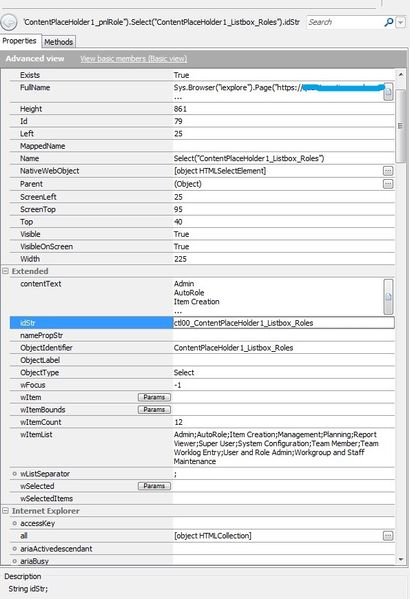
ContributionsMost RecentMost LikesSolutionsRe: Cannot active the <item> in a Listbox - ClickItem("xyz") function suddenly stopped working? Hi Robert, The object identifiers haven't changed as far as I can see. It is able to find the object from the list below: I'm using property idStr and trying to click the second item in the list - AutoRole. I have used the Find method first, providing a Full Name of the object. Then assigned it to a variable, verified the find was successful and Perform Click action. It is able to see AutoRole, but when executing the script, gets the error 'Cannot activate the 'AutoRole' item'. What would be the other things to be checked? or is there a way to perform click by wList(index) property? Best Regards, Shiva Re: Cannot active the <item> in a Listbox - ClickItem("xyz") function suddenly stopped working? Any gentlemen around here who can give me ideas on a workaround? Re: Testcomplete to handle username and password when the password change is required I think store the Username & Password in an external file (excel, open office etc). Lets say they have columns Username, Password, New Password. You have your generic function in the project to login. Login(Username, Password){ // Read from external file // Enter Username, Password & Submit // If your password has expired message{ Change_Password (Password, New Password) } // your normal code.. to home page. } // function to change password Change_Password (Current Password, New Password){ // } This way you will only change your external file's Password & New Password fields every 6 months and don't have modify any TestComplete variables for those many Project suites. Cannot active the <item> in a Listbox - ClickItem("xyz") function suddenly stopped working? Hi, I have a piece of line that has been working for years and it has suddenly stopped working with no changes made to the script/application in that area. Using Jscript for Web application: Page.NativeWebObject.Find("ObjectIdentifier", "ContentPlaceHolder1_Listbox_Roles").ClickItem("xyz"); This is giving me error message 'cannot activate the 'xyz' item.' during runtime. The object spy cannot go inside the listbox (contentPlaceHolder1_Listbox_Roles), so that is last point of reference, I tried using other functions like SelectItem(xyz) or using full name or using different identifier or using test recorder etc.with no luck. I cannot use index (instead of name) as the item passed is a variable and will have different index on a different instance. I think it is able to see the item, just cannot active it. Update: It is due to running the scripts in IE 11, previously it used to be ran on IE8/9. Is there any workaround for this to work in IE 11? Many Thanks, Shiva how to check if sheet in excel driver exist or not Hi, I want to check if Sheet1 exists or not. Sometimes 'Sheet1' is named as Error in our application, and hence is an actual error in export. Even though file is exported correctly. Attempt: var excelDDT= DDT.ExcelDriver(ProjectSuite.Variables.PlanExportDirectory, "Sheet1", true); if(excelDDT.){ Log.Message("excel DDT exists"); } else{ Log.Error("Exported file contains error"); } while(!DDT.CurrentDriver.EOF()){ //Test Log.message(DDT.CurrentDriver.Value(0)); } // Close driver DDT.CloseDriver(DDT.CurrentDriver.Name); It throws Jscript error on first line because Sheet1 doesn't exist. Thanks in advance, Shiva SolvedRe: Using Wildcard in property checkpoint Right... that should do as well. Thanks Using Wildcard in property checkpoint Hi, I want to verify if a panel contains string. "*" instead of "Workhistory Notes". So, if the application is in different language, I wouldn't have to parameterise all those checkpoints values. All I need to check if the grid contains something. Thanks in advance, Shiva SolvedRe: Button.Enabled returning True for disabled button Nice. Thanks guys! Apparently .isDisabled seems to be working :smileylol: Button.Enabled returning True for disabled button Hi, I'm having a trouble checking if a button is disabled or not. Please see the attached image for details (script, gui & test Log). Usually this feature works fine but not this time. Thanks in advance, Shiva SolvedRe: Saving and verifying export Thanks Tanya, Yep it considered pop-up window as Frame Notification Bar. I will have to hardcode the co-ordinates because object spy couldn't hover over open button.