anneparrOccasional ContributorJoined 11 years ago10 Posts3 LikesLikes received1 SolutionView All Badges
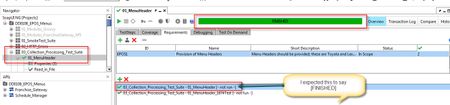
ContributionsMost RecentMost LikesSolutionsRe: Loading a composite project in Ready API version 2.4.0 causes ReadyAPI to hang I have found the cause of this; it seems to be rectified by removing ALL pre-existing versions of Ready!API from my C drive, and also all my log history from the .readyapi folder. Thought I would share this in case anyone else has a similar issue. Loading a composite project in Ready API version 2.4.0 causes ReadyAPI to hang I have just downloaded the version of Ready (2.4.0) and it takes ages to load. If and when it eventually loads, I select to open an existing composite project and nothing happens - but Ready is 'locked' - I have to close it with windows task manager to stop it running. Re: ReadyAPI 2.4 doesn't start Actually I have now found that the application froze when he tried to load a composite project previously created. He opened using a shortcut for 2.4 although he also tried from 2.3 after applying the update. We are both using Windows 7 Enterprise (service Pack 1) , 64 bit operating system with 8.00 GB RAM ReadyAPI 2.4 doesn't start I was about to update my version from 2.2 to 2.4, but my team member has upgraded from 2.3 to 2.4 and is just getting a blank screen. Is there an issue with 2.4? SolvedJsonPath Match - 'Select from Current' is returning blank when null is in response In 2.2 null was returned when building an expected result using 'Select from Current' when the value in json was null. In 2.3, blank is returned - this means that everywhere we are using this assertion in all our test projects will fail. Is there a fix for this? I saw that that a similar issue may be fixed by using a Maintenance build? Is this true? How do I set the value of a header in my rest request to concat of a project variable and parameter? I want to set my Rest request in Projects to have a default setting for a Referer header. This default should use an environment variable (which I use all for other headers) concatenated with the input parameter set as Query/Resource. I am attaching a screenshot - I want to replace the ?partCode with a reference to the parameter. Is this possible? Re: Test Case Status in Requirements view I have discussed this with Smartbear via their support desk - any test cases that are run from with the test case linked to the requirement MUST have the option 'Run primary TestCase (fail if already running)' set for the requirement setting 'FINISHED' or 'FAILED' etc to be updated approriately. I have attached a screenshot of the option to demo. Re: Test Case Status in Requirements view I will try this if I can - but currently I cannot use 1.5.0, only 1.4.1, as when I try to use 1.5.0, my Ready!API license won't work - I am told that 'too many copies have been activated' . I have raised a support issue for this Test Case Status in Requirements view When does the Test case status get updated in the requirements list? I have created a requirement for the project and linked it to a specific Test case, and marked it as 'In Scope'. When I sibsequently run the test case and the status is 'Finished', the test case on the Requirements tab still shows [- not run -] I expected it to be set to [FINISHED], as shown on the linked page. http://readyapi.smartbear.com/_detail/structure/projects/window/requirements/main.png?id=features%3Arequirements%3Aproject Solvedsensitive information exposure assertion fails for null/empty response I am using the default sensitive information exposure assertion for a (Rest) GET request. When I run the request directly in a test case (with parameters set appropriately) and get a '304' HTTP response (not modified), this assertion passes. If I repeat this test by running via a modularised 'run test case' to replicate this, I get an error - Request - FAILED - 576 - [Sensitive Information Exposure] null/empty response. (the number varies each time). This means that the test case in the second scenario always fails. I am attaching a screenshot to demo