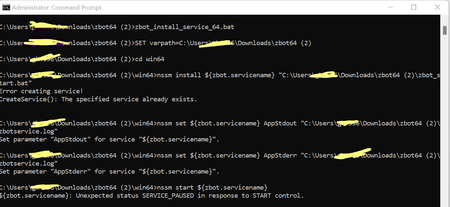
ContributionsMost RecentMost LikesSolutionsRe: Unable to run ZBOT batch file (zbot_install_service_64.bat) Even through not running service but always showing message "Specified service already exists" while running "zbot_install_service_64.bat" file. Can someone look on this and help on this ASAP? Appreciate your support. Note : I am trying to running the batch file on Windows 11 Unable to run ZBOT batch file (zbot_install_service_64.bat) Hi Team, I have downloaded ZBOT from Zephyr tool and am trying to run the batch file (zbot_install_service_64.bat) and throwing below error Can you please let me know shall i need to update any properties file before running batch file? where I need to update "${zbot.servicename}"? to run this batch file. Zephyr Enterprise- Unable to create test execution status for specific test cycle Hi Team, I want to create a report/test execution status for a specific cycle in Zephyr Enterprise tool. I tried using "Execution Analysis Snapshot' gadget am getting report entire release wise instead of cycle wise. There is no filter after selecting Project & Release options. Can you please guide me, how to fetch execution status report by test cycle wise. Thanks How to capture missing xml tag from reposnseHi, Actually we have one requriement is that, we have A.xml(expected xml) which we stored in the our input data file. After that SOAP UI pro is executed then SOAP UI pro will verify response against the A.xml by using xpath assertion then populated result status into the Result.xls file. If suppose response xml file and A.xml file is not matched then our test case will be 'Fail', In this case will it able capature what are all the xml tag is missed out aganist the expected xml. My question is how will you read each xml tag from response and will compare with the expected xml then capatue it and put it into the worksheet.. could you please help me out..