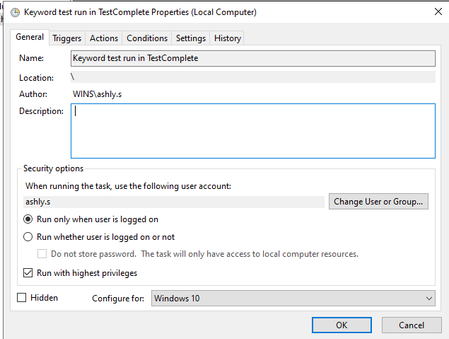
ContributionsMost RecentMost LikesSolutionsAdding testcase description to test log In testcomplete, is there an option to create test case descriptions in a way it can be added to the test execution report? I am looking for solutions for adding the test case description to the test log details. Please let me know if you have any idea how to do that. SolvedRe: Unintended actions during keyword test run where can I find the object spy tool Re: Unintended actions during keyword test run hi, I have rebooted the system and in a new project suite I created a new test project and recorded the keyword testcase. I have created it as one keyword test. When I selected that item and selected "Highlight on Screen", it selected the entire ribbon menu and not specifically the tab that I selected. When I selected "Run selected operation" the operation has worked by clicking the intended tab but also some other unrelated icon. In the namemapping session, the name of these objects haven't yet come. I will attach the log for reference. This is the log generated when I run the selected operation only. Re: Unintended actions during keyword test run But I have also tried the same without namemapping and there also it failed. No mouse coordinates are used. Unintended actions during keyword test run Hi, I am encountering a problem where TestComplete is performing unintended actions during a keyword test run, specifically clicking not only the intended tab but also some other unrelated icon or control. I have tried recording the same steps both with namemapping and without namemapping and the issue sill exist. while clicking on instrument tab, mouse click also happens on auto position adjust while clicking on preference tab, mouse click also happens on prompts enabled similar is the case with analyze tab. how can I solve this? Re: csv file comparison ok .. can you please share an example for the third- party diff utility within TC Re: csv file comparison Yes got it! But according to our requirement we cannot make a baseline copy of the existing csv file and store it in the Files folder within the Stores. Instead both the comparing files should be able to be saved within some other folder. Hence we have opted Compare Files operator but as mentioned earlier it does not show what differences were found. So is there any other alternative to fix this? csv file comparison Hi, In TestComplete keyword testing I am using Compare files checkpoint to compare two csv files. Currently, the Compare files operator returns True or False depending on the comparison result of two csv files. However it does not show (or save into a separate file) what differences where found. The files can contain many lines of the records and it could be tedious job going through and find what exactly has changed. Is there a way the TestComplete not only report that the files differ from each other but also show all differences sharing testcases with relative paths Hi, I am testing a desktop application named A. In it, I wanted to pass a file path in testcomplete keyword testing and this file path will be dynamic. Also I wanted this file path to be a relative file path so that when I share the testcase to someone else they also can test this without changing the file path. How can this be done? SolvedSchedule test case run using Task Scheduler Hi, I was trying to schedule the keyword test run using the windows task scheduler. I am running the testcomplete application through a remote desktop connection and I have done the below steps in the remote PC. But the test was not run and no log was generated. How can I solve this issue after setting this I have closed the testcomplete application and the task scheduler. Then I have disconnected the remote connection by running this command Solved