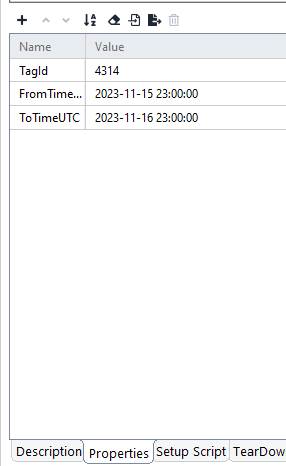
ContributionsMost RecentMost LikesSolutionsRe: How to build SQL query using strings whose value should be retrieved from TestCase property Thank you, my issue got resolved. Re: How to build SQL query using strings whose value should be retrieved from TestCase property Hello, In the database it is defined like this Time(datetime2(0),not null) Re: How to build SQL query using strings whose value should be retrieved from TestCase property Thank you for the response. But i was facing the below error Can't get the Connection for specified properties; com.microsoft.sqlserver.jdbc.SQLServerException: An error occurred during the current command (Done status 0). Conversion failed when converting date and/or time from character string. When i used the query like this SELECT * FROM Table1 where TagId = 4314 and Time > '${#TestCase#FromTime}' How to build SQL query using strings whose value should be retrieved from TestCase property Suppose i have the following properties defined in the Test Case Properties FromTime = 2023-11-15 23:00:00 ToTime = 2023-11-16 23:00:00 I want to replace the time given in the below query with the above test case property variables. How to do that in ReadyAPI JDBC datasource ? SELECT * FROM Table1 where TagId = 4314 and Time > '2023-11-15 23:00:00' and Time < '2023-11-16 23:00:00' I am able to retrieve integer values like TagId and use it by adding 'Prepared Properties' within the JDBC datasource window. But if i add the string and use it inside the query, data is not fetched as the string is not interpreted properly. Re: JDBC connection error indicating SSL issue Thank you. Link was useful. My problem got resolved. JDBC connection error indicating SSL issue I have configured a MS SQL DB in my data source step. If i test it , the connection is successful. But while running the data source step alone, i am facing the following error: I have copied the latest MS SQL JDBC Drivers(12.4.1 and 12.4.0) into the ReadyAPI bin path. Kindly help me to resolve the same. Cannot get a connection for the specified properties com.microsoft.sqlserver.jdbc.SQLServerException: "encrypt" property is set to "true" and "trustServerCertificate" property is set to "false" but the driver could not establish a secure connection to SQL Server by using Secure Sockets Layer (SSL) encryption: Error: PKIX path building failed: sun.security.provider.certpath.SunCertPathBuilderException: unable to find valid certification path to requested target. ClientConnectionId:6f0f5b46-4e69-446f-80ee-866d05e2b8e2 I have added the following properties "encrypt" as false and "trustServerCertificate" as true in the database configuration. SolvedRe: How to retrieve oauth2.0 access token for grant type Client Credentials in Groovy Hi, I am using the following code to set the token automatically. You can set it as a test suite property variable and try it out. import com.eviware.soapui.impl.rest.actions.oauth.OltuOAuth2AzureClientFacade; import com.eviware.soapui.support.editor.inspectors.auth.TokenType; import com.eviware.soapui.model.support.ModelSupport; // Get a project def project = ModelSupport.getModelItemProject(context.getModelItem()); // Get the needed authorization profile def authProfile = project.getAuthRepository().getEntry("YOUR AUTHORIZATION PROFILE NAME"); //Create a facade object def tokenType = TokenType.ACCESS; def oAuthFacade = new OltuOAuth2AzureClientFacade(tokenType); // Request an access token in headless mode and assign it to the authorization profile we got earlier oAuthFacade.requestAccessToken(authProfile, true, true); // Access token retrieval may take time, so we need to pause the execution for 3 seconds to finish it. sleep(3000); // Posts a new token to the script log log.info("Set new token: " + authProfile.getAccessToken()); Is it possible to integrate the Azure TestPlan Test cases and the ReadyAPI tests ? I have created manual test cases in Azure devops Test Plan. I have automated the manual test case functionality using ReadyAPI. Now i want to link the Azure Test Plan test cases while running the ReadyAPI tests via the Azure pieplines. Is it possible to do so ? I am using the Azure devops extension named "ReadyAPI Test for Azure Devops" and "Publish Test Results" in my pipeline. How to store Azure pipeline ReadyAPI test results into a network shared path? I created a pipeline to run ReadyAPI tests.I have used ReadyAPI test for Azure Devops extension and Publish Test Results step in my pipeline and configured the test results path to local path. If i use local path i can see the generated test results. But if i configure the network path in both the extensions, then the result is not generated in the network path. I am able to successfully open the network path in the Agent in which the pipeline tests are running. Still i dont see any files generated. How to properly configure network path for Test Results in the ReadyAPI Test for Azure Devops extension ? Re: Can we integrate ReadyAPI with Swagger UI and import the APIs to ReadyAPI ? Thank you very much for the detailed explanation. It saved a lot of time.